Template details
Astro Theme Pure
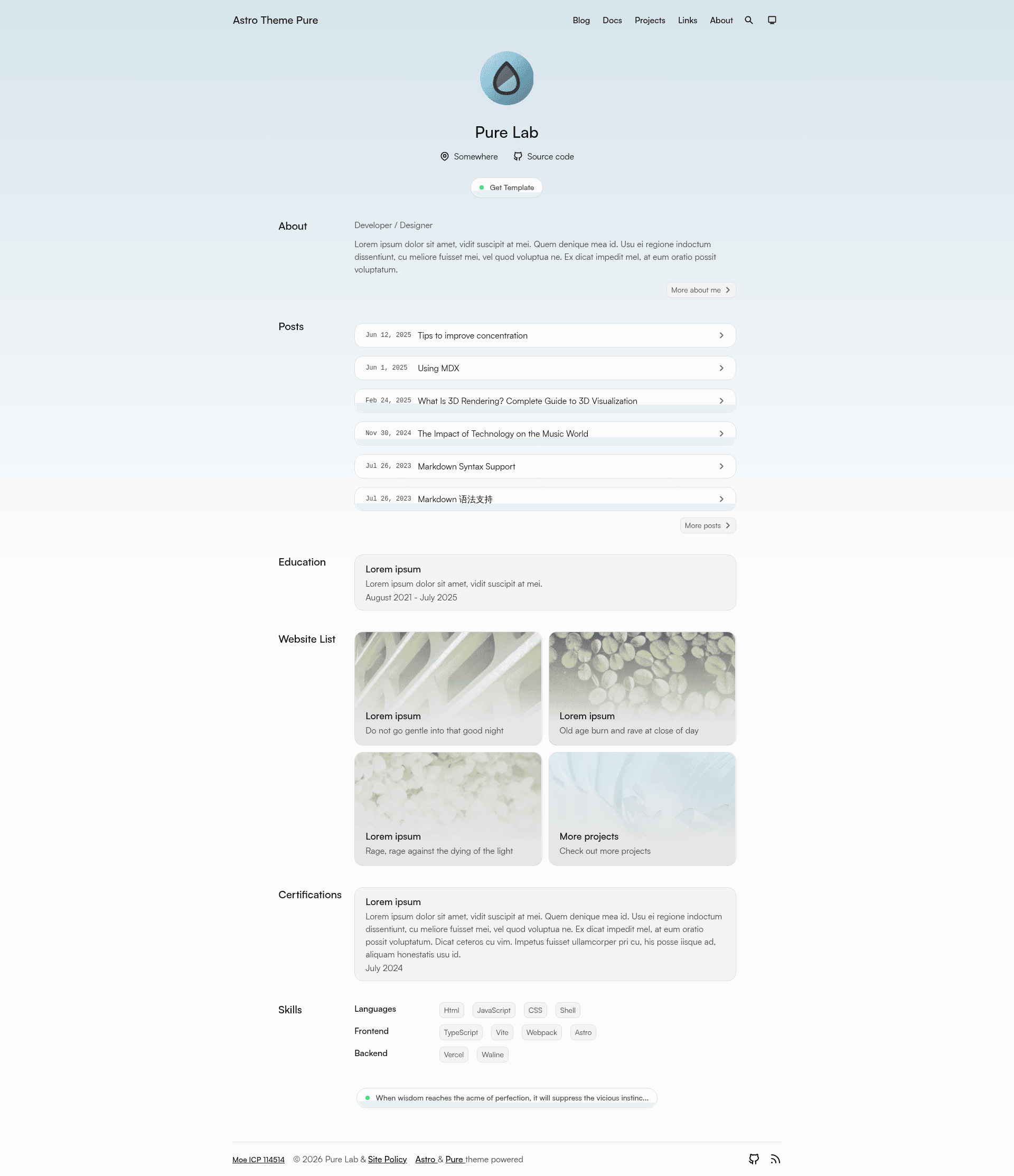
A simple, fast and powerful blog & document theme built by Astro.
About this template
Astro Theme Pure is a blog and documentation theme for the Astro static site builder, created by GitHub user cworld1, that transforms markdown content into a fast, searchable static website with minimal configuration.
What is Astro Theme Pure?
Astro Theme Pure is an open-source template distributed under the Apache 2.0 License. It takes markdown files as input and outputs a static blog or documentation site with full-text search, RSS feed, sitemap, and SEO metadata. The theme is built on the Astro framework and requires Node.js 18.0.0 or higher for local development, with commands run through the Bun runtime.
Key Features
- Full-site search — Uses Pagefind to add client-side search without any external search service.
- RSS and sitemap — Automatically generates an RSS feed and sitemap.xml for search engine discovery.
- Dynamic Open Graph images — Generates an Open Graph image for each post so shared links show a custom preview.
- Table of contents — Builds a TOC from heading tags, making long articles easier to navigate.
- Image lightbox — Integrates MediumZoom so readers can click images to view them enlarged.
- Reusable components — Ships with basic components like Aside, Tabs, Timeline, Steps, Spoiler, and advanced ones like GithubCard, LinkPreview, Quote, QRCode; these can be reused in other Astro projects if UnoCSS is installed.
- Responsive design — The layout adapts to mobile, tablet, and desktop viewports.
- Lighthouse score — The README displays a Lighthouse performance score with a link to PageSpeed Insights.
Who should use Astro Theme Pure?
Astro Theme Pure suits bloggers who want a minimal, fast personal site with built-in search and feeds. It also works well for technical writers creating documentation with TOC and sitemap. Developers who already use Astro can reuse its components in other projects.
What can you do with it?
- Personal bloggers: Publish markdown posts and get a static site with Pagefind search, RSS, and social previews for every article.
- Documentation maintainers: Build a docs section with automatic TOC, sitemap, and full-text search using the same theme.
- Astro developers: Extract components such as GithubCard or LinkPreview into separate Astro applications, provided the project includes UnoCSS.
How does it work?
Clone the repository, then use the included commands: bun install installs dependencies, bun dev starts the development server, bun pure new creates a new post, bun run build produces a static build, and bun preview previews the result locally. After building, you deploy the static files to any hosting provider.
Pros and cons
- Pros: Fast performance, clean design, built-in search, RSS, sitemap, and reusable components.
- Cons: Header and customize options are still under development, as noted in the README.
Alternatives
Other Astro themes referenced by this project include Astro Cactus and Astro Resume, both of which are listed in the themes' acknowledgments section.
FAQ
Is Astro Theme Pure free?
Yes. The project is open source under the Apache 2.0 License, so you can use, modify, and distribute it freely, including for commercial projects.
Does Astro Theme Pure include search?
Yes. It comes with full-site search powered by Pagefind, which runs entirely in the browser and requires no external search service or API keys.
What are the system requirements?
Local development requires Node.js 18.0.0 or higher. The commands in the README are written for the Bun runtime, though you may be able to adapt them for npm or yarn.
How do I create a new blog post?
After setting up the project, run bun pure new from the terminal. This command scaffolds a new markdown post file for you to fill in.
Can I reuse the components in my own Astro project?
Yes. The theme includes components like Aside, Tabs, Timeline, Steps, Spoiler, GithubCard, LinkPreview, Quote, and QRCode. To use them in another Astro project, your project must have UnoCSS installed.