Template details
Astro Vanilla Framework
Astro template for the Ubuntu Vanilla CSS Framework
About this template
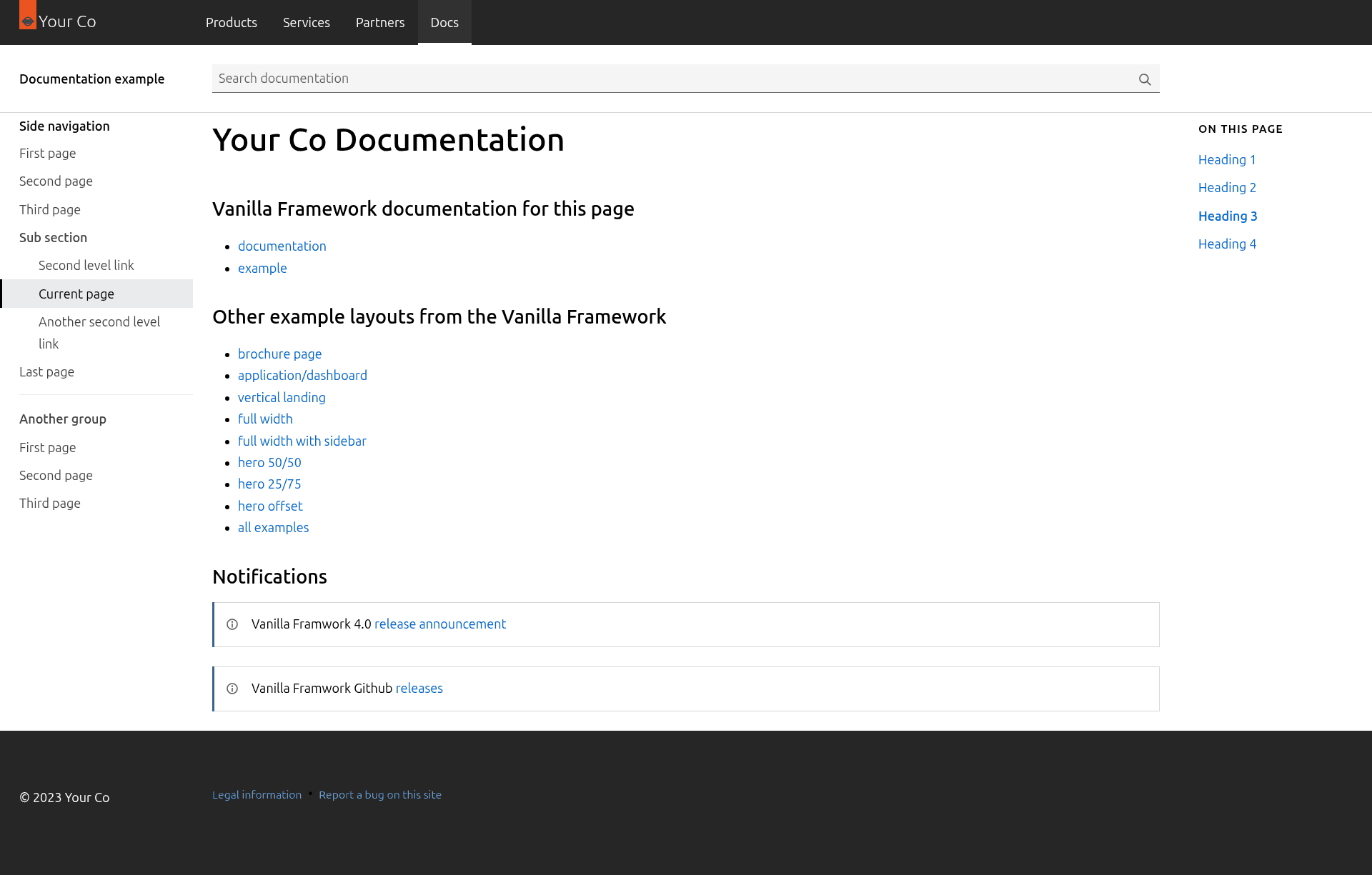
Astro Vanilla Framework is an Astro starter template that integrates Ubuntu's Vanilla CSS framework into a minimal static-site build, giving you a production-ready site in ./dist after a single build command.
What is the Astro Vanilla Framework template?
This template is a GitHub project by getmarkus that combines Astro with the Vanilla framework. It takes a new Astro project and layers in Vanilla's SCSS-based component library, so you get a clean, industrial-looking site with minimal setup. The output is a static site that Astro generates, which you can deploy anywhere. It is an unofficial showcase of Vanilla's capabilities and is not affiliated with Ubuntu or Canonical.
Key Features
- SCSS-based styling — Vanilla is written in SASS/SCSS, and the template includes SCSS compilation so you can customize variables and build your own styles.
- Minimal design — The template delivers a clean, industrial aesthetic that fits enterprise-friendly sites, a deliberate contrast to the default Tailwind look.
- Ubuntu-tested components — Vanilla is the CSS framework used by Ubuntu products, so the component patterns are battle-tested in production.
- Alpine.js friendly — You can add Alpine.js for interactivity without pulling in a full JavaScript framework.
- Permissive license — The template is offered under a permissive license, meaning you can freely use it in commercial or personal projects.
- Astro CLI commands — Includes the standard Astro workflow:
npm install,npm run dev(serves atlocalhost:4321),npm run build(outputs to./dist/), andnpm run preview. - Placeholder logo — Ships with a logo from logoipsum.com so you can see the layout without needing your own assets.
Who is it for?
- Developers who prefer SCSS to utility CSS — If you want a component-based, SCSS-driven approach rather than Tailwind's utility classes, this template gives you a working starting point.
- Teams needing an enterprise look — The minimal, industrial styling is suited for corporate sites, internal tools, or product pages where a polished, tested framework matters.
- Alpine.js users — If you like lightweight scripting, this template is ready for Alpine.js to handle interactions.
What can you do with it?
- Scaffold a new Astro site — Create a project with one command, then start editing components and SCSS variables.
- Showcase Vanilla components — Use the template as a demonstration of Vanilla's look and feel for presentations or internal documentation.
- Build a marketing or landing page — The clean layout works well for product introductions, with the ability to add Alpine.js for small interactive features.
How does the template work?
Install it by running npm create astro@latest -- --template getmarkus/astro-vanilla-framework. After scaffolding, run npm install to fetch dependencies, then npm run dev to start a development server at localhost:4321. When you're ready to ship, npm run build compiles the site into static files in ./dist/.
Alternatives
- Astro with Tailwind CSS — The most common Astro styling setup; it uses utility-first CSS rather than Vanilla's component classes, giving a different design aesthetic.
FAQ
Is this template affiliated with Ubuntu?
No, the repository clearly states it is not affiliated with Ubuntu; it was created by a fan of the Vanilla framework.
What exactly is the Ubuntu Vanilla Framework?
Vanilla is a SCSS-based CSS framework designed by Canonical for Ubuntu products. It provides a set of reusable components, utilities, and design guidelines for building consistent web interfaces.
How do I get the template onto my machine?
Run the create command with the template name getmarkus/astro-vanilla-framework, then follow the README commands for install, dev, and build.
What does the build output look like?
npm run build generates a fully static site in the ./dist/ directory, which you can deploy to any static host or CDN.
Can I customize the SCSS variables?
Yes, since the template uses SCSS, you can modify variables and style overrides as part of your own build process.