Template details
Astrobrew
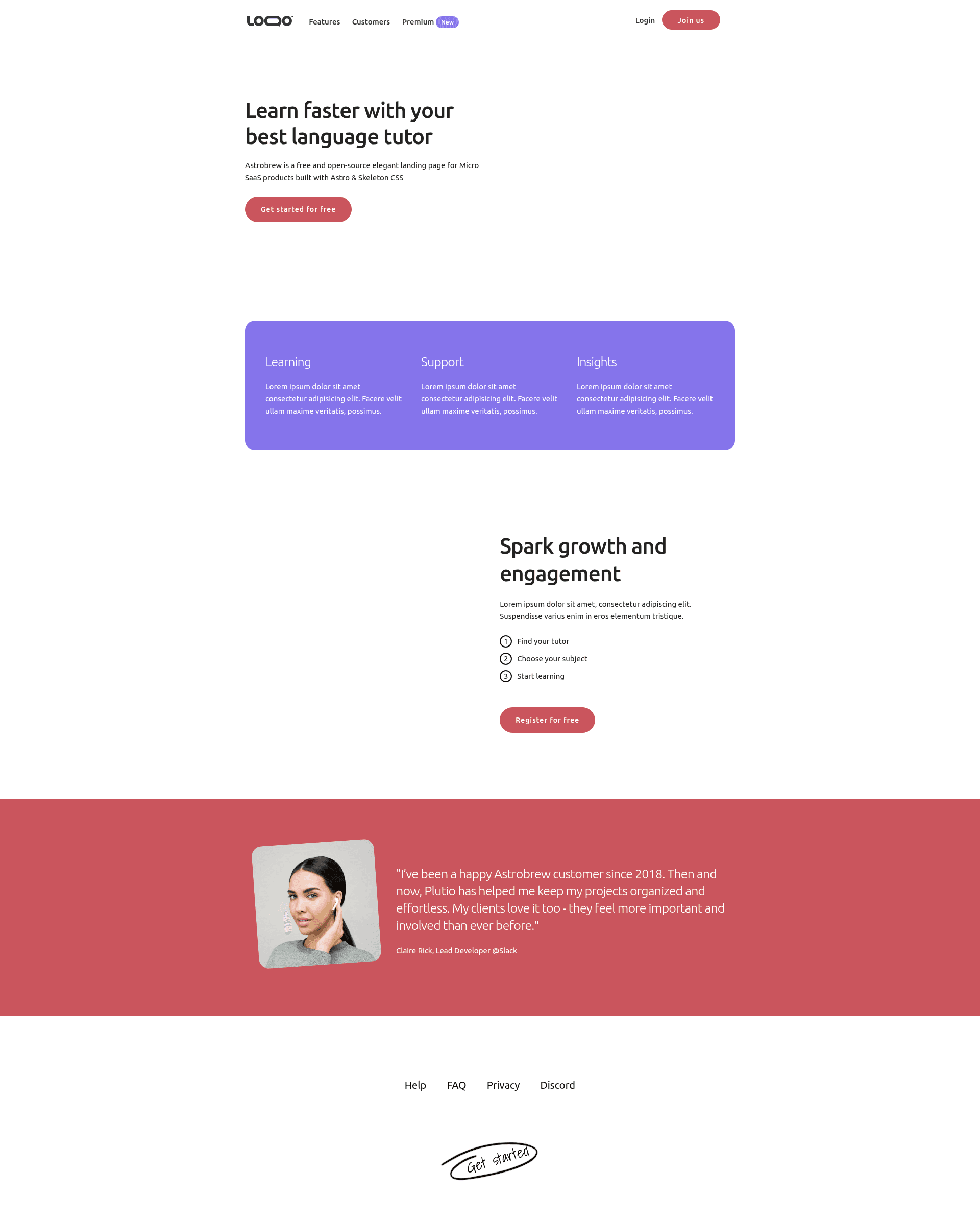
Astrobrew is a free and open-source elegant landing page for Micro SaaS products built with Astro & Skeleton CSS
About this template
Astrobrew is a free, open-source landing page template for Micro SaaS products, built with the Astro framework and Skeleton CSS.
What is Astrobrew?
Astrobrew is a single-page website template designed specifically for Micro SaaS products. It takes a basic Astro project structure and gives you ready-made landing page sections — header, hero, features, how-to-use, final call-to-action, and footer — each implemented as its own .astro component. The template scaffolds a production-ready static site; running npm run build outputs your site to the dist folder, and npm run dev serves it locally at localhost:3000. It is published on GitHub by LAB-CH3, who also offers an upgraded "Pro" version linked from the project page.
Key Features
- Framework — Built with Astro, a static site generator that ships zero JavaScript by default, and styled with Skeleton CSS, a lightweight, minimal CSS framework.
- Component-based structure — The layout is split into reusable .astro components: Header, Hero, Features, HowToUse, FinalCta, and Footer, all composed in a single index page under src/pages.
- Ready-to-run commands — Standard npm workflow: npm install to install dependencies, npm run dev for local development on localhost:3000, npm run build to produce a static site in ./dist/, and npm run preview to test the production build locally.
- Open source and free — The full source code is public on GitHub, with no licensing barrier; the repository currently has 58 stars and is tagged with landing-page and saas topics.
- Pro upgrade path — A separate "Astrobrew Pro" version is available at brewpro.indiebold.com, providing a paid option for users who need more than the free template.
- Live demo — A working demo of the template can be viewed at brew.indiebold.com to see the landing page in action.
Who is it for?
Astrobrew is aimed at indie developers and small teams launching a Micro SaaS product who want a clean landing page without building one from scratch. It's also useful for developers comfortable with Astro who want a minimal starting point to customize and extend, and for designers looking for a lightweight, text-focused layout that highlights a product's core value proposition.
What can you do with Astrobrew?
- Indie SaaS founders: Quickly launch a landing page for a new Micro SaaS product by editing the existing .astro components — replace the hero text, feature list, and call-to-action with your own details.
- Astro developers: Use the template as a learning reference or starting point to see how a typical single-page site is organized with Astro components and Skeleton CSS.
- Hobbyist makers: Create a personal project page or product teaser site with the built-in sections and deploy it as static HTML anywhere.
How does Astrobrew work?
The template runs on the Astro framework; you clone the repository, install dependencies with npm install, then start the dev server with npm run dev. You edit the .astro files in src/components, and when ready, npm run build generates a static site in ./dist/ that you can deploy to any static host.
Pricing
Astrobrew is free and open source. A paid "Pro" version is also available, though the Pro tier's specific features and price are not listed on the project page.
FAQ
Is Astrobrew free?
Yes, the template is free and open source, published on GitHub. The repository includes the full source code and can be used without payment, though the creator offers an optional Pro version.
What does Astrobrew do?
It provides a pre-built single-page landing site for Micro SaaS products, using Astro components for header, hero, features, how-to-use, final CTA, and footer sections. You customize those components and build a static site.
Does Astrobrew use Tailwind CSS?
No, it uses Skeleton CSS, a minimal CSS framework, not Tailwind. That keeps the default styling lightweight and small.
Can I deploy the build output anywhere?
Yes, npm run build creates a pure static site in the dist directory, so it can be hosted on any static file host, CDN, or web server without a backend.
How do I run Astrobrew locally?
After downloading, run npm install to install dependencies, then npm run dev to start a local dev server at localhost:3000.