Template details
Atom
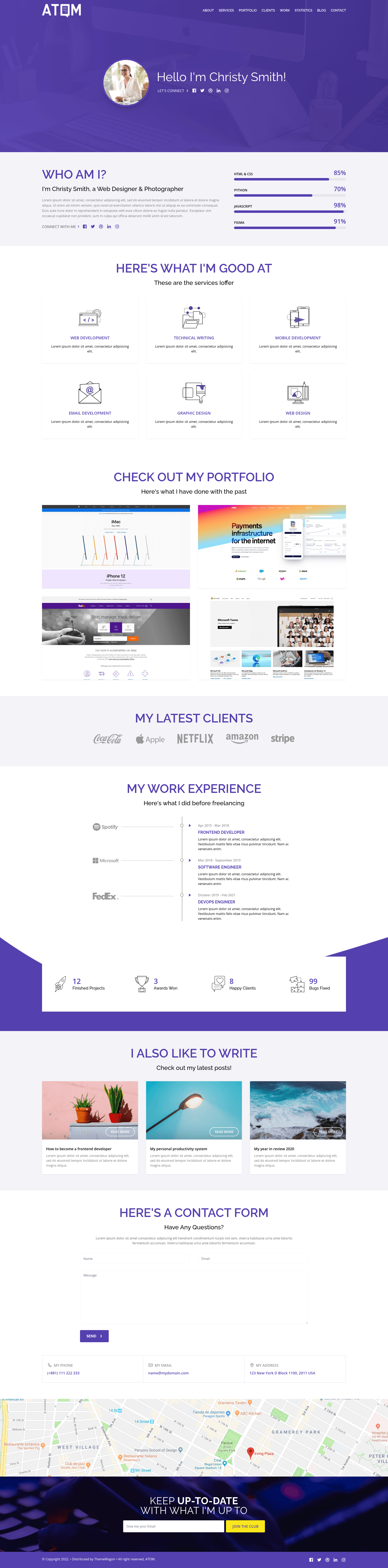
Free one-page Tailwind CSS portfolio and blog template with portfolio, blog, contact, and newsletter sections.
About this template
Atom is a free, one-page portfolio website template built with Tailwind CSS v3.0.23, distributed by ThemeWagon to help designers and developers launch a lightweight portfolio or blog fast.
What is Atom?
Atom is a free website template from ThemeWagon, created by the tailawesome team, that ships as a single pre-built HTML page. It takes portfolio and blog content and renders it into a responsive, mobile-first landing-page layout with a hero header, top navigation, progress bars, blog and portfolio sections, a contact form, and a newsletter subscription form. The template runs on plain HTML5 and CSS3 powered by Tailwind CSS, with Google Fonts and Google Map integration, and is distributed under an open-source license that permits commercial use.
Key Features
- Tailwind CSS v3.0.23 — The template is built on a specific Tailwind CSS version, so utility classes and the config file match that release.
- One-page design — All sections (hero, portfolio, blog, contact) are condensed into a single scrolling page, which focuses visitors on one flow.
- Blog and portfolio sections — Two content areas meant to display project thumbnails, post titles, and descriptive text.
- Contact and newsletter forms — A working contact form layout and a newsletter subscription form to collect emails.
- Google Map integration — A geolocation block with a Google Map embed so visitors can find a physical location.
- Mobile-first and fully responsive — Layouts are built to adapt from small phones to desktop, with a top navigation bar that works across Android, iPhone, Chrome, Firefox, Safari, Edge, and Opera.
- Page-speed and SEO optimized — The clean, minimal CSS and semantically structured markup aim to improve loading times and search visibility.
- Well-commented, clean codebase — HTML and CSS are commented for easier customization, and the project includes all demo images, libraries, and plugins needed to run.
Who is it for?
- Freelance designers and developers who need a quick, professional portfolio website to showcase projects and collect inquiries via the built-in contact and newsletter forms.
- Creative professionals (photographers, illustrators, writers) who want a clean, one-page blog-and-portfolio layout that loads fast on mobile devices.
- Developers learning Tailwind CSS who want a commented, open-source reference project to study and modify for client work.
What can you do with Atom?
- Portfolio websites: display selected work in the portfolio section, add project titles and images from the included demo assets, and link out to live case studies.
- Blogging: publish short-form posts through the blog section, with headlines and excerpts formatted via Tailwind utilities.
- Local business landing pages: use the contact form, Google Map, and newsletter block to capture leads and show a physical location.
Pros and cons
- Pros: Free and open source; usable in commercial projects; lifetime free updates; one-page design; mobile-first and cross-browser compatible; clean and commented code; SEO and page-speed focused; includes Google Fonts, Google Map, forms, and progress bars.
- Cons: Free license requires credit and offers no support; limited to a single pre-built design (one-page only); customization is limited compared to premium templates that include Figma files and 24/7 support.
Pricing
Atom is free to download. ThemeWagon lists it under the free template category, and the download page states it is open source, usable in commercial projects, and receives lifetime free updates.
Alternatives
- Atlas — a free responsive Tailwind CSS blogging website template from ThemeWagon, focused more on magazine-style reading than portfolio-focused one-page layouts.
- Rainblur — a free Tailwind CSS coming soon page template, useful if you only need a placeholder.
FAQ
Is Atom free to use in commercial projects?
Yes. The ThemeWagon download page marks Atom as open source and explicitly allows commercial use, with lifetime free updates. The free template license requires attribution credit and does not include dedicated support.
What Tailwind CSS version does Atom use?
Atom is built with Tailwind CSS v3.0.23. The theme’s utility classes and configuration are designed for that version, so you should keep the Tailwind dependency aligned when customizing the code.
What is included in the Atom download?
The download contains one pre-built design (a single HTML page), all demo images shown in the preview, and the necessary libraries and plugins, including Tailwind CSS, Google Fonts, and Google Map assets.
Does Atom have a contact form?
Yes, Atom includes a contact form section and a separate newsletter subscription form. The forms are part of the static HTML layout, so you’ll need to connect them to a backend service or an email-sending endpoint to make them functional.
Can I customize Atom?
Yes, the codebase is clean and well-commented, and it uses Tailwind utility classes, so you can adjust colors, spacing, and components by editing the HTML and the Tailwind config. However, the free version is limited to the one single page design; a multi-page or more heavily customized version would require editing significant portions of the template.