Template details
Author
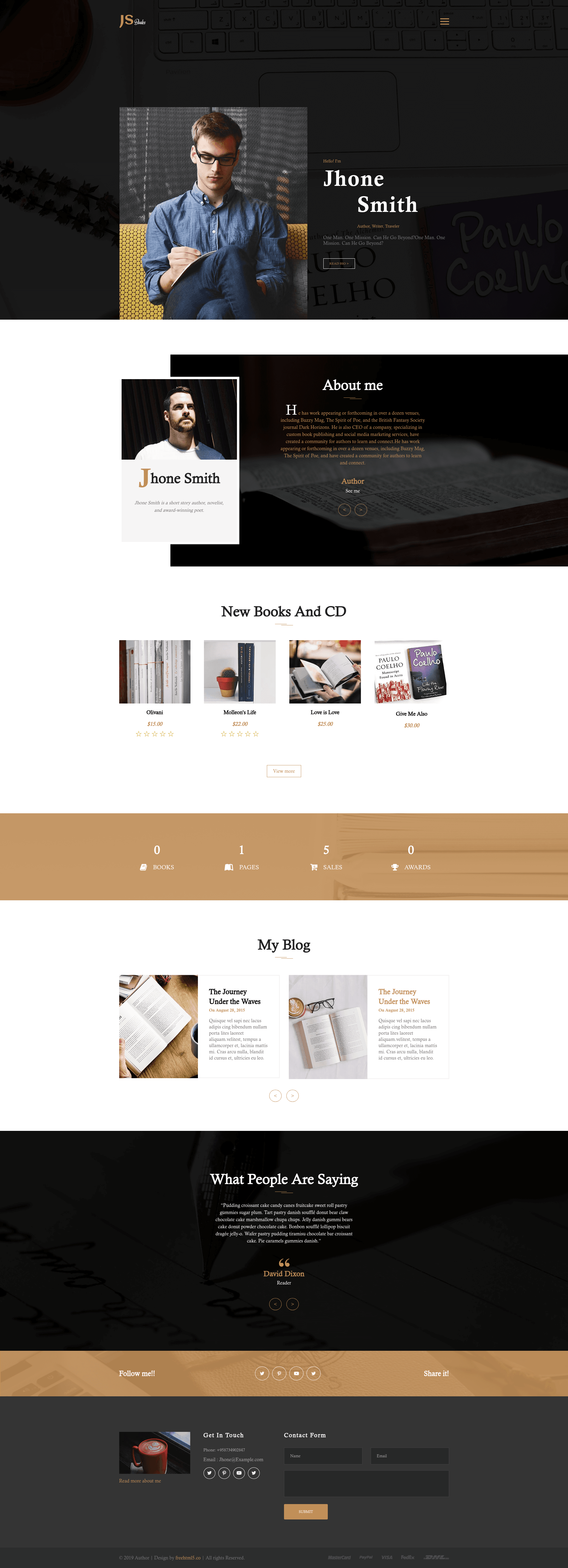
Free one-page HTML5 personal portfolio template with off-canvas menu, testimonial carousel, fun fact counters, and contact form UI.
About this template
Author is a free one-page HTML5 personal portfolio website template distributed by ThemeWagon and built by Free HTML5 CO, designed to present a freelancer's work on a single responsive page.
What is Author?
Author is a free HTML5 personal portfolio website template built on Bootstrap 3, offered as a single-page layout for showcasing an individual's work and skills. It takes static content — demo images, text, and font icons — and renders a fully responsive website with a dark header, off-canvas menu, testimonial carousel, and blog section. The template is distributed by ThemeWagon and was created by Free HTML5 CO; it is open source and licenced for commercial projects.
Key Features
- Fully responsive — The layout adapts to any screen size from mobile to desktop and is tested in Chrome, Edge, Firefox, Opera, Safari, and mobile browsers.
- Off-canvas menu — Navigation hides behind a stylish dark header and slides in on demand, keeping the one-page design uncluttered.
- Testimonial carousel — Built with Slick, the carousel lets you rotate client quotes in a sliding banner.
- Fun fact counters — Animated counters display metrics like project counts or years of experience to draw attention to achievements.
- Call to action button — A prominent button is included for driving visitors to contact or hire you.
- On hover image effects — Images respond with hover animations to make portfolio pieces interactive.
- Contact form UI — A ready-made contact form layout (without backend processing) lets visitors see where to send messages.
- Blog section — A dedicated area on the page for listing recent posts, so the template can double as a simple blog layout.
- Hundreds of font icons — An icon font library is bundled for adding social links, feature bullets, and decorative elements.
Who is it for?
- Freelancers and independent professionals who want a quick, static one-page site to display their portfolio and contact information.
- Designers and web developers who need a minimal, tweakable starting point for a personal brand site; the single HTML file and plain CSS/JS source are simple to edit.
- Agencies and small studios that need a fast, free landing page for a campaign or personal project, with sections for testimonials and blog posts.
What can you do with Author?
- Freelance designers: Showcase six or more projects with hover effects and draw attention to key stats with fun fact counters.
- Consultants: Place a call-to-action button beneath a short bio to capture leads, and embed a testimonial slider to build trust.
- Hobbyist bloggers: Use the built-in blog section to list article headlines on a single scrolling page without maintaining a separate blog template.
- Agencies: Reuse the off-canvas menu and contact form UI as the skeleton for a starter website for a client, then swap images and copy.
Pricing
Author is completely free to download and use. It is open source, can be used in commercial projects, and includes lifetime free updates (the current version is 1.0). No premium tier is offered; ThemeWagon also sells premium templates separately.
Alternatives
- Personal Portfolio — Free Bootstrap 4 HTML5 Portfolio Website Template, a Bootstrap 4 option from ThemeWagon.
- MeetMe — Free HTML5 Bootstrap personal portfolio website template, a Bootstrap 4 personal resume-style alternative.
- Ronin — Free Bootstrap 4 HTML5 personal portfolio website template, another Bootstrap 4 one-page portfolio choice.
FAQ
Is Author free?
Yes, Author is a free download from ThemeWagon. It is open source, so you can use it in commercial projects, and you receive lifetime free updates for the template.
What does Author run on?
Author is a static HTML5 and CSS3 template built on Bootstrap 3, so it runs in any modern browser without a server, build tool, or backend. The package includes one HTML file, CSS files, the JavaScript source, and the Slick carousel library.
Which browsers are supported?
ThemeWagon lists compatibility with Chrome, Edge, Firefox, Mobile browsers, Opera, and Safari, and the template is fully responsive across screen sizes.
Does the contact form actually send emails?
No, the template includes only a contact form user interface — the HTML and CSS layout for the form fields and button. You'll need to connect it to a backend service or a form handler to receive submissions.