Template details
Automatic GatsbyJS App Landing Page
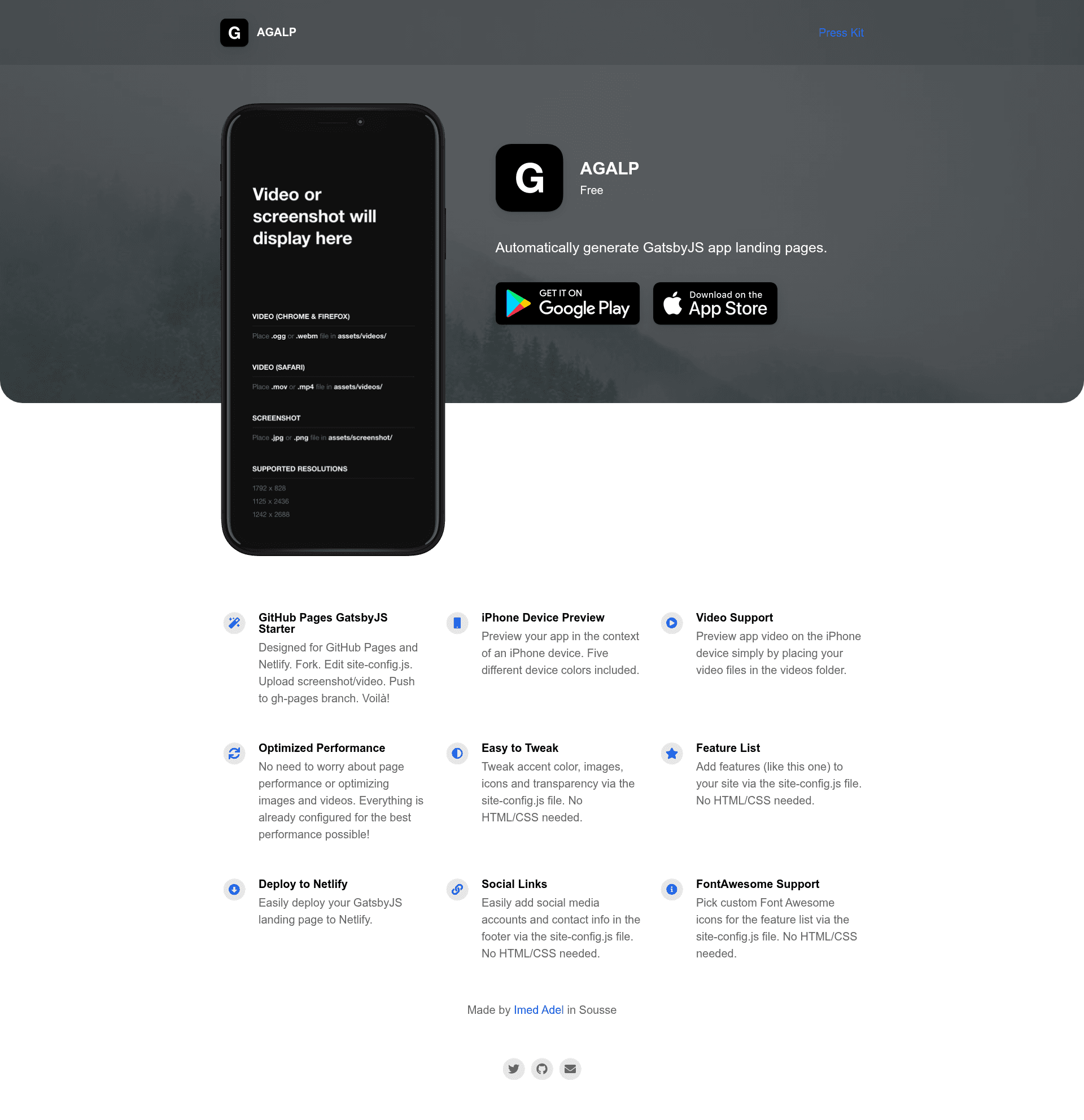
Automatically generate an iOS app landing page using GatsbyJS, customizable via site-config.js and deployable to GitHub Pages or Netlify.
About this template
Automatic GatsbyJS App Landing Page is a Gatsby starter that generates a single-page iOS app landing site from a configuration file, ready for one-click deployment to Netlify or GitHub Pages.
What is the Automatic GatsbyJS App Landing Page?
It is a boilerplate/starter project built with GatsbyJS that produces a static landing page for an iOS app. You provide app metadata, a screenshot or video preview, and page content through a single site-config.js file; the template outputs a pre-styled site with no HTML or CSS editing. The project is authored by Imed Adel, released under the MIT license, and is an adaptation of Emil Baehr's Automatic App Landing Page template.
Key Features
- Zero HTML/CSS configuration — All site content, colors, links, and media are driven by
site-config.js, so you never touch markup or stylesheets. - GatsbyJS static build — The site is pre-rendered as static HTML, giving fast load times and easy hosting anywhere.
- One-click Netlify deployment — A dedicated Deploy to Netlify button wires the repository directly to a Netlify site.
- GitHub Pages friendly — You can build the public folder and push it to GitHub for Pages hosting.
- Video or screenshot preview — The layout supports a product preview area where you upload either a video or an image.
- Built with FontAwesome icons — Icons are included via FontAwesome for feature lists and social links.
- Gatsby starter compatible — Works with
gatsby new YourProjectNamefor scaffolding new projects.
Who should use the Automatic GatsbyJS App Landing Page?
- Indie iOS developers — Launch a polished product page for an App Store app without writing front-end code; just fill in the config.
- Startup founders — Spin up a professional landing page for a beta or upcoming iOS app in minutes, then deploy to Netlify.
- Designers — Use the fixed layout as a starting point for a client's iOS app marketing page, customizing text and imagery in the config file.
Use cases
- App developers: Create a landing page that links to the App Store, shows a preview video, and lists features — all from
site-config.js. - Hackathon teams: Quickly generate a presentable page for an iOS prototype and deploy it publicly to share with judges or users.
- Open-source maintainers: Publish a Gatsby starter like this one to help others scaffold iOS landing pages with minimal effort.
How does the Automatic GatsbyJS App Landing Page work?
- Fork the repository (or run
gatsby new YourProjectNamewith the repo URL). - Upload your app preview video or screenshot into the intended folder.
- Edit
site-config.jsto set app name, description, links, colors, and content. - Run
npm run buildto generate static files, then deploy to Netlify via the button or push the public folder to GitHub Pages.
Pricing
The template is free and open-source under the MIT license, so there are no fees or paid tiers.
Alternatives
- Automatic App Landing Page — the original HTML/CSS template by Emil Baehr that this Gatsby version is based on.
FAQ
Do I need to know HTML or CSS to use this template?
No. All customization happens in the site-config.js file, including text, links, colors, and media. The template ships with ready-made styling, so you only edit configuration values.
Is the Automatic GatsbyJS App Landing Page free?
Yes, the project is released under the MIT license, meaning it is free to use, modify, and distribute, even commercially.
Can I deploy to GitHub Pages with this template?
Yes. After running npm run build, you can deploy the generated public folder to GitHub Pages, or use the one-click Netlify button for a Netlify deployment.
What is this template based on?
It is built on GatsbyJS and is an adaptation of Automatic App Landing Page by Emil Baehr, replacing the original HTML/CSS approach with a Gatsby-powered workflow.