Template details
Black Dashboard Django
Open-source dark Bootstrap 4 admin dashboard starter for Django with auth, charts, dynamic tables, and Docker.
About this template
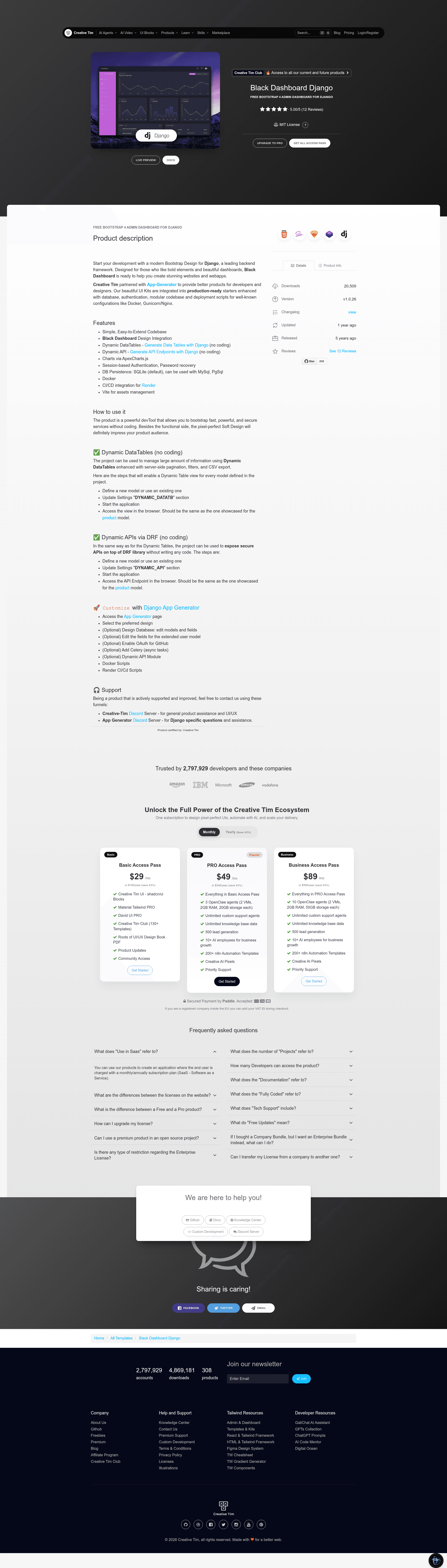
Black Dashboard Django is an open-source admin dashboard template that pairs the dark-themed Bootstrap 4 Black Dashboard design with the Django Python framework, giving developers a prebuilt starter for authenticated back-office applications.
What is Black Dashboard Django?
Black Dashboard Django is a free, open-source Django project starter built on Creative Tim's Black Dashboard, a widely used Bootstrap 4 admin template. It delivers a runnable Django application with a dark UI, login and registration pages, password recovery, charts, dynamic tables, and a dynamic API module. The project is provided by Creative Tim in partnership with App-Generator and is publicly available on GitHub under the Creative Tim EULA license.
The codebase is organized with a config/ directory for Django settings and URL routing, and an apps/ directory containing modules for charts, dynamic API, dynamic datatables, and pages. It uses SQLite as the default database and can be configured for MySQL or PostgreSQL.
Key Features
- Dark Bootstrap 4 admin design — Black Dashboard's dark theme is integrated into Django templates, providing a modern look for admin panels.
- Session-based authentication — Includes login, registration, and password recovery flows; the demo uses credentials
test / Pass12__. - Dynamic Tables — The
dyn_dtapp lets you generate data tables with minimal coding, as described in the App-Generator dynamic datatables docs. - Dynamic API — The
dyn_apiapp provides API endpoint generation for Django models without writing custom views. - Charts module — A dedicated
chartsapp is included for embedding visualizations directly into the dashboard. - Django CLI integration — Bundled with App-Generator's Django CLI package, supporting Git commit/rollback, database backup and restore, environment management, and dependency management.
- Deployment-ready setup — Includes Docker configuration and CI/CD for Render, plus Vite for assets management.
- Database flexibility — SQLite by default, with documented support for switching to MySQL or PgSql.
Who is it for?
- Django developers can use it as a starting scaffold for admin dashboards, avoiding repetitive setup of authentication and layout.
- Product teams building internal tools or customer-facing back-office apps get a dark-themed UI with charts and tables out of the box.
- Freelancers and agencies can customize the Bootstrap 4 design to spin up client admin panels quickly, then deploy to Render with the included CI/CD.
What can you do with it?
- Build a custom admin panel: Start from the prebuilt pages and add your own Django models; the session auth and password recovery are already wired.
- Expose model data via API: Use the dynamic API app to create endpoints for your models with minimal code, then consume them from a frontend.
- Generate data tables: Use the dynamic datatables module to display database records in sortable tables without writing custom view logic.
- Deploy to production: Push the repo to Render via the Blueprint workflow or run locally with Docker.
How does it work?
To get started, clone the repository and create a virtual environment, then install dependencies from requirements.txt. Run database migrations with python manage.py makemigrations and python manage.py migrate, then start the development server with python manage.py runserver. The app runs at http://127.0.0.1:8000/; create a new user on the registration page to unlock private pages.
Pricing
Black Dashboard Django is free and open-source, released under the Creative Tim EULA. A separate PRO version adds more components, pages, priority support, ApexCharts.js, a media files manager, Celery async tasks, and additional CLI tooling.
FAQ
Is Black Dashboard Django really free?
Yes, the source code is open and available on GitHub under the Creative Tim EULA. You can clone it, customize it, and deploy it without paying a license fee. A paid PRO version exists with extra features.
What are the default demo credentials?
The live demo authenticates with the username test and password Pass12__. You can also register a new account on the registration page to access the private pages.
Which database does it support?
SQLite is the default database, configured out of the box. The project also supports MySQL and PostgreSQL by adjusting the settings; persistence is handled through Django's ORM.
Does it work with Docker?
Yes, the template includes Docker configuration and CI/CD setup for Render. This allows containerized deployment and automated builds when you connect the repository through Render's Blueprint interface.
What is the difference between the free and PRO versions?
The free version includes the core dark dashboard, auth, charts, dynamic tables, and API. The PRO version adds more components, a media files manager, Celery for async tasks, ApexCharts.js, and priority support, and is available from Creative Tim's website.