Template details
Brevifolia
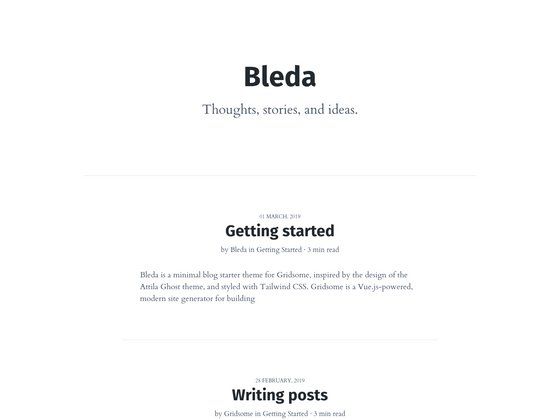
Minimalist Gatsby blog starter preconfigured with Forestry CMS, SCSS styling, and Netlify deploy support.
About this template
Brevifolia is a minimalist blog starter for Gatsby that pairs the React-based static site generator with Forestry as a Git-backed CMS, letting you run a static blog whose markdown content is managed through a visual interface.
What is Brevifolia?
Brevifolia is a starter repository that combines Gatsby's static site generation with Forestry's Git-based content management. It takes markdown blog posts, images, and YAML data files as input, and outputs a fully static Gatsby site ready to be deployed on Netlify or any static host. The project source lives at kendallstrautman/brevifolia-gatsby-forestry, and it is designed to give developers a minimal blog foundation while giving editors a CMS without leaving the Git workflow.
Key Features
The starter ships with a focused set of features that keep the blog minimal while covering the essentials for a Gatsby plus Forestry workflow.
- Gatsby static generation — The site is built by Gatsby from React components and markdown files, producing a static blog with optimized asset handling.
- Forestry CMS preconfiguration — The
.forestrydirectory contains frontmatter configuration and sidebar settings, so content editors can manage posts, data files, and media through Forestry's UI, with changes committed directly to the repository. - SCSS styling with CSS modules and BEM — Styles are authored in SCSS, scoped with CSS modules, and follow the BEM naming convention; the design uses the Work Sans font.
- Markdown and YAML content — Blog posts are markdown files processed by gatsby-transformer-remark, while site-level data can be stored in YAML files via gatsby-transformer-yaml.
- Image optimization — Includes gatsby-image and remark plugins (gatsby-remark-images, gatsby-remark-relative-images, gatsby-remark-normalize-paths) for correct image paths and responsive loading.
- Immediate local dev workflow — Clone or scaffold with
gatsby new, then runyarn devornpm run devto start a dev server at localhost:8000. - Netlify deploy support — A one-click Deploy to Netlify button is provided, and Forestry commits automatically trigger rebuilds on Netlify.
Who is it for?
Brevifolia suits developers and content editors who want a lightweight blog that keeps content in Git.
- Developers who want a minimal blog starter — They can scaffold a new site with the Gatsby CLI using the repo URL, install dependencies with yarn or npm, and start editing the layout components and SCSS in
src/. - Content editors and writers — They can use Forestry's sidebar to create and edit markdown posts, upload media, and manage data files, with changes automatically committed to the repository.
- Small teams that prefer a Git-backed CMS — Forestry stores content as markdown and YAML in the repo, supports remote admin at yoururl.com/admin, and lets you configure media storage via git LFS, Cloudinary, S3, or Netlify Large Media.
What can you do with Brevifolia?
With Brevifolia you can go from repository clone to a live, editable blog in a few commands.
- Launch a personal blog in minutes — Use the Forestry quick-start import link or run
gatsby new my-blog https://github.com/kendallstrautman/brevifolia-gatsby-forestryto get a working blog with a dev server. - Edit content visually without touching code — Forestry's admin sidebar exposes posts and data files, and the project includes a
forestry:previewcommand that supports Forestry's instant previews on port 8080. - Deploy automatically to Netlify — Connect the repo to Netlify using the provided deploy button; Netlify rebuilds the static site whenever Forestry (or any contributor) pushes a commit.
How does Brevifolia work under the hood?
gatsby-node.js handles the creation of blog pages from markdown, while gatsby-config.js reads site-level settings from config.json and merges them into Gatsby's graphql queries. The project separates content in content/ (posts, images, data files), pages in src/pages, a blog post template in src/templates, and reusable components in src/components. When Forestry saves a change, it edits the corresponding markdown or YAML file and commits to the repo, and the static site rebuilds.
FAQ
Does Brevifolia require Forestry to work?
No. Forestry is an optional CMS layer. The starter is a normal Gatsby project, so you can clone it, edit the markdown files directly, and run yarn dev to build the site without ever using Forestry. Forestry simply provides a visual editing interface over the same files.
How do I set up Brevifolia with Forestry?
Use the "Import this project into Forestry" quick-start button in the repository, or first run gatsby new [SITE_DIRECTORY_NAME] https://github.com/kendallstrautman/brevifolia-gatsby-forestry and then import that repo into Forestry at app.forestry.io. The .forestry directory already contains the sidebar and frontmatter settings.
What file formats does Brevifolia support for content?
Blog posts are written in markdown; data files use YAML (add gatsby-transformer-json if you prefer JSON). Images are handled through gatsby-image, which generates optimized paths. Media storage can be configured for git LFS, Cloudinary, S3, or Netlify Large Media.
How do I deploy Brevifolia?
The recommended path is Netlify: click the Deploy to Netlify button in the repository, or set up a new site that points at the repo. Netlify will run the Gatsby build and replicate the site on every push; when Forestry commits changes, Netlify automatically triggers a rebuild.
Can I customize the styling?
Yes. Global and component styles live under src/styles/ and are written in SCSS using CSS modules and the BEM convention. The starter's default font is Work Sans, which you can swap by editing the font imports and SCSS variables.