Template details
CBP Style Guide
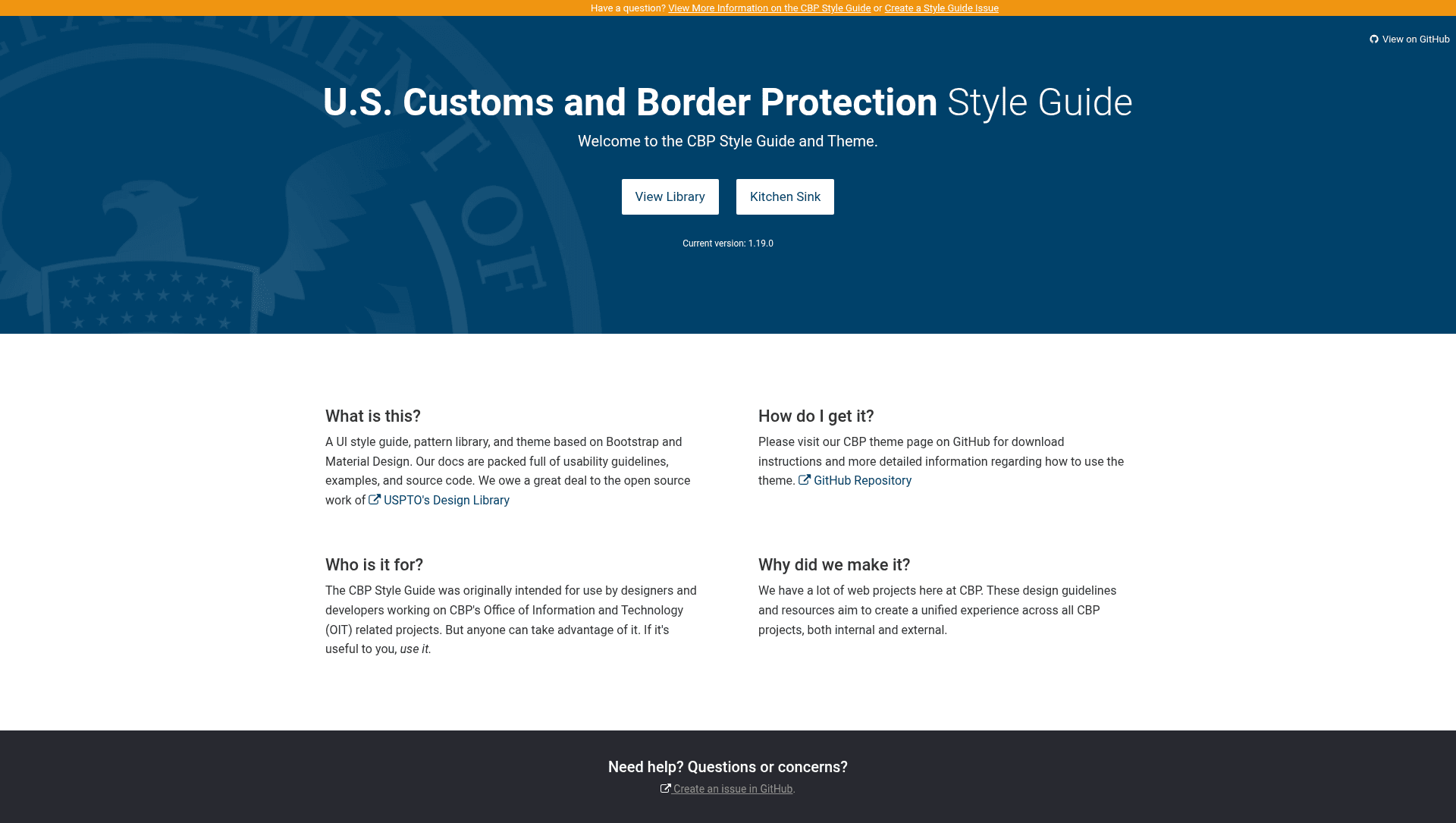
The CBP Style Guide to compliment the CBP Theme. The style guide describes CBP theme components and patterns and how to use them.
About this template
CBP Style Guide is an open-source Jekyll-based documentation site from US Customs and Border Protection that documents the components, patterns, and colors of the CBP Theme. It serves as a working reference for developers and designers who build sites with the CBP Theme, providing concrete examples and usage guidance rather than just a list of variable names.
What is the CBP Style Guide?
The CBP Style Guide is a companion to the CBP Theme, a Jekyll theme published by the US-CBP GitHub organization. Its core function is to describe the theme's components, patterns, and colors and show how to use them in practice. The style guide itself is a static Jekyll site that runs locally on Node.js and uses Grunt for build automation and Bower for front-end dependency management. The repository is hosted on GitHub under an open-source license and welcomes contributions from the public.
Key Features
The CBP Style Guide offers the following distinct capabilities visible in its repository documentation:
- Component and pattern reference — Gives guidance and examples for each component and pattern in the CBP Theme, covering both usage and visual styling.
- Color guidance — Documents the CBP Theme's palette to help teams maintain consistent branding.
- Jekyll static site generation — Built with Jekyll, so the documentation can be compiled into a fully static site for any web server.
- Grunt and Bower support — Front-end build tasks run through Grunt and dependencies are fetched with Bower, both managed via npm.
- Local live server — Running
npm run devcompiles the site and serves it at localhost:4000 for quick previewing. - Distribution build —
npm run buildproduces adistfolder containing the entire static site and all resources, ready to deploy. - Open-source contribution — Follows the CBP open-source policy and includes a contribution guide for external developers.
Who should use the CBP Style Guide?
Three types of users will find this documentation most useful:
- Front-end developers building pages with the CBP Theme can look up the correct component markup, pattern usage, and theme structure before writing code.
- Designers working on CBP-branded websites can consult the documented color palette and component examples for visual consistency.
- Jekyll maintainers who want to customize or extend the CBP Theme can use the style guide as a working reference for build commands and project layout.
What can you do with the CBP Style Guide?
The style guide supports several concrete use cases:
- Front-end development: Reference component examples and pattern guidance to implement pages that follow CBP Theme conventions.
- Design work: Browse the documented color palette to pick approved hues for new designs.
- Site deployment: Build a local preview with
npm run devor generate a deployable static site withnpm run build.
How does the CBP Style Guide work?
The README describes a build process that starts with installing Jekyll and Node.js, then installing Grunt and Bower globally via npm install -g grunt-cli bower. After running npm install to fetch project dependencies, npm run dev compiles the documentation and starts a local server at localhost:4000. A production build uses npm run build to output the static site to a dist directory.
Pricing
The CBP Style Guide is open-source and free to use, released under the CBP Open Source License. No paid tiers or commercial licensing are mentioned in the repository.
Alternatives
- US Web Design System — a broader federal design system with its own documentation and component library, used across many government websites.
FAQ
Is the CBP Style Guide free?
Yes, the project is open-source under the CBP Open Source License, and the source code is publicly available on GitHub. There are no costs mentioned for using or building the documentation.
What tools do I need to run it locally?
The README asks you to install Jekyll and Node.js, then install Grunt and Bower globally. After that, npm install fetches dependencies, and npm run dev builds and serves the site.
How do I generate a production build?
Run npm run build to create a dist folder that contains the entire static site and resources, which you can then deploy to any web server.
Can I contribute to the style guide?
The project welcomes contributions under the CBP open-source policy. You can follow the contribution guide linked from the README to submit changes.