Template details
Next Galaxy Template
A non-opinionated TypeScript documentation starter for Next.js with Markdoc, Tailwind CSS, and one-click deploy.
About this template
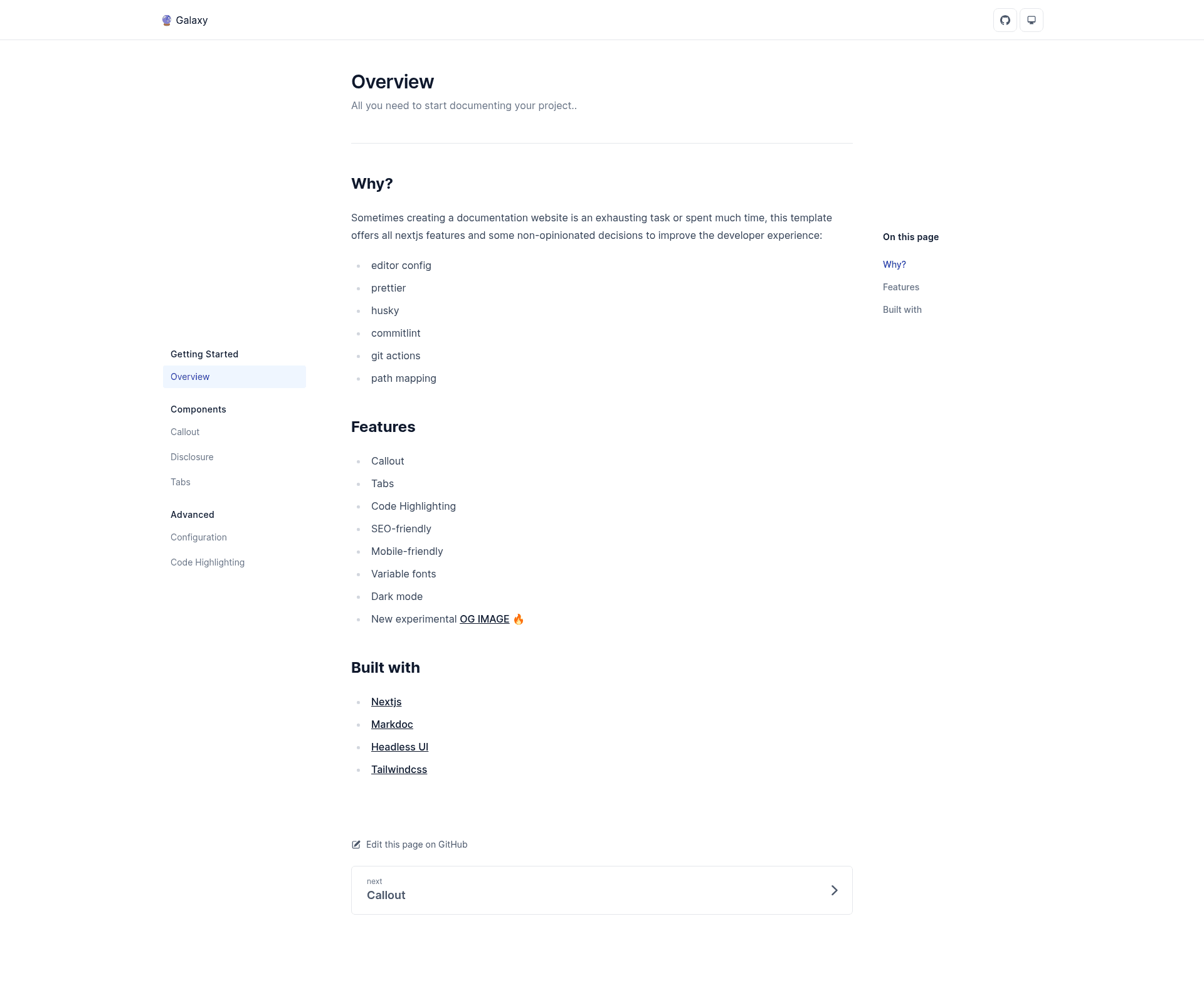
Next Galaxy Template is a non-opinionated TypeScript template starter for Next.js that gives you a pre-configured documentation site with Markdoc, Tailwind CSS, and Headless UI, so you can start writing docs immediately instead of wiring up tooling.
What is Next Galaxy Template?
Next Galaxy Template (repository: next-galaxy-starter) is a GitHub template created by mverissimo that scaffolds a documentation website on Next.js. As input it takes an empty project and a set of preinstalled dependencies; as output it produces a production-ready docs site with components for callouts, disclosures, tabs, and code highlighting. It runs on Node.js via standard Next.js scripts (dev, build, start) and can be deployed in one click to Vercel or Netlify.
Key Features
- Content components — The template ships with Callout, Disclosure, Tabs, and Code Highlighting components, which work with Markdoc to let you write rich documentation blocks without custom code.
- Dark mode — A built-in theme switch lets readers toggle between light and dark appearances.
- SEO-friendly and mobile-friendly — The layout is responsive and includes SEO metadata, making documentation accessible on phones and indexable by search engines.
- Variable fonts — Uses variable font technology for performance-optimized, flexible typography.
- Experimental OG image — Links to the og-playground on Vercel for generating Open Graph preview images, marked as experimental.
- Developer tooling preconfigured — EditorConfig, Prettier, Husky, Commitlint, GitHub Actions, and path mapping are already set up, so code style and CI are consistent from the first commit.
- Commands — Includes
dev,build,start,lint, andtest(using Jest) so you can run the development server, create a production build, serve it, lint, and test all components and pages.
Who is it for?
- Developers creating project documentation — They can clone the template and immediately write Markdoc documents without dealing with Next.js configuration.
- Open-source maintainers — They benefit from the one-click Vercel and Netlify deploy buttons to publish docs quickly.
- Teams standardizing on a React/Next.js stack — They get a consistent setup with Husky, Commitlint, and GitHub Actions that enforces commit message and code style conventions.
What can you do with it?
- Document your open-source project — Use Markdoc and the included callout, tab, and code-highlighting components to write guides, API references, and tutorials.
- Publish a product knowledge base — Start with a mobile-friendly, SEO-friendly layout and add dark mode support for your readers.
- Jumpstart a marketing or docs site — The template's built-in tooling and one-click deploys help you ship a production site on Vercel or Netlify without manual setup.
How does it work?
You start by running yarn create next-app -e https://github.com/mverissimo/next-galaxy-starter or the equivalent npm command. This uses Create Next App to pull the template into a new project. Then you write Markdoc files, run yarn dev to preview locally, and use the provided Vercel or Netlify deploy buttons to ship it.