Template details
4dTermuxArch
A Jekyll documentation theme for TermuxArch, which installs Linux distributions in Termux via PRoot without root access.
About this template
4dTermuxArch is a Jekyll documentation theme for the TermuxArch project, which enables running Arch Linux and other Linux distributions inside Termux via the PRoot utility.
What is 4dTermuxArch?
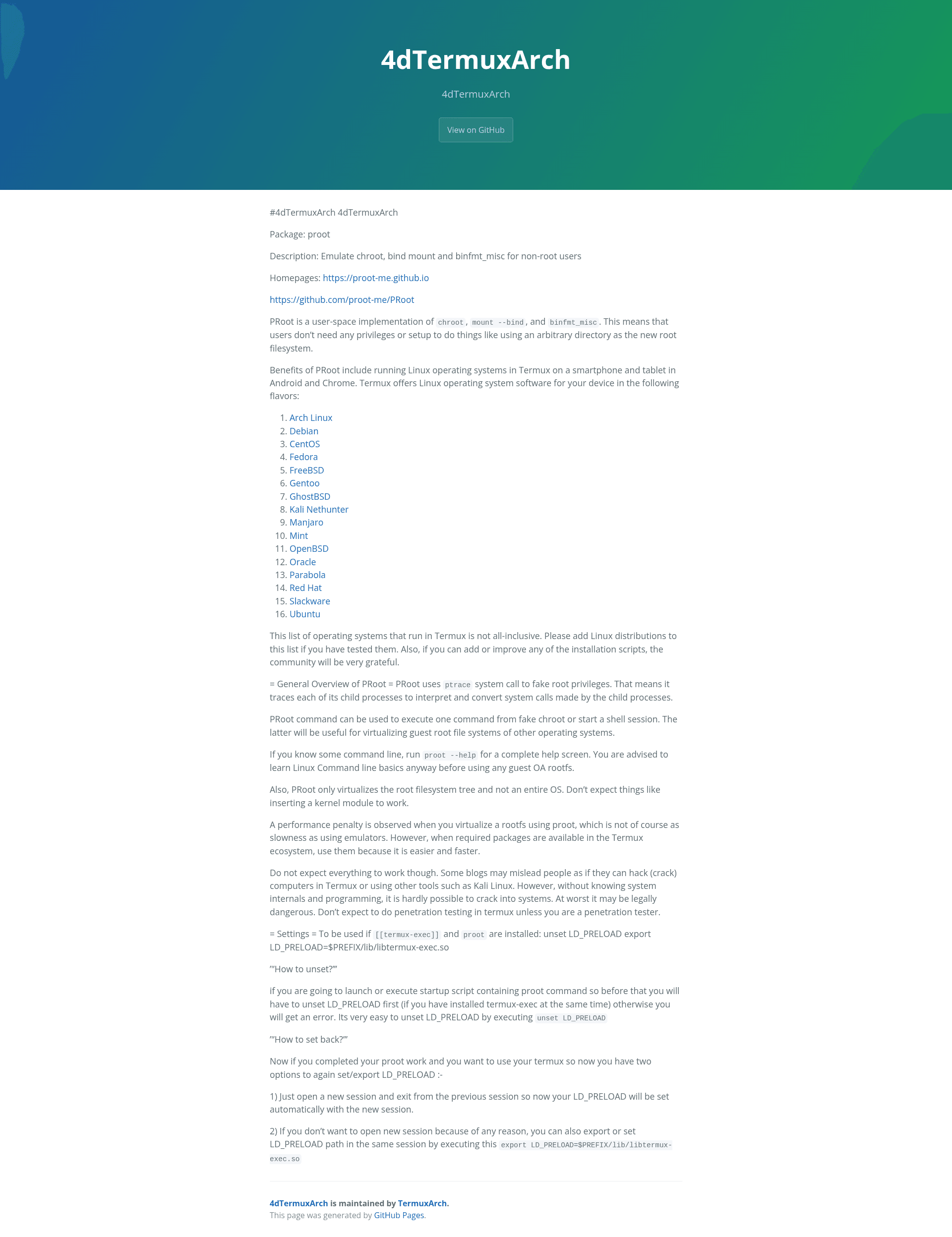
4dTermuxArch is a Jekyll theme designed to host documentation for TermuxArch, a community project that installs Linux root filesystems in Termux on Android and Chrome devices. It takes Markdown content—such as the README shown here—and renders it as a static, GitHub Pages-compatible website. The repository is tagged with topics including debian, github-page, jekyll-themes, termux-proot, and theme, and has 13 stars.
The documentation page it produces explains PRoot, a user-space implementation of chroot, mount --bind, and binfmt_misc that lets non-root users treat any directory as a new root filesystem. It also lists more than a dozen operating systems that have been tested to run in Termux, including Arch Linux, Debian, CentOS, Fedora, FreeBSD, Gentoo, Kali Nethunter, Manjaro, Mint, OpenBSD, Parabola, Red Hat, Slackware, and Ubuntu.
Key Features
- PRoot usage guide — The theme includes full documentation on PRoot, covering how it emulates chroot and mount --bind for unprivileged users using the ptrace system call.
- Distribution directory — A curated list of 16+ Linux distributions that can run under Termux, with links to each project's download or setup page.
- LD_PRELOAD settings — Step-by-step instructions for managing the LD_PRELOAD environment variable when both termux-exec and proot are installed, including how to unset it before launching proot and how to restore it afterwards.
- GitHub Pages deployment — As a jekyll-theme with the github-page topic, it can be served directly from a GitHub repository with minimal configuration.
- Community contribution guidance — The included README explicitly invites users to add newly tested distributions to the list and to improve installation scripts.
Who is it for?
- Termux users on Android smartphones and tablets who want a no-root way to run a full Linux distribution such as Arch or Debian and need the installation and usage documentation this theme presents.
- Documentation maintainers who want a minimal Jekyll theme for a technical project and prefer the content-focused layout this template provides for GitHub Pages.
- PRoot enthusiasts who want to learn how the tool works and which distributions are known to run, since the theme's content explains the ptrace-based mechanism and lists tested distros.
What can you do with 4dTermuxArch?
- Launch a guest Linux OS: Use the documented PRoot command to start a shell session inside a fake chroot, running a distribution like Arch Linux or Ubuntu directly from Termux.
- Toggle Termux environment variables: Follow the settings section to unset LD_PRELOAD before executing a proot script and re-export it afterward, avoiding conflicts with termux-exec.
- Expand the supported distro list: Contribute to the project by appending any Linux distribution you have tested successfully to the list, as the README encourages.
How does it work?
PRoot relies on the ptrace system call to intercept and convert system calls from its child processes, giving the appearance of root privileges without actually having them. The documentation explains that you can use it to run a single command or start an interactive shell. When termux-exec is also installed, you must first unset LD_PRELOAD, then run proot, and finally export LD_PRELOAD back to the Termux library path for normal Termux use.
Pros and cons
- No root required — PRoot works entirely in user space, so no device rooting or privilege setup is needed to virtualize a root filesystem.
- Wide OS coverage — The project lists 16+ distributions, giving users many choices for their Termux environment.
- Performance overhead — The documentation acknowledges a performance penalty when virtualizing a rootfs with proot, though it notes it is faster than using an emulator.
- Not a full OS virtualization — PRoot only virtualizes the root filesystem tree; kernel modules and other low-level operations will not work.
FAQ
Does PRoot require root access on my Android device?
No. PRoot is designed specifically for non-root users; it uses ptrace to fake root privileges, so you can run a Linux distribution inside Termux without rooting your phone or tablet.
What is the performance impact of using proot?
The documentation states that a performance penalty is observed when virtualizing a root filesystem with proot, but it is not as slow as using an emulator. For best speed, use Termux's native packages whenever they are available.
Can I insert kernel modules inside a proot environment?
No. PRoot only virtualizes the root filesystem tree, not an entire operating system. Expecting kernel modules or other hardware-level operations to work will lead to failure.
How do I fix an LD_PRELOAD error when running proot?
If you have termux-exec installed, unset LD_PRELOAD before running proot. After finishing, restore it by exporting LD_PRELOAD with the path to libtermux-exec.so, or simply open a new Termux session.