Template details
Chicago 7
A minimal, zero-JS Hugo theme with a retro Apple System 7 aesthetic built on PicoCSS.
About this template
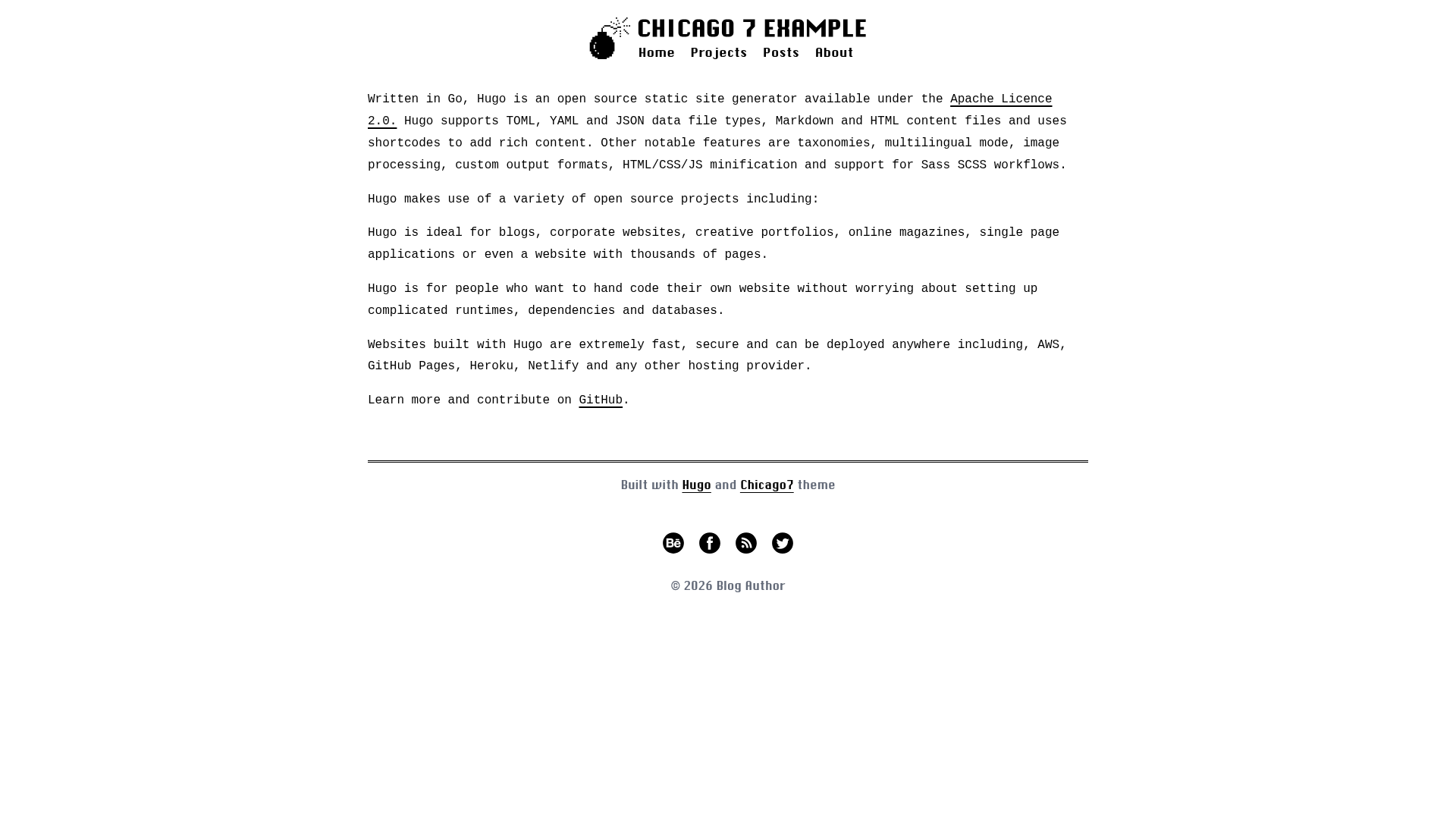
Chicago 7 is a minimal, zero-JavaScript Hugo theme that recreates the look and feel of Apple System 7 with a monospaced Chicago-style font, designed for blogs and personal sites.
What is Chicago 7?
Chicago 7 is a Hugo theme for static websites, developed by akopdev and available on GitHub. It takes Markdown content and Hugo configuration as input and produces a fully static, responsive website with light/dark mode and semantic HTML output. The theme runs on Hugo, requires version 0.90.0 or newer, and is listed on the Hugo Themes directory. A live demo is available at https://akop.dev/hugo-theme-chicago7.
Key Features
- Zero JavaScript — The entire theme works with no JavaScript at all; interactivity like dark mode is handled entirely through CSS, keeping pages fast and lightweight.
- Built on PicoCSS — Styling uses the PicoCSS classless CSS framework, which automatically styles semantic HTML elements without utility classes or a build step.
- Retro System 7 typography — The monospaced font is inspired by the classic Chicago typeface used in Apple System 7, giving the site a distinctive nostalgic, terminal-like personality.
- Light and Dark mode — Visitors can toggle between light and dark color schemes, and the theme also respects the user's system preference.
- Fully responsive — The layout adapts to all screen sizes using responsive CSS, with an emphasis on clean, accessible semantic markup.
- Easy to install — The theme can be added via git submodule (
git submodule add https://github.com/akopdev/hugo-theme-chicago7.git themes/chicago7) or imported as a Hugo module through thethemearray inhugo.toml. - Social media links — Configuration supports 15 platforms: Behance, Goodreads, Dribbble, Facebook, Feed, GitHub, Google+, Instagram, LinkedIn, Pinterest, Soundcloud, Twitter, Vimeo, and YouTube.
Who is it for?
- Personal bloggers who want a fast, minimalist site with a retro edge and no JavaScript bloat.
- Retro computing fans who appreciate the Apple System 7 aesthetic and want their online presence to reflect that style.
- Hugo developers looking for a small, easy-to-customize theme whose CSS can be overridden without fighting a complex design system.
What can you do with Chicago 7?
- Publish a blog: Write posts in Markdown, configure your social links in
hugo.toml, and generate a static site that loads instantly without client-side scripts. - Build a portfolio: Use the responsive, semantic layout to present projects or creative work, with the monospaced typography creating a memorable visual identity.
- Create a retro community hub: Use the theme for a niche site or event page, taking advantage of the lightweight design to serve content quickly even on older devices.
How does Chicago 7 work?
Install the theme by cloning it into the themes/ directory or by importing it as a Hugo module in hugo.toml. Then set the theme name in your configuration and run hugo server to see your content styled with the System 7 look. Social links and other options are set through fields in the configuration file, and the theme's templates render your Markdown files into static HTML.
FAQ
Is Chicago 7 free to use?
Yes, the theme is open source and listed on the Hugo Themes site, so you can use it for personal or commercial projects. The source is freely available on GitHub.
Does Chicago 7 have any JavaScript?
No. The theme is intentionally zero JavaScript; all features like dark mode switching and responsive behavior are implemented with pure CSS and HTML.
How do I start a new site with Chicago 7?
Create a new Hugo site (hugo new site my-blog), initialize a Hugo module (hugo mod init), then add theme = ['github.com/akopdev/hugo-theme-chicago7'] to hugo.toml and run hugo server. The README provides this full example.
What social media links are supported?
The theme supports Behance, Goodreads, Dribbble, Facebook, Feed, GitHub, Google+, Instagram, LinkedIn, Pinterest, Soundcloud, Twitter, Vimeo, and YouTube — 15 platforms in total, configured via your hugo.toml.