Template details
chringel
Privacy-focused Hugo theme with self-hosted Isso comments, umami analytics, IndieWeb support, and Tailwind CSS styling.
About this template
chringel is a privacy-focused Hugo theme for static blogs and personal sites, bundling self-hosted Isso comments, umami analytics, IndieWeb microformats2 support, and Tailwind CSS styling.
What is chringel?
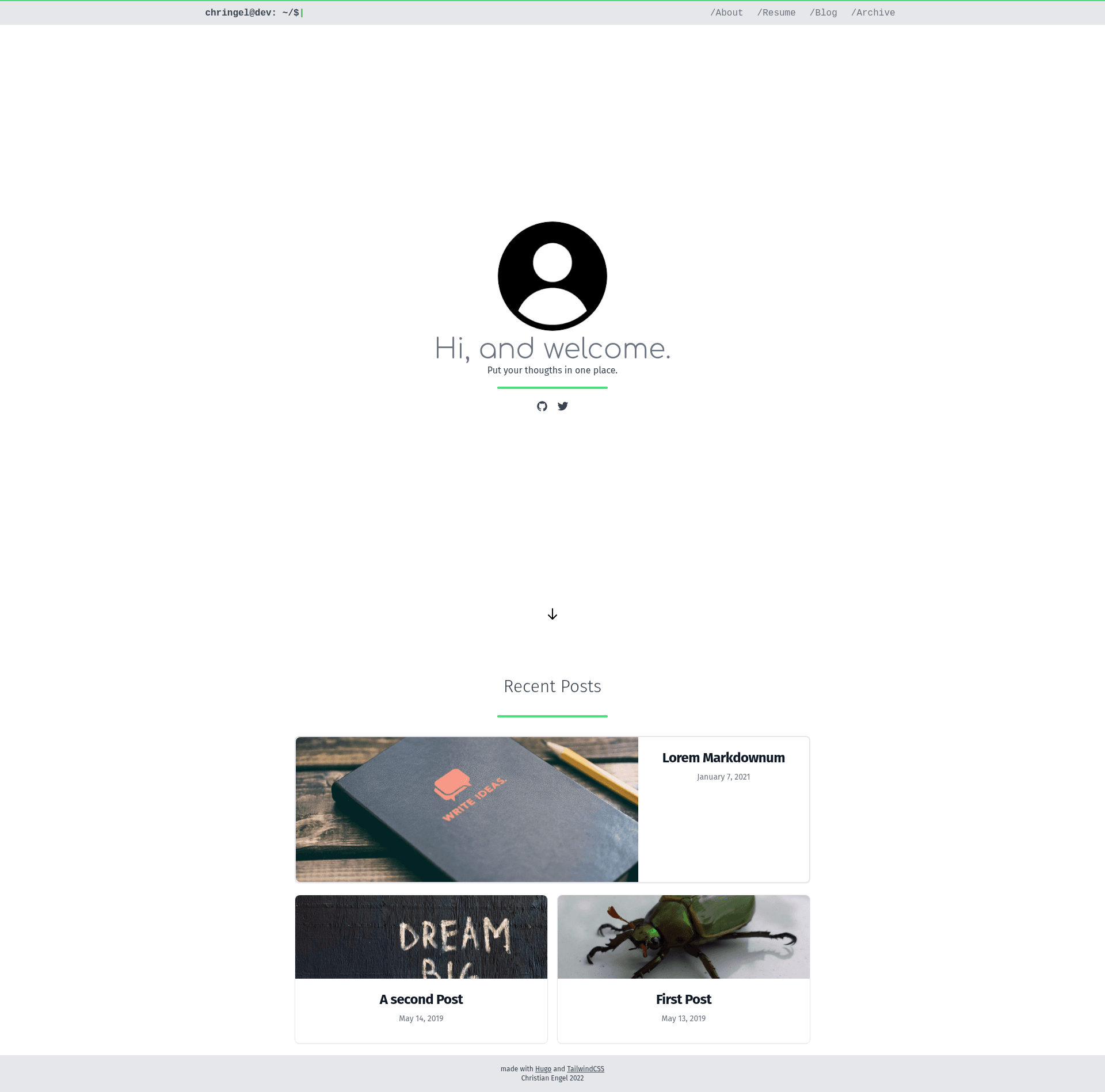
chringel is a theme for Hugo, the static site generator, created by Christian Engel. It takes Markdown content — posts, notes, and resume data — and generates a static blog or personal website with automatic dark mode, syntax highlighting, and social icons. The theme is based on the Hugo Starter Theme with Tailwind CSS and is configured through a single config.toml file.
Key Features
Key features cover privacy, IndieWeb, and developer convenience.
- Automatic dark mode — switches between light and dark based on the visitor's device setting, with no manual toggle required.
- Self-hosted Isso comments — a Disqus-like commenting server you run yourself; configure the endpoint, language, avatar, and author requirements in
config.toml. - Self-hosted umami analytics — a simple, privacy-friendly analytics solution; enable it by setting your website ID and the
umami.jslocation. - SVG social icons via ionicons — ships with Twitter, GitHub, Mastodon, and RSS icons; a shell script lets you download more from the ionicons set.
- Syntax highlighting with copy button — code blocks include a copy function, with Dracula as the default highlight style.
- Deeplinks to headings — blog post headings automatically get anchor links for easy sharing.
- Resume from JSON — build a resume page from a JSON file following the JsonResume schema.
- IndieWeb microformats2 — implements
h-cardandh-entryfor richer personal publishing, plus webmention endpoints via webmention.io.
Who is it for?
This theme suits a range of users who value privacy and self-hosting.
- Privacy-conscious bloggers who want self-hosted comments and analytics without third-party trackers.
- IndieWeb enthusiasts who want to publish notes, posts, and replies with microformats2 and webmentions.
- Hugo developers who want a Tailwind CSS-based theme they can customize; the theme requires Hugo v0.69.0 or later and global
postcss-cliandautoprefixerfor development. - Job seekers who want a resume page generated from a structured JSON file.
What can you do with chringel?
These use cases highlight the theme's practical workflows.
- Privacy-focused publishing: run a fast static blog with Isso comments and umami analytics, both self-hosted, so no data leaves your server except to your own endpoints.
- Publish notes like tweets: use the included archetype to create notes at
content/notes/YYYY/mm/dd/HHMM.mdwithhugo new notes/..., perfect for short status updates. - Build a resume: drop a JSON resume following JsonResume schema into the theme and get a formatted resume page.
- Enable webmentions: plug in your webmention.io URL and endpoint to receive mentions on your posts.
How does chringel work?
To get started, clone the theme into your Hugo site's themes folder and set theme = "chringel-hugo-theme" in your config.toml. For development, run HUGO_THEME_DEVELOPMENT=true hugo server --disableFastRender --buildDrafts --buildFuture; the theme uses Hugo Pipes with PostCSS to compile Tailwind CSS. For production, set writeStats = true under the build section so unused CSS classes are purged.
FAQ
Does chringel include Disqus or Google Analytics?
No. Disqus and Google Analytics are disabled by default to keep the theme privacy-focused. Instead, the theme supports self-hosted Isso for comments and self-hosted umami for analytics, both configured in config.toml.
Is chringel free?
Yes, the theme is open source and available on GitHub at chringel21/chringel-hugo-theme. You can clone it freely and use it in your own Hugo projects.
What Hugo version do I need?
You need Hugo v0.69.0 or higher. The theme also requires postcss-cli and autoprefixer installed globally if you are building the CSS during development.
Does chringel support dark mode?
Yes, the theme automatically switches between light and dark mode based on the device setting of the visitor. There is no manual toggle included.
Can I customize the social icons?
Yes, the theme ships with Twitter, GitHub, Mastodon, and RSS icons using ionicons. A shell script is provided to download additional icons from the ionicons set.