Template details
Devii
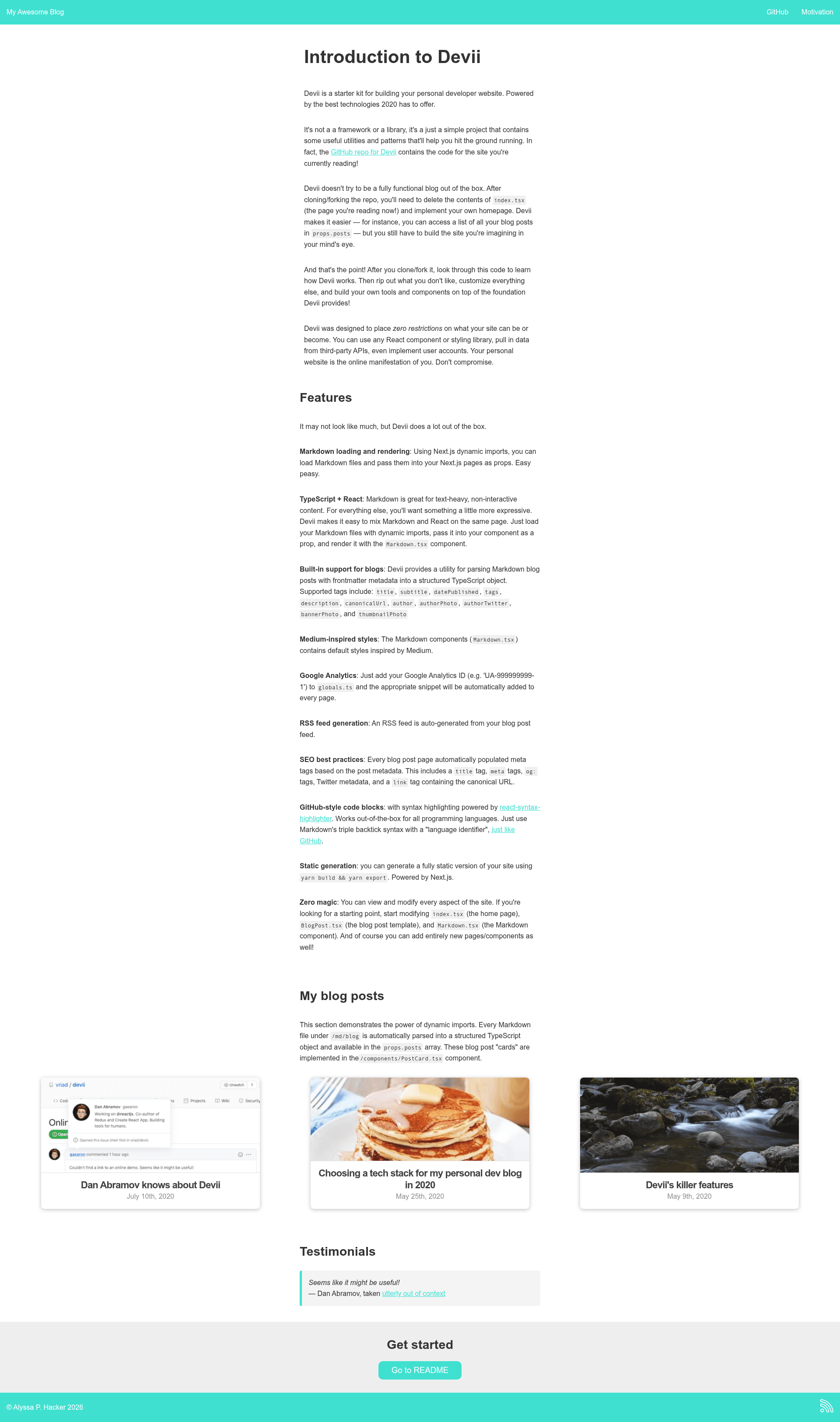
A developer blog starter built on Next.js, React, and TypeScript that generates a static site from Markdown files.
About this template
Devii is a developer blog starter for 2020 built on Next.js, React, and TypeScript that turns Markdown files in a /md/blog directory into a statically exported blog with automatic RSS feed generation and SEO meta tags.
What is Devii?
Devii is an open-source (MIT-licensed) project scaffold that functions as a Markdown-based static-site generator powered by Next.js. It takes Markdown files with optional frontmatter metadata as input and produces a static blog site with typed React components, an RSS feed, and SEO-ready meta tags as output. The repository, created by Colin Hacks, also serves as the code base for the documentation and demo site at devii.dev.
Key Features
- Markdown-based static-site generation — Drop a Markdown file into
/md/blogand it automatically becomes a blog post at/blog/your-filename; no database or CMS is required. - Next.js powered static export — Runs on Next.js, with
yarn buildandyarn exportgenerating a fully static version of the site in theoutdirectory, ready for any static file host. - React + TypeScript pages — Every
.tsxfile in thepagesdirectory becomes a page; the home page (index.tsx) and a dynamic blog template ([blog].md) are included. - GitHub-style syntax highlighting — The
Markdown.tsxcomponent renders triple-backtick code blocks with language tags for all programming languages, using theCode.tsxcomponent. - Automatic RSS generation — An RSS feed is produced from posts that include a
datePublishedfrontmatter timestamp, built with therssandshowdownmodules. - SEO best practices built in — Each post automatically gets a title tag, meta description, Open Graph tags, Twitter metadata, and a canonical URL based on the
urlglobal config. - Frontmatter metadata parsing — The
loadPostutility parses frontmatter into a typedPostDataobject with fields like title, subtitle, description, author, tags, bannerPhoto, and more. - Medium-inspired default styling — The included Markdown renderer ships with Medium-like styles implemented in styled-jsx, and you can replace them with a styling library of your choice.
Who is it for?
- Individual developers who want a self-hosted, Markdown-driven technical blog with minimal setup — fork the repo, add posts, and export a static site.
- Developers who want full control over their site code — because the project exposes all source files, you can rewrite the homepage, styling, and components from scratch.
- Teams prototyping a content site — useful as a starting point for any React + TypeScript project that needs Markdown content rendering and static generation.
- Developers who prefer writing in Markdown — posts are plain
.mdfiles with frontmatter, so you can author content in any editor and manage it with Git.
What can you do with Devii?
- Publish blog posts: Create a new Markdown file in
/md/blogwith a frontmatter block and content, and it becomes a route on your site. - Add custom React pages: Drop an
about.tsxfile intopagesto create a new static page alongside the blog. - Generate an RSS feed and SEO tags: Configure the global settings in
globals.ts(siteName, url, twitterHandle, etc.) and the feed and meta tags are generated from the post metadata. - Integrate Google Analytics: Add your Analytics ID to
globals.ts, and Devii automatically includes the tracking snippet viapages/_app.ts. - Style with any library: Use styled-jsx or bring emotion or another npm package; Devii is unopinionated about styling, so the default Markdown styles can be reimplemented as needed.
How does Devii work?
Fork the repository, run yarn to install dependencies, then start a development server with yarn dev. Writing a Markdown file under md/blog makes it available at http://localhost:3000/blog/[filename]. During the Next.js build step, the getStaticProps function on the home page calls loadBlogPosts from loader.ts, which reads every Markdown file in the directory, parses its frontmatter, and returns an array of PostData objects. Exporting with yarn export compiles the site into static assets in the out directory.
Pros and cons
- Pros: No database or CMS needed; full source code is visible and modifiable; built-in RSS and SEO; static export works on any hosting service.
- Cons: The homepage is intentionally left minimal, so you must implement your own homepage and site identity from scratch; RSS generation only works for posts that include a
datePublishedtimestamp.
FAQ
Is Devii free?
Yes. Devii is open-source and distributed under the MIT license, as shown in the repository's license badge.
How do I create a new blog post?
Add a Markdown file to the /md/blog directory. Include frontmatter metadata (title, datePublished, author, etc.) if you want it to appear correctly in the blog list, RSS feed, and SEO tags. The new post will be available at /blog/your-file-name.
What happens if a post lacks a datePublished field?
The RSS feed generation requires a datePublished timestamp in the frontmatter. Posts without it will still render as blog pages, but they will not be included in the generated RSS feed.
Can I customize the design?
Yes. Devii is unopinionated about styling. The default Medium-inspired styles live in the Markdown.tsx component and can be modified or replaced with any styling library, such as emotion or styled-jsx.
How do I deploy the site?
Run yarn build and yarn export to generate a static version in the out directory. That directory can be hosted on Vercel, Netlify, Firebase Hosting, Amazon S3, or any other static file host.