Template details
Content Ops Starter
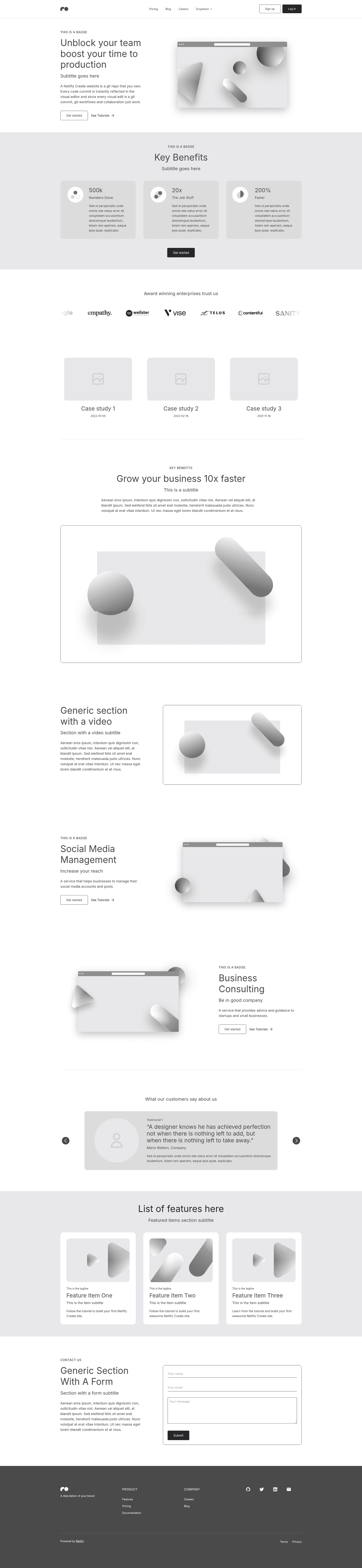
Netlify starter that's made for customization with a flexible content model, component library, visual editing and Git Content Source.
About this template
Content Ops Starter is a Netlify boilerplate for building content-driven Next.js websites with a flexible content model, a component library, Netlify Visual Editor, Git Content Source, and Algolia search.
What is Content Ops Starter?
Content Ops Starter is a Netlify starter template (maintained by Netlify) designed for creating customizable static sites for content-rich projects. It pairs a Next.js frontend with a Git-based content source and a visual editing interface, so you can generate a production-ready site from content stored in GitHub. The template includes a component library and a flexible content model that you can extend to suit different page types, and it comes with Algolia search wired in, ready for your Algolia application credentials.
Key Features
- Next.js framework — Built on Next.js, giving you static site generation, client-side rendering, and a React development workflow.
- Tailwind CSS styling — Uses Tailwind CSS for utility-first styling, making it easy to restyle components using predefined classes.
- Netlify Visual Editor — Integrates with the Netlify Visual Editor through the
@stackbit/cli, letting editors preview and modify content directly. - Git Content Source — Content is pulled from Git, so every change is version-controlled and deploys through the same Netlify pipeline as code changes.
- Algolia search integration — Search is included; after creating an Algolia app and index, set the environment variables
NEXT_PUBLIC_ALGOLIA_APP_ID,NEXT_PUBLIC_ALGOLIA_SEARCH_API_KEY, andNEXT_PUBLIC_ALGOLIA_INDEX_NAMEto enable it. - Flexible content model — A customizable content model gives you a starting structure for blog posts, marketing pages, or documentation.
- Component library — A set of reusable UI components you can compose into pages or replace with your own.
- One-click deploy — The "Deploy to Netlify" button creates a copy of the repository and sets up continuous deployment automatically.
Who is it for?
- Developers building content-heavy sites — Use the starter as a foundation: customize the component library and content model, then add page templates with Next.js.
- Content editors — With Netlify Visual Editor, editors can edit copy, images, and structured content in a live preview without writing code.
- Teams using a Git-based workflow — Content lives in the same repo as code, so reviews, branching, and rollbacks happen through familiar Git processes.
- Agencies building client sites — The combination of visual editing and flexible models makes it easy to hand off content management to clients.
What can you do with Content Ops Starter?
- Launch a blog or news site — Structure articles with the flexible content model, add Algolia search, and let authors work through the Visual Editor.
- Create a SaaS marketing site — Assemble pricing, feature, and landing sections using the component library; the repository is tagged as a SaaS boilerplate.
- Build a documentation portal — Organize Git-backed content and provide searchable documentation through Algolia.
- Prototype a content-backed Next.js app — Quickly scaffold a static site that reads from Git content, then extend it with custom components and API routes.
How does Content Ops Starter work?
Clone the repo, run npm install, and start the Next.js development server with npm run dev. Install the Netlify Visual Editor CLI (@stackbit/cli) and run stackbit dev in a second terminal to open a visual editing URL. For production, run npm run build to generate a static site. To activate search, create an Algolia app and index and set the relevant environment variables in Netlify.
FAQ
How do I deploy Content Ops Starter to Netlify?
Click the "Deploy to Netlify" button on the repository README. It creates a new repository for you and sets it up for continuous deployment on Netlify automatically.
How do I set up Algolia search?
Create an Algolia account, create an application and an index, then set the three environment variables NEXT_PUBLIC_ALGOLIA_APP_ID, NEXT_PUBLIC_ALGOLIA_SEARCH_API_KEY, and NEXT_PUBLIC_ALGOLIA_INDEX_NAME in your Netlify site configuration.
How do I edit content with the Visual Editor?
Install the @stackbit/cli globally, run stackbit dev in the project directory, and open the URL it outputs to access Netlify Visual Editor for your project. You can edit content fields with a live preview.
What technologies does Content Ops Starter use?
It uses Next.js as the React framework, Tailwind CSS for styling, and Algolia for search. It also integrates with the Netlify Visual Editor and Git Content Source.