Template details
Cookie
Jekyll and Tailwind CSS landing page template with an integrated blog, Soopr integration, and one-click Netlify deploy.
About this template
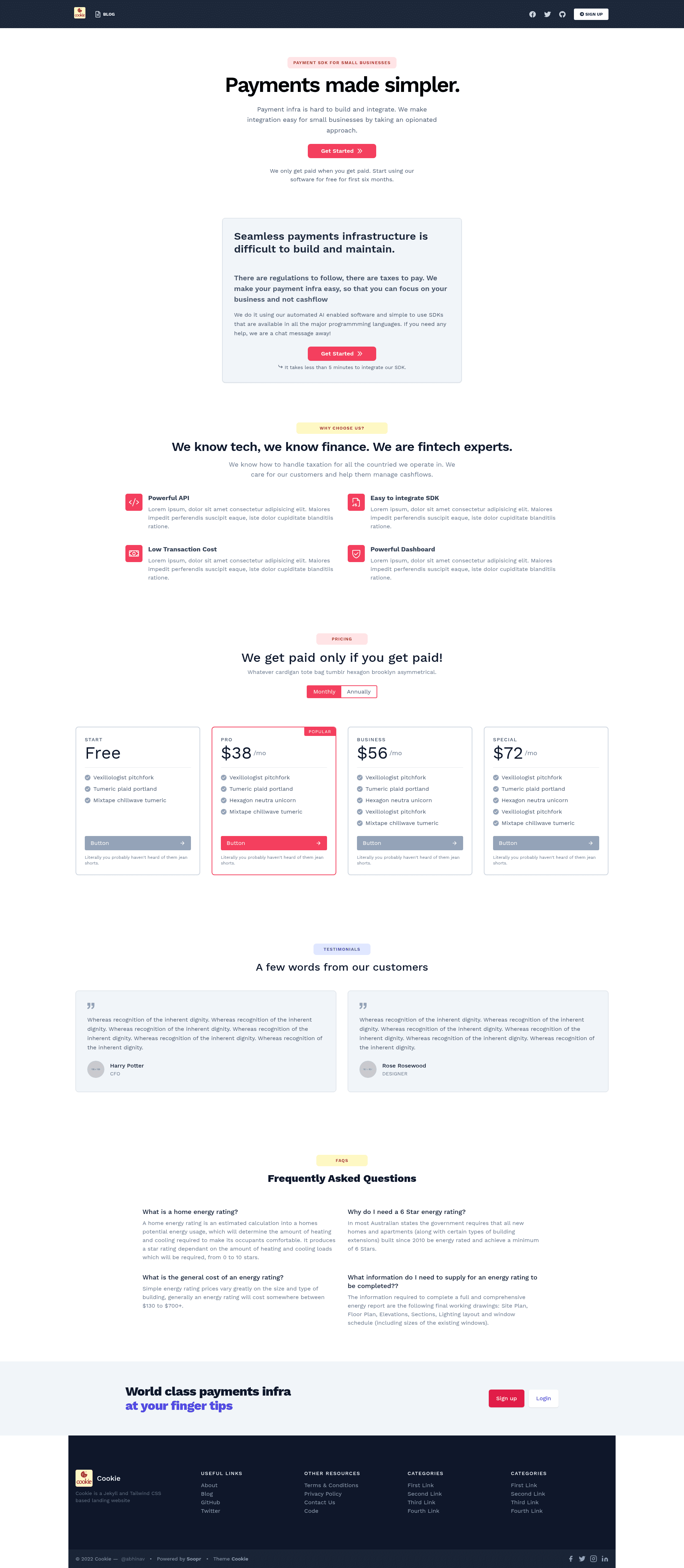
Cookie is a Jekyll and Tailwind CSS landing page template with an integrated blog, built for fast one-click deployment on Netlify. It turns markdown content and a _config.yml file into a responsive static website containing a landing page, additional pages, and a blog, with no server-side processing at runtime.
What is Cookie?
Cookie is a static landing website template built with Jekyll and Tailwind CSS. It takes markdown content and configuration files as input and generates a responsive landing page, additional pages (about, terms of service, privacy policy), and a blog as static HTML output. The template is created by Abhinav Saxena and distributed on GitHub under the MIT License. Production output is plain HTML, so the site loads quickly without server-side processing.
Key Features
- Tailwind CSS 3.0 — The template uses Tailwind 3.0 for styling, with Tailwind Typography included for blog formatting and code syntax highlighting.
- Responsive landing page — A mobile-friendly landing page is included as the home page, customizable by editing
index.html. - Integrated blog — Write blog posts in markdown in the
_postsdirectory; the blog is a regular Jekyll blog with RSS feed support via Jekyll Feed. - SEO optimization — Jekyll SEO Tag is integrated to generate meta tags and structured data for search engines.
- Soopr integration — After adding a free publish token from Soopr to
_config.yml, each page gets a short URL, like button, and auto-generated social media share images. - One-click Netlify deploy — Use the provided Deploy with Netlify button to launch the site instantly; deployment also works on Vercel, AWS, and other static hosts.
- Additional pages — Includes about us, terms of service, and privacy policy pages, stored in the
_pagesdirectory; more pages can be added. - Font Awesome icons — Font Awesome is integrated, so icons can be added directly in HTML files.
Who is it for?
- Startup founders — Launch a polished landing page and product blog in under an hour without writing frontend code.
- Indie hackers — Quickly spin up a marketing site for a side project, then deploy free on Netlify or Vercel.
- Developers who know Jekyll — Customize the Jekyll layout, write posts in markdown, and hook the "Work with Us" form to a real backend.
- Content marketers — Use Soopr-powered short URLs and auto-generated share images to promote blog posts on social media.
What can you do with Cookie?
- Ship a pre-launch page: Publish a responsive landing page with a "Work with Us" signup form, then replace the form action with your own backend.
- Maintain a product blog: Write markdown posts that automatically appear on the blog with syntax highlighting and RSS feed.
- Customize branding: Replace content in
index.html, add favicons in thecustom-head.htmlinclude, and swap image assets inassets/img. - Measure content performance: Use Soopr's built-in website analytics to see how your landing page and blog posts are performing.
How does Cookie work?
- Fork the repository on GitHub.
- Run
bin/bootstrapto set up the project locally. - Use
bin/startto launch a development server at http://127.0.0.1:4061. - Customize
index.html,_config.yml, and add blog posts in_posts. - Deploy with one click to Netlify, or use any static host.
Pricing
Cookie is free and open source under the MIT License. There are no paid tiers or subscriptions for the template itself.
FAQ
Is Cookie free?
Yes, Cookie is open source under the MIT License, so you can use it for personal and commercial projects without paying. You still need to host the site yourself; Netlify and Vercel offer free tiers for static sites.
How do I deploy Cookie?
You can use the Deploy with Netlify button in the README to deploy the repository as-is, or push your customized repo to GitHub and connect it to Netlify or Vercel. The site builds as static HTML, so deployment is straightforward.
Does Cookie include a blog?
Yes, Cookie includes an integrated Jekyll blog. You write posts in markdown inside the _posts directory, and the template applies Tailwind Typography for formatting and code syntax highlighting, plus RSS feed support via Jekyll Feed.
Can I customize the landing page?
Yes. The landing page is index.html in the root directory. You can edit its content directly, add Font Awesome icons, and change the styling using Tailwind CSS utility classes. Other pages like terms of service and privacy policy are in the _pages directory.
What is Soopr and do I need it?
Soopr is a content marketing tool that adds share and like buttons, URL shorteners, and website analytics to your pages. Cookie integrates with Soopr, but it is optional. If you do not add a publish token to _config.yml, the rest of the template still works normally.