Template details
Dot-Org
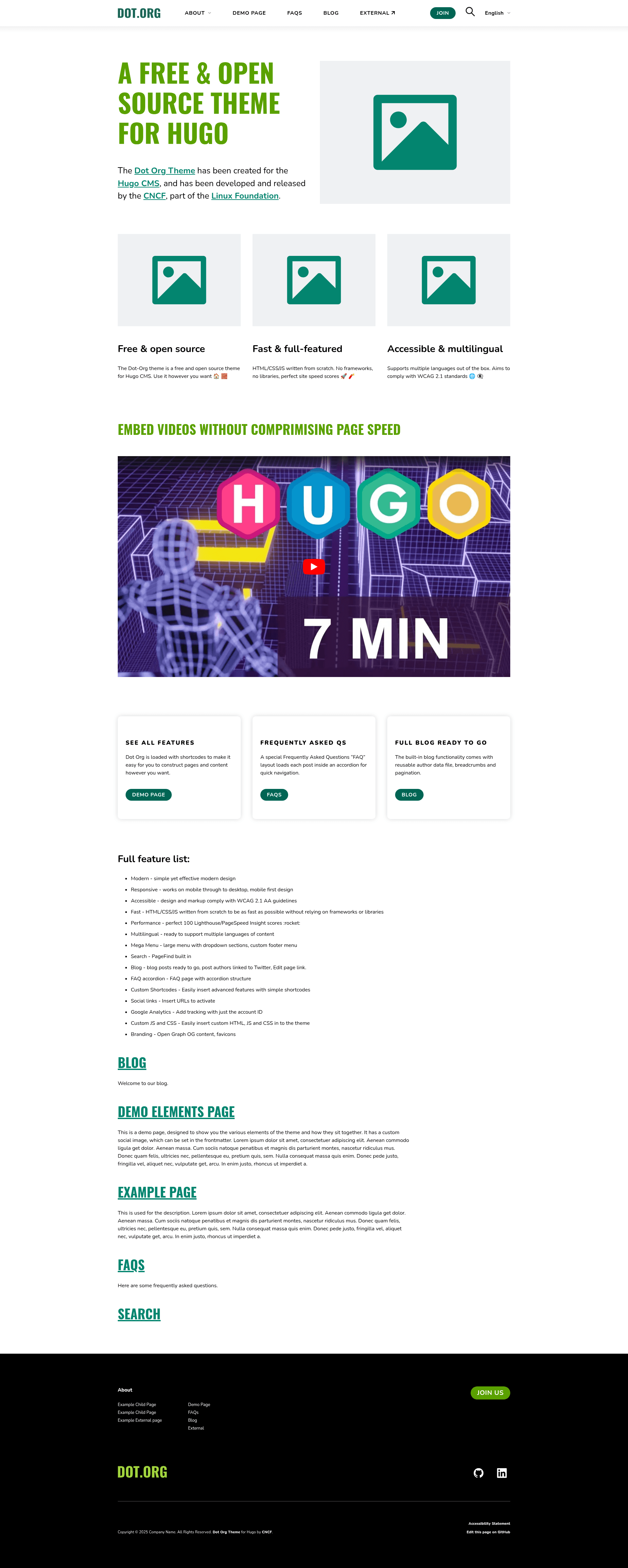
Modern, accessible Hugo theme for small organizations — multilingual, PageFind search, mega menu, FAQ accordion, and custom shortcodes.
About this template
Dot-Org is a modern, accessible Hugo theme for small organization websites, built for the TODO Group and open sourced under the CNCF.
What is the Dot-Org theme for Hugo?
Dot-Org is a Hugo static site theme that turns markdown content into a complete organizational website with a mega menu, FAQ accordion, and built-in search. It runs on the Hugo static site generator, requires Node.js and npm for building assets, and outputs plain HTML, CSS, and JavaScript with no frontend framework dependencies.
Key Features
The theme packs performance, accessibility, and content flexibility into a single Hugo package. Its standout capabilities include:
- From-scratch performance — HTML, CSS, and JS are written from scratch without frameworks or libraries, keeping the theme fast and dependency-light.
- WCAG 2.1 AA accessibility — design and markup comply with WCAG 2.1 AA guidelines, covering contrast, keyboard navigation, and semantic structure.
- Multilingual content — the theme is ready to support multiple languages using Hugo's internationalization system.
- PageFind search — a search.html page is included, and the Pagefind index is generated by running
npx -y pagefind --site publicafter each build. - Mega menu and FAQ accordion — the theme ships with a large dropdown menu for grouped links and an accordion component for FAQ sections.
- Thirteen custom shortcodes — includes button, cards, columns, current_year, iframe, img, intro, linebreak, responsive_table, search_form, spacer, toc, and youtube_enhanced shortcodes for styling markdown content.
- Front matter controls — per-page options like
showHeader: falseandnoindex: truelet you hide page headers or exclude pages from search engine indexing.
Who is it for?
Dot-Org targets small organizations, open source projects, and communities that need a clean, fast, accessible website without heavy JavaScript. It is used by open source projects like OWASP CRS and ModSecurity, plus nonprofits and communities such as Hardware City and the Northeast Collegiate Cyber Defense League. Developers can start quickly using the exampleSite configuration, while content editors work with markdown files and simple shortcodes.
What can you do with the Dot-Org theme for Hugo?
The theme's building blocks support a range of organization-site tasks. Typical uses include:
- Open source projects: launch a project site with documentation and blog pages, as seen on OWASP CRS and ModSecurity.
- Small nonprofits and communities: create a multilingual organization site with an FAQ section and mega menu, like the TODO Group and Hardware City.
- Developer advocacy and events: embed privacy-friendly YouTube videos with the
youtube_enhancedshortcode and highlight upcoming talks using cards. - Tech documentation hubs: use the table of contents shortcode and responsive table wrapper to publish readable docs on any device.
How does the Dot-Org theme for Hugo work?
The theme installs via git clone or submodule and requires copying a few config files before running npm commands. After cloning the repo into themes/, copy package.json, postcss.config.js, and the exampleSite config directory to your project root, then run npm install. Use npm run start for local development, npm run build for production builds, and re-run the Pagefind index command whenever content changes.
Showcase
Nine production sites already use the Dot-Org theme, spanning open source security and local tech communities. The README lists TODO Group, DeepCausality, ModSecurity, Northeast Collegiate Cyber Defense League, OWASP CRS, Hardware City, k8up, FodyDev, and Millennium IT as public adopters.