Template details
cState
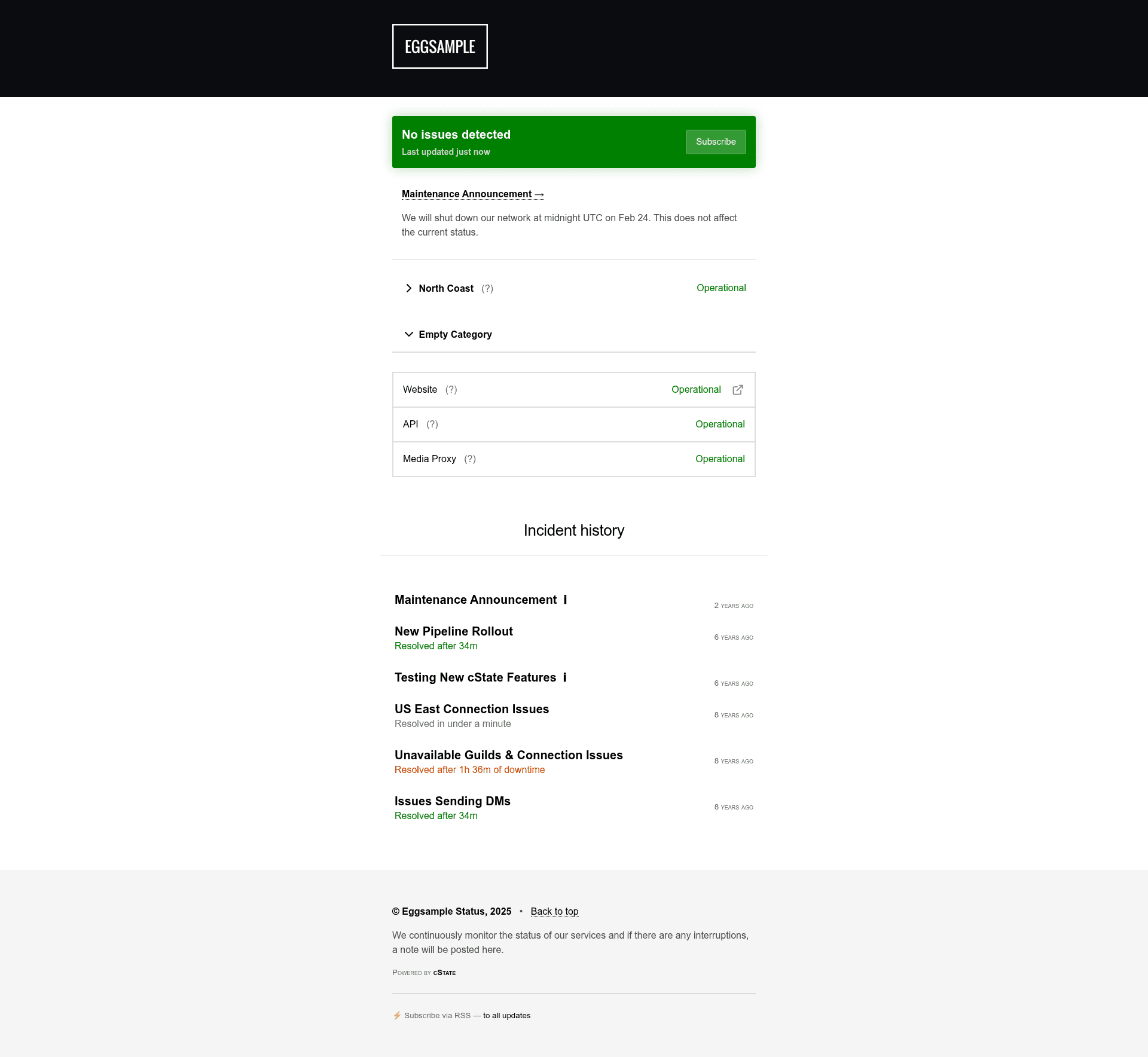
Open source static serverless status page built with Hugo, featuring Netlify CMS, a read-only API, badges, and IE8+ browser support.
About this template
cState is an open-source, serverless status page template built on the Hugo static site generator that turns a Git repository of Markdown incident files into a fast, customizable status page.
What is cState?
cState is a Hugo theme and starter-site template for publishing a status page from a plain Git repository. Its input is a set of Markdown files in the content/issues directory with front matter fields such as title, date, resolved, severity, and affected systems; its output is a fully static HTML site with incident history, system status indicators, an RSS feed, and a read-only JSON API at the site index. The template runs on Hugo, has no mandatory JavaScript or CSS dependencies, and works in browsers as old as Internet Explorer 8. cState is maintained by Mantas Vilčinskas and released under the MIT license.
Key Features
- Speed — Hugo and Google's Go language build a site with thousands of entries in seconds; the generated pages use minimal JS and no CSS framework.
- Netlify CMS included — A preloaded admin panel lets non-technical users create incidents without touching code; Forestry.io is also supported.
- Read-only API and RSS — Incident data is exposed via an index.json feed for custom integrations, and RSS feeds are built in.
- Badges and embeds — Built-in shields.io-style badges show current status, and a companion HTML embed project adds a dot indicator or alert widget to external sites.
- Auto dark mode — The design automatically switches to dark mode based on the visitor's preference, with all main settings in a single config.yml file.
- Multi-language support — Built-in translations for English, German, French, Italian, Lithuanian, Macedonian, Dutch, Portuguese, Turkish, and Tagalog.
- Incident categories and severity — Incidents can be linked to specific systems, assigned three severity levels (notice, disrupted, down), and show resolution time data.
- Flexible deployment — One-click deploy to Netlify, plus support for Cloudflare Pages, GitHub Pages, GitLab Pages, Vercel, render.com, Docker, and manual hosting.
Who is it for?
- DevOps and SRE teams — Record incidents and communicate downtime to users with a self-hosted, free status page.
- SaaS startups — Publish a branded status page on their own domain without paying for hosted status services.
- Open-source maintainers — Show uptime for project services; live examples include Chocolatey, sr.ht, and Testing Farm.
- Teams that want no-code updates — Set up Netlify CMS so customer support staff can log incidents from a browser.
What can you do with cState?
- DevOps engineers: Create incident entries as Markdown with front matter, and cState automatically recalculates the overall status and affected systems.
- Project maintainers: Embed a status indicator or alert banner on a docs site using the official HTML embed project.
- Cost-conscious teams: Deploy a free status page to Netlify in a few clicks and update it through the CMS or Git commits.
- Translators: Add new languages to the status page using the existing i18n translation system.
How does cState work?
Clone the example repository, edit the config.yml file, and add incident files under content/issues. Deploy to a static host with build command hugo and publish directory public. When you push a new incident file or use Netlify CMS, the host rebuilds the site automatically.
Pricing
cState is free and open-source under the MIT license. There are no paid plans; the only potential cost is hosting, and platforms like Netlify offer a free tier.
FAQ
Is cState free?
Yes, cState is open-source under the MIT license. You can self-host it at no cost, and static hosts like Netlify, GitHub Pages, and Cloudflare Pages offer free hosting tiers.
Can cState monitor my services automatically?
No, cState does not include automatic uptime monitoring out of the box. It is an informational hub for recording incidents. You can connect external monitoring tools to update the status page programmatically.
How do I create an incident in cState?
Create a Markdown file in the content/issues directory with front matter fields: title, date, resolved, severity, and affected systems. Alternatively, use Netlify CMS or Forestry to create incidents through a web interface.
Which deployment platforms are supported?
cState works with Netlify (with one-click deploy), Cloudflare Pages, GitHub Pages, GitLab Pages, Vercel, render.com, and any static host. It also ships a Dockerfile for self-hosting.