Template details
DEV API + Netlify Functions Starter Site
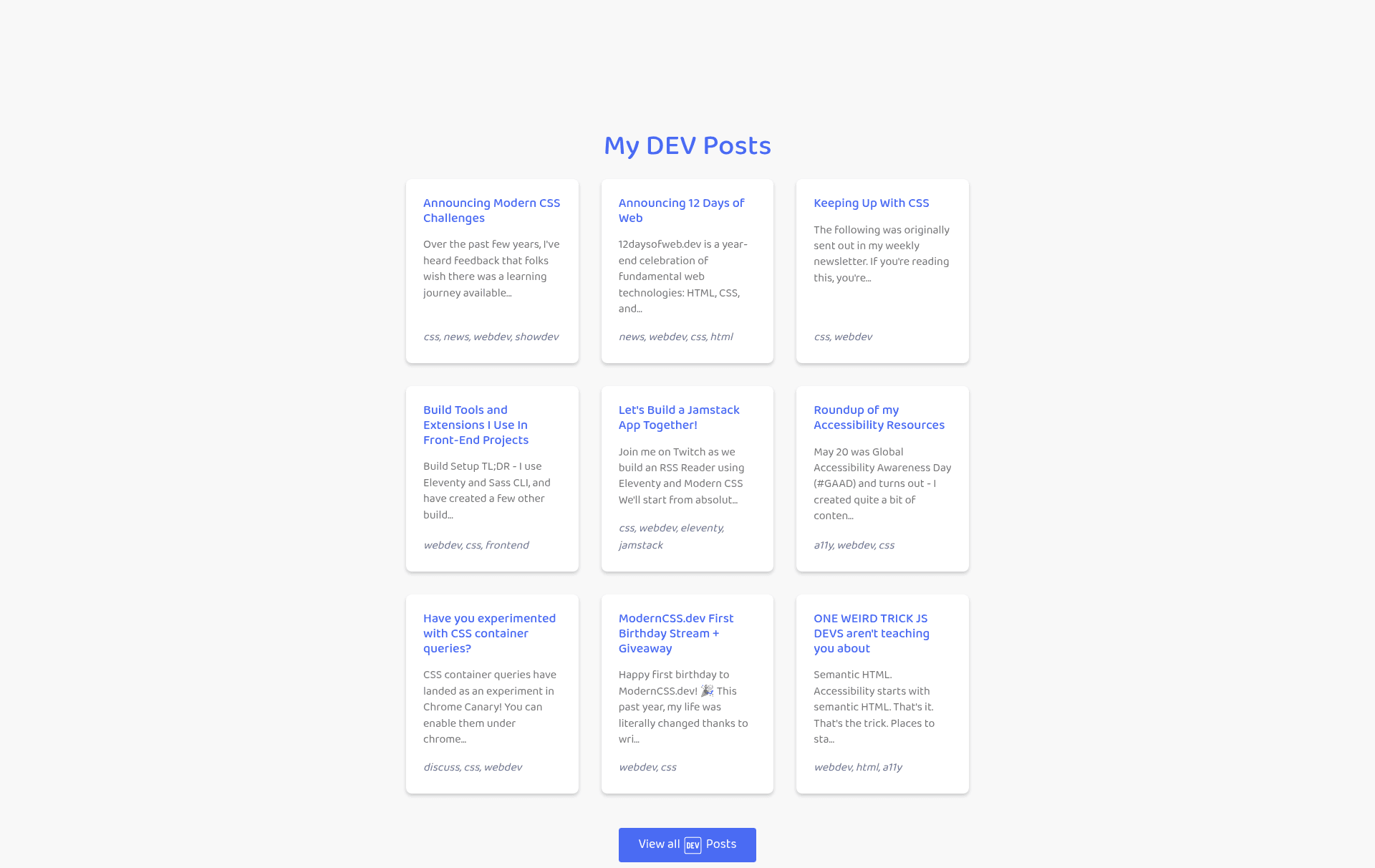
HTML/Sass starter site that fetches DEV posts via a Netlify function, with node-sass, Browsersync, and minified autoprefixed builds.
About this template
DEV API + Netlify Functions Starter Site is a minimal HTML/Sass boilerplate that retrieves your published DEV.to articles through a Netlify Function and renders them as a styled post list on a static site. It ships with node-sass for styling, Browsersync for hot reloading, and a production build that minifies and autoprefixes CSS.
What is the DEV API + Netlify Functions Starter Site?
The DEV API + Netlify Functions Starter Site is a skeleton project that combines a plain HTML/Sass front end with a Netlify function to pull your published DEV posts from the DEV API. Inputs are a DEV API key and a Netlify account; outputs are a deployable static site and a JSON endpoint at [yoursite.com]/.netlify/functions/devto that returns your latest posts. The template includes a netlify.toml that preloads Netlify build settings, and the repository metadata lists six stars.
Key Features
- Netlify Function endpoint —
functions/devto.jsfetches published articles and exposes them at/.netlify/functions/devto; theper_pagevalue can be set up to 1000. - Node-sass build pipeline — Styles are compiled with node-sass and the production script
npm run buildproduces minified, autoprefixed CSS. - Browsersync hot reloading —
npm run developstarts a local server at localhost:1337 with live reload for rapid iteration. - Pre-configured Netlify deployment — The included
netlify.tomlfills in build settings, and you only need to add theDEVTOenvironment variable containing your DEV API key. - Customizable post rendering — The
createPostListfunction injs/posts.jscontrols the list markup, and the API field map insidefunctions/devto.jsdetermines which values appear. - Local data mocking — You can copy the live API JSON into
js/postdata.jsonto develop and style offline without hitting the API on every change. - Flexible page structure — Add or remove HTML pages and images; any page with a
.postselement and thejs/posts.jsscript will display the post list.
Who is it for?
This starter is aimed at DEV.to authors who want an auto-updating index of their articles on a custom domain without maintaining the HTML by hand. It also suits developers learning Netlify Functions who want a compact, working example of a serverless function consuming an external API. Static-site hobbyists who prefer a dependency-light HTML/Sass setup over a full framework will find the plain structure approachable.
What can you do with the template?
- Publish a personal DEV posts directory: Deploy to Netlify and get a continuously updated list of your DEV articles, with pagination controlled by
per_page. - Create a personal API: Use the
/.netlify/functions/devtoendpoint to feed your post data into other applications or dashboards. - Practice styling and build tooling: Experiment with node-sass, autoprefixing, and Browsersync in a minimal project that separates function code from presentation.
How does the template work?
- Click "Use this template" on the GitHub repository to copy it to your own account.
- Generate a DEV API key from your DEV account settings.
- Create a new Netlify site from the repo; the build settings are loaded from
netlify.toml. - In Netlify's advanced build settings, add the environment variable
DEVTOwith your API key as its value. - Trigger a manual deploy; the function is then available at
/.netlify/functions/devtoand the site builds successfully.
FAQ
Do I need a DEV account to use this template?
Yes. The template requires a DEV profile with at least one published post and a DEV API key to authenticate requests to the DEV API.
How do I change the number of posts displayed?
Edit the per_page value inside the $apiRoot variable in functions/devto.js. The DEV API permits values up to 1000.
Can I run the site locally?
Yes. Use npm run develop to serve with hot reload at localhost:1337, or npm run build followed by npm run serve to serve the latest production files.
What is the DEVTO environment variable for?
It holds your DEV API key and is used by the Netlify Function to authenticate when fetching your published posts.