Template details
Saucebase
Laravel SaaS starter kit with Vue or React, TypeScript, Inertia.js, Tailwind, and shadcn - built for rapid SaaS development
About this template
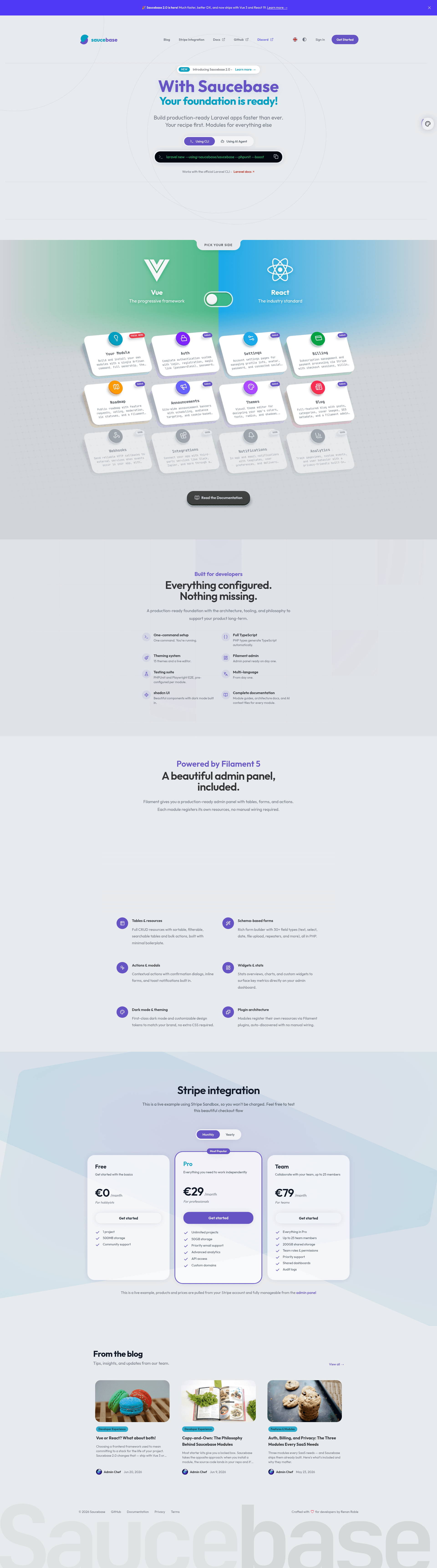
Saucebase is a modular, open-source Laravel SaaS starter kit that pairs a Laravel 13 backend with Inertia.js 3.0 and your choice of Vue 3.5 or React 19, giving you prebuilt auth, billing, blog, and roadmap modules to ship a SaaS product without writing boilerplate.
What is Saucebase?
Saucebase is a modular Laravel SaaS starter kit for the modern web, maintained by the Saucebase development team and released under the MIT license. It takes a Laravel 13 application and layers on Inertia.js 3.0, Tailwind CSS 4.3, TypeScript 6.0, and either a Vue 3.5 or React 19 frontend, then extends it with individual Composer modules for auth, settings, billing, announcements, roadmap, themes, and blog. The repository describes its stack as Vue or React, TypeScript, Inertia.js, Tailwind, and shadcn, with the frontend UI built around Tailwind and shadcn-style components. The result is a production-ready foundation: you choose the frontend and modules during install, and get a codebase you can build on immediately.
Key Features
- Modular architecture — every capability (auth, settings, billing, announcements, roadmap, themes, blog) is an independent Composer package; install only what your SaaS needs.
- CLI installer — running
curl -fsSL https://install.saucebase.dev | bashlaunches a script that installs PHP/Composer if required, then interactively guides you through frontend framework selection and module installation. - Dual frontend support — choose Vue 3.5 or React 19 as your Inertia.js frontend; TypeScript 6.0 and Tailwind CSS 4.3 are configured out of the box.
- Auth module — includes authentication, social login, email verification, and admin impersonation, so user identity is handled from day one.
- Billing module — implements subscriptions, checkout sessions, and payment processing, removing the need to build a billing backend yourself.
- Blog module — ships a public blog with categories, cover images, scheduled publishing, and SEO support.
- Themes module — provides a visual theme editor to design and bake your application's look and feel without editing stylesheets directly.
- Testing support — Playwright 1.60 is wired in for browser tests, and the separate
saucebase/laravel-playwrightpackage is maintained to make end-to-end testing easier.
Who is it for?
Saucebase is built for developers and small teams who want a modern Laravel SaaS foundation without assembling the pieces themselves. Solo founders can launch an MVP by installing the auth and billing modules and skipping blog and roadmap until later. Laravel developers get a well-structured codebase with module boundaries, TypeScript, and Inertia already integrated, so they can focus on domain logic. Product teams can use the roadmap module to collect feature requests and the announcements module to schedule site-wide banners. Agencies can hand off custom-branded apps by using the themes module to change the visual identity quickly.
Use cases
- SaaS startups: combine auth, settings, and billing to get a subscription product running, then add the blog module for content marketing.
- Community-driven products: activate the roadmap module so users can submit and vote on feature requests, and use announcements to notify them of new releases.
- Founders who want custom branding: open the themes editor to design colors and typography visually before baking the theme into the app.
How does Saucebase work?
Installation is a single command: curl -fsSL https://install.saucebase.dev | bash. The CLI script installs PHP/Composer if they are missing, then prompts you to choose a frontend framework (Vue 3.5 or React 19) and select which modules to include. After installation, you have a working Laravel 13 + Inertia.js + TypeScript codebase with only the modules you requested, and you can add more packages later from the official module list.
Pricing
Saucebase is free and open-source under the MIT license, so you can use, modify, and distribute it without licensing fees. There are no paid tiers advertised on the page; the project is funded through community contributions and sponsorships.
FAQ
Is Saucebase free?
Yes. The Saucebase repository is licensed under the MIT license, which permits free use, modification, and distribution, including for commercial SaaS products.
What frontend frameworks does Saucebase support?
Saucebase works with both Vue 3.5 and React 19 through Inertia.js 3.0. The installer lets you pick your preferred framework, and TypeScript 6.0 plus Tailwind CSS 4.3 are preconfigured either way.
How do I install Saucebase?
Run the recommended command curl -fsSL https://install.saucebase.dev | bash. The CLI installs PHP/Composer if needed, then walks you through choosing a frontend framework and installing your first modules.
What modules are included in Saucebase?
The official modules are auth (authentication, social login, email verification, admin impersonation), settings (profile, avatars, passwords), billing (subscriptions, checkout, payments), announcements (scheduled banners), roadmap (feature requests and voting), themes (visual theme editor), and blog (categories, covers, scheduling, SEO).
Does Saucebase have a demo?
Yes. You can try the live online demo at https://demo.saucebase.dev/ to see Saucebase in action before installing it.