Template details
DevFinder
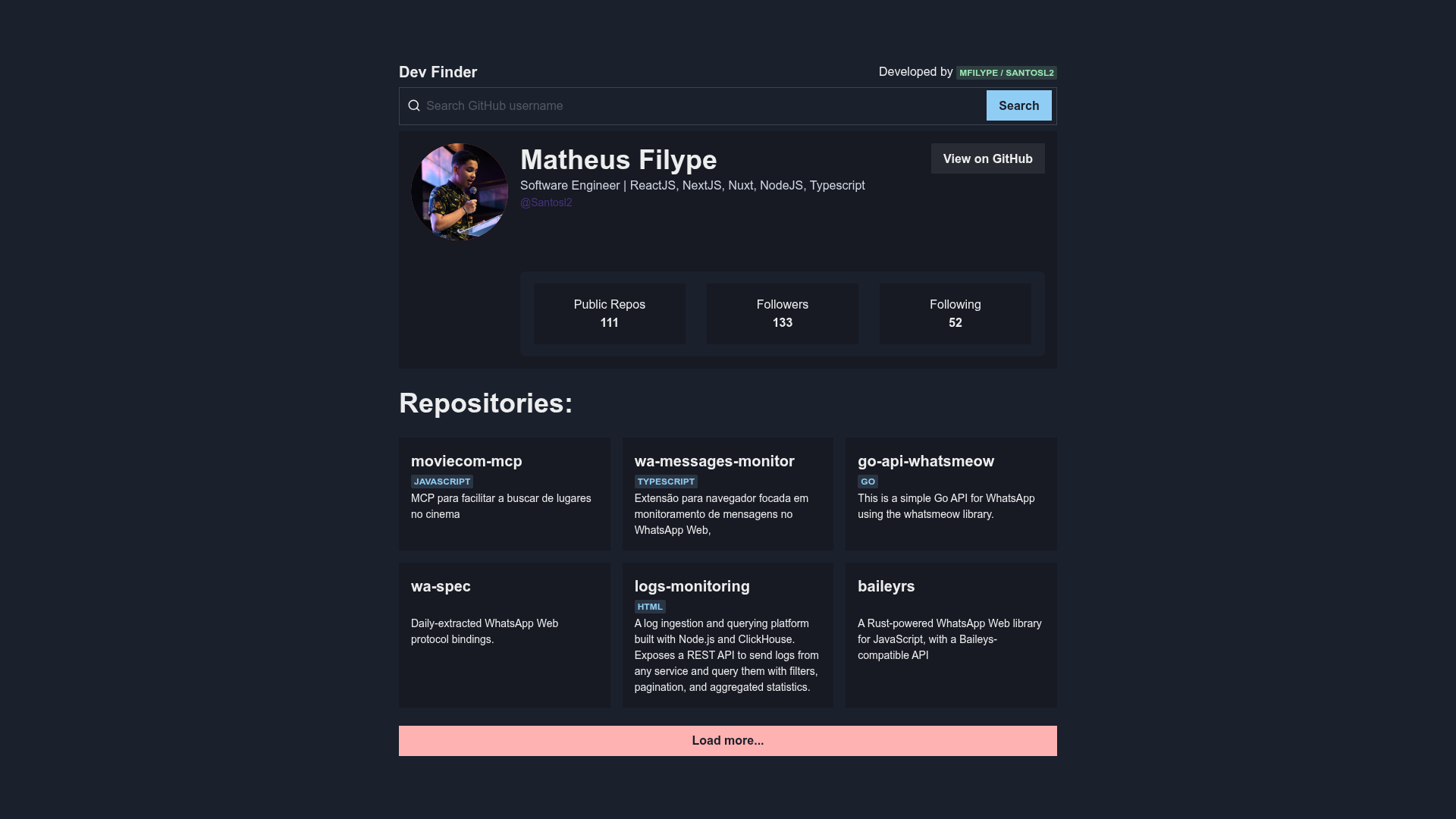
A small website to search GitHub user profiles, built with Chakra UI, Next JS, React Query, and Redux Toolkit.
About this template
DevFinder is a boilerplate project for a GitHub profile search website that uses the GitHub API, Next.js, and Chakra UI to let a user type a username and see the matching profile. It was developed by Matheus Filype and is published as a public GitHub repository with 9 stars at the time of writing.
What is DevFinder?
DevFinder is a small web application for searching GitHub user profiles. It takes a GitHub username as input, queries the GitHub API using Axios, and displays the returned profile data in a Chakra UI interface. The application is built on Next.js, runs in the browser, and can be started locally with a development server. The project's README documents that it was created by Matheus Filype and includes instructions for installing dependencies and running the app.
Key Features
- Next.js framework — The app is built on Next.js, giving you React with server-side rendering and file-based routing out of the box.
- React Query data fetching — React Query is used for managing server-state in the app, including caching and re-fetching of GitHub API requests.
- Redux Toolkit state management — Redux and Redux Toolkit manage client-side state, providing a structured global store.
- Chakra UI styling — The interface is styled with Chakra UI, a component library that supplies accessible, themeable React components.
- Axios HTTP client — Axios makes the HTTP requests to the GitHub API and handles error checks.
- Atomic Design structure — Components are organized following Atomic Design principles, separating atoms, molecules, organisms, templates, and pages.
- GitHub API integration — The app directly consumes the GitHub API to search for profiles, so it returns real-time public data from GitHub.
Who is it for?
DevFinder is aimed at front-end developers who want a working example of combining Next.js, React Query, Redux Toolkit, and Chakra UI in one project. It's also useful for developers learning how to integrate a third-party REST API like GitHub's into a React application, and for anyone who wants a starting point for a GitHub-profile lookup tool.
What can you do with DevFinder?
- Front-end developers: study a setup that combines Next.js, React Query, Redux Toolkit, and Chakra UI to fetch and display data from the GitHub API.
- Learners of state management: see a concrete implementation of Redux Toolkit slices and React Query hooks working together in a small app.
- Hobbyist developers: use the project as a base to build a more feature-rich GitHub search tool, adding bookmarking, follower graphs, or extended user details.
How does DevFinder work?
To run it locally, clone the repository, run yarn or npm install to install dependencies, and then run yarn dev to start the development server. The application will be available at https://localhost:3000. Once running, you enter a GitHub username in the UI and the app fetches that user's profile data from the GitHub API.
FAQ
Is DevFinder free?
Yes, DevFinder is a public GitHub repository, so the code is freely available to view and use. The README shows no commercial license restrictions, and it was created as an open-source project by Matheus Filype.
What does DevFinder do?
DevFinder is a website for searching GitHub user profiles. When you submit a GitHub username, it calls the GitHub API and presents the returned profile information in a Chakra UI interface.
Which technologies does DevFinder use?
The project is built with React JS, Next JS, React Query, Redux, Redux Toolkit, Chakra UI, and Axios, and it follows the Atomic Design methodology for component organization.