Template details
Freshman21
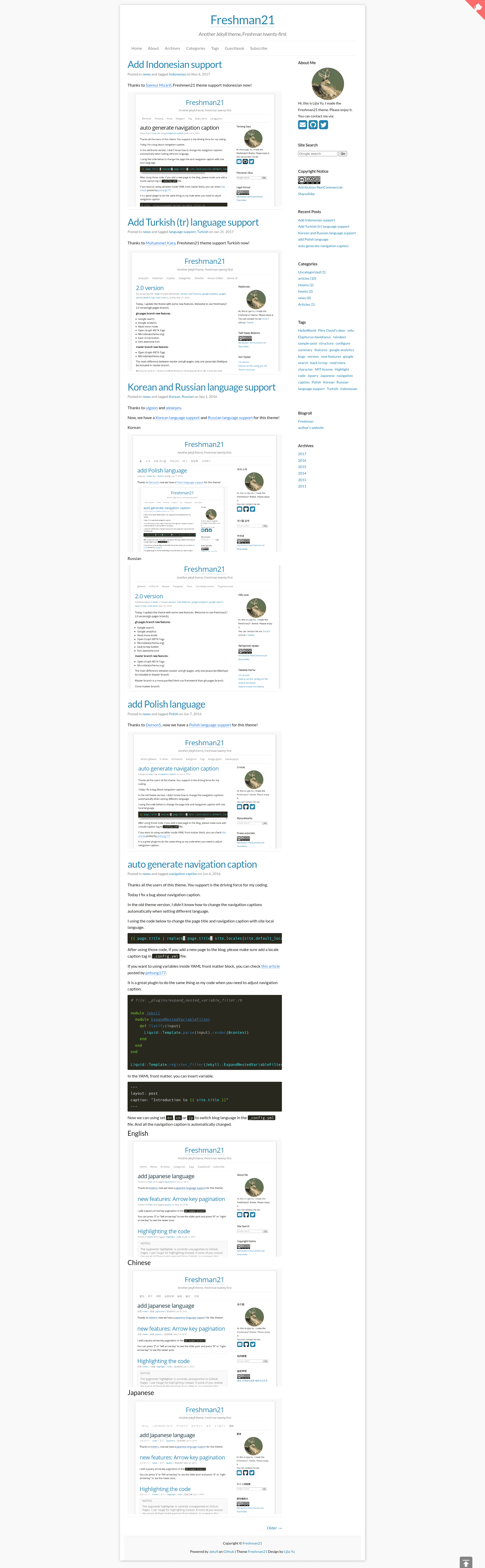
A free Jekyll blog theme with single/two-column layouts, Disqus comments, LaTeX support, and 8 language translations.
About this template
Freshman21 is a free Jekyll blog theme that supports both single-column and two-column layouts, built as a tribute to WordPress themes Twenty-Twelve and Twenty-Eleven. It originated as an enhancement of the Freshman theme and is publicly maintained on GitHub by yulijia, with 133 stars at the time of writing.
What is Freshman21?
Freshman21 is a Jekyll theme designed for static blogs, taking Markdown posts and front matter as input and generating a complete static website as output. It runs on Jekyll, the Ruby-based static site generator, and requires only a Ruby environment with the jekyll and sass gems. The theme is distributed as a GitHub repository and is a tribute to WordPress themes Twenty-Twelve and Twenty-Eleven.
Key Features
- Single and two-column layouts — Switch between a single-column focus for long-form writing and a two-column layout with sidebar; the layout is controlled through the configuration file.
- Multi-language support — Built-in interface translations for English, Chinese, Japanese, Polish, Korean, Russian, Turkish, and Indonesian, contributed by community translators.
- Disqus comments — Integrate Disqus by adding your site's shortname to the config; no external database needed.
- LaTeX rendering with MathJax — Write mathematical formulas in Markdown posts and have them rendered client-side by MathJax.
- Syntax highlighting — Code blocks are highlighted out of the box for a range of programming languages.
- Open Graph and Microdata — The master branch includes Open Graph META tags and schema.org microdata for social sharing and structured search results.
- gh-pages enhancements — The gh-pages branch adds Google Analytics, a BackToTop script, a readmore module, keyboard shortcuts for pagination, Font Awesome icons, and Google search integration.
Who should use Freshman21?
Freshman21 is aimed at bloggers, researchers, and developers who want a clean Jekyll-based blog without building a theme from scratch. It is particularly suited for:
- Developers and researchers — Publish technical articles with code snippets, LaTeX math, and syntax highlighting, all generated as static HTML.
- Multilingual writers — Write in any of the eight supported languages without editing theme templates, since the UI strings are localized.
- Self-hosted bloggers — Deploy on GitHub Pages or any Jekyll host and keep full ownership of the generated HTML and assets.
What can you do with Freshman21?
- Set up a personal blog in minutes — Clone the repository, edit the
_config.ymlfile, write posts in Markdown, and run Jekyll to produce a complete static site. - Publish math-heavy content — Use MathJax to render LaTeX equations in posts, ideal for math, physics, or statistics articles.
- Build a bilingual blog — Use the built-in language strings to change the interface language while keeping separate post content in each language.
- Enhance reader experience — On the gh-pages branch, add Google Analytics, keyboard shortcuts for pagination, a back-to-top button, and a readmore module that collapses long posts.
How do you install Freshman21?
Freshman21 installs with standard Jekyll tooling: install the sass and jekyll gems, clone the repository, and move the theme folder into your Jekyll site directory. The master branch is the simplest version; the gh-pages branch includes the extra modules. Clone each branch with git clone -b master --single-branch or git clone -b gh-pages --single-branch.
Pricing
Freshman21 is free and open-source. The full theme, including both branches, is publicly available on GitHub with no paid tiers, subscriptions, or premium features.
FAQ
Is Freshman21 free?
Yes, Freshman21 is a free open-source Jekyll theme. You can clone the repository and use it for personal or commercial projects without paying any license fee.
What Jekyll version does Freshman21 require?
The installation instructions simply run gem install jekyll, so it works with a standard Jekyll setup that includes Sass support. The theme does not state a minimum Jekyll version, so using a recent stable Jekyll release is recommended.
How do I install Freshman21?
First install Sass and Jekyll with the commands gem install sass and gem install jekyll. Then clone the repository with git clone https://github.com/yulijia/freshman21.git and move the fresh-man21 folder to your blog directory, for example yourblogname.github.io. Finally run jekyll serve to build and preview the site.
Does Freshman21 support comments?
Yes, it integrates with Disqus. Add your Disqus shortname to the theme's configuration file, and comments will appear on each post without any other setup.
What languages are supported?
Freshman21 includes translations for English, Chinese, Japanese, Polish, Korean, Russian, Turkish, and Indonesian. The language packs were contributed by different community members and are selected in the configuration.