Template details
DevOps Portfolio Template
Free DevOps portfolio website template — Kubernetes, CI/CD, AWS, Terraform. Cyber terminal aesthetic. React + TypeScript. Deploy to Vercel in 5 minutes.
About this template
The DevOps Portfolio Template is a free, open-source React and TypeScript portfolio website designed for DevOps, Cloud, and SRE engineers, featuring a cyber terminal aesthetic and preconfigured deployment to Vercel.
What is the DevOps Portfolio Template?
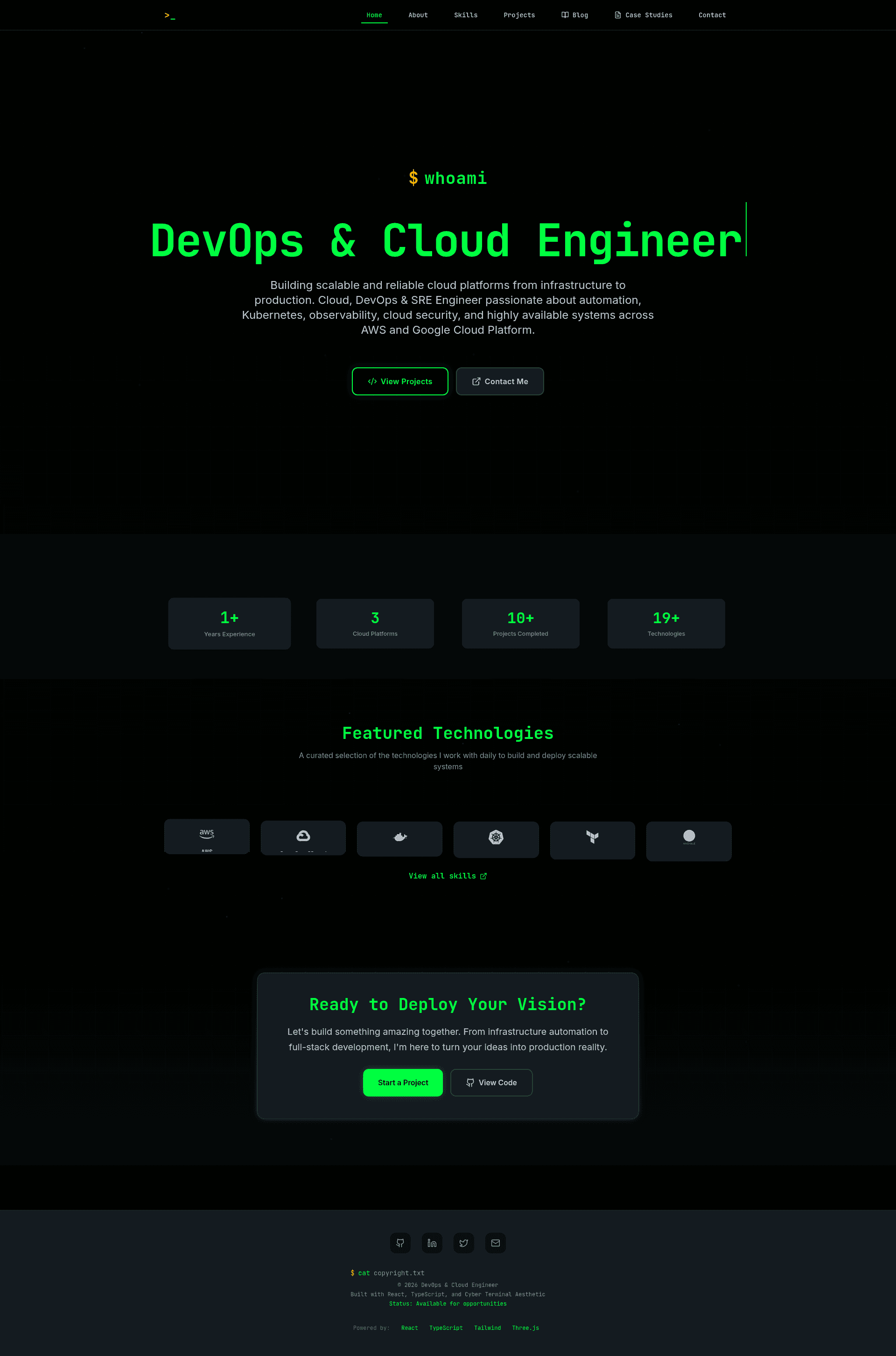
The template is a single-page application built with React 18, TypeScript, Vite, Tailwind CSS, React Router, Framer Motion, Three.js, and Lucide React. It produces a portfolio site with an animated terminal-style hero, a skills explorer, filterable project cards, case studies with challenge-solution-impact breakdowns, a modal-based blog with view counts and likes, and a Web3Forms-powered contact form. It was created by Neeraj Chandra Nakka and is licensed under MIT. You supply personal data and content by editing TypeScript data files; the output is a static site ready to deploy to Vercel or Netlify.
Key Features
The template bundles portfolio, blog, and case-study modules with deployment configuration out of the box.
- Cyber terminal design — Electric neon green accent (#00ff41) on dark surfaces, monospace typography, and typewriter and glitch effects powered by Framer Motion.
- 3D animated background — A dynamic grid rendered with Three.js.
- Interactive skill explorer — Visual proficiency indicators for the DevOps toolchain.
- Project filtering — Filterable project cards with technology stack tags.
- Case study breakdowns — Each case study includes problem statement, solution, tech stack, and before/after metrics, edited in
src/components/case-studies/EnhancedCaseStudies.tsx. - Blog with metrics — Full article modal reading, view counts, likes, category filters (DevOps, Cloud Infrastructure, Full-Stack), search, and sorting by date/views/likes; content lives in
src/components/blog/EnhancedBlog.tsx. - Backend-free contact form — Uses Web3Forms; requires a free access key in a
.envfile and theVITE_WEB3FORMS_KEYenvironment variable in production. - DevOps-ready deployment —
vercel.jsonships with SPA redirect rules, enabling live deployment in under two minutes; Netlify deployment works with anetlify.tomlredirect from/*to/index.html.
Who is it for?
DevOps engineers targeting product-based companies or FAANG-adjacent roles who want a portfolio that shows technical depth instead of marketing polish. Cloud engineers and SREs who need to present Kubernetes, CI/CD, AWS, and Terraform project experience. Job seekers who want a deployable portfolio in under 10 minutes without using a website builder.
What can you do with the DevOps Portfolio Template?
The template supports three main workflows: showcasing projects, publishing technical writing, and documenting infrastructure impact.
- DevOps job seekers: replace the sample data in
src/data/portfolio.tsand the case studies array to present your own projects, then deploy to Vercel for free. - SREs and platform engineers: publish technical articles through the blog section, featuring posts with view counts, likes, and category filters to demonstrate writing and communication skills.
- Freelance infrastructure consultants: use the case study format to document measurable impact with before/after performance metrics for client pitches.
How does the template work?
Fork the repository, clone it, run npm install, copy .env.example to .env and add a free Web3Forms key, then run npm run dev. Edit content in the designated files, commit, and push to trigger automatic Vercel deployment; alternatively, run npm run build and upload the dist/ folder to Netlify Drop.
Pricing
The template is free and open source under the MIT license, so you can use, fork, and deploy it for personal and commercial projects without cost.
FAQ
Is the DevOps Portfolio Template free?
Yes. It is released under the MIT license and free to use, fork, and deploy for personal and commercial projects. The live demo runs on Vercel's free tier.
Do I need a backend for the contact form?
No. The contact form uses Web3Forms, a free service that delivers submissions to your email. You only need to replace the access key in your .env file with a key from web3forms.com.
How do I change the colors?
Edit tailwind.config.js, specifically the primary color value and the bg-page and bg-surface background colors. The default accent is neon green (#00ff41).
Does the template include a blog?
Yes. The blog supports article modal reading, view counts, likes, category filters, search, sorting, and featured article highlights. Blog posts are edited in src/components/blog/EnhancedBlog.tsx.
Can I deploy to Netlify?
Yes. Build the project with npm run build and upload the dist/ folder to Netlify Drop. Add a netlify.toml redirect from /* to /index.html to support client-side routing.