Template details
Digest
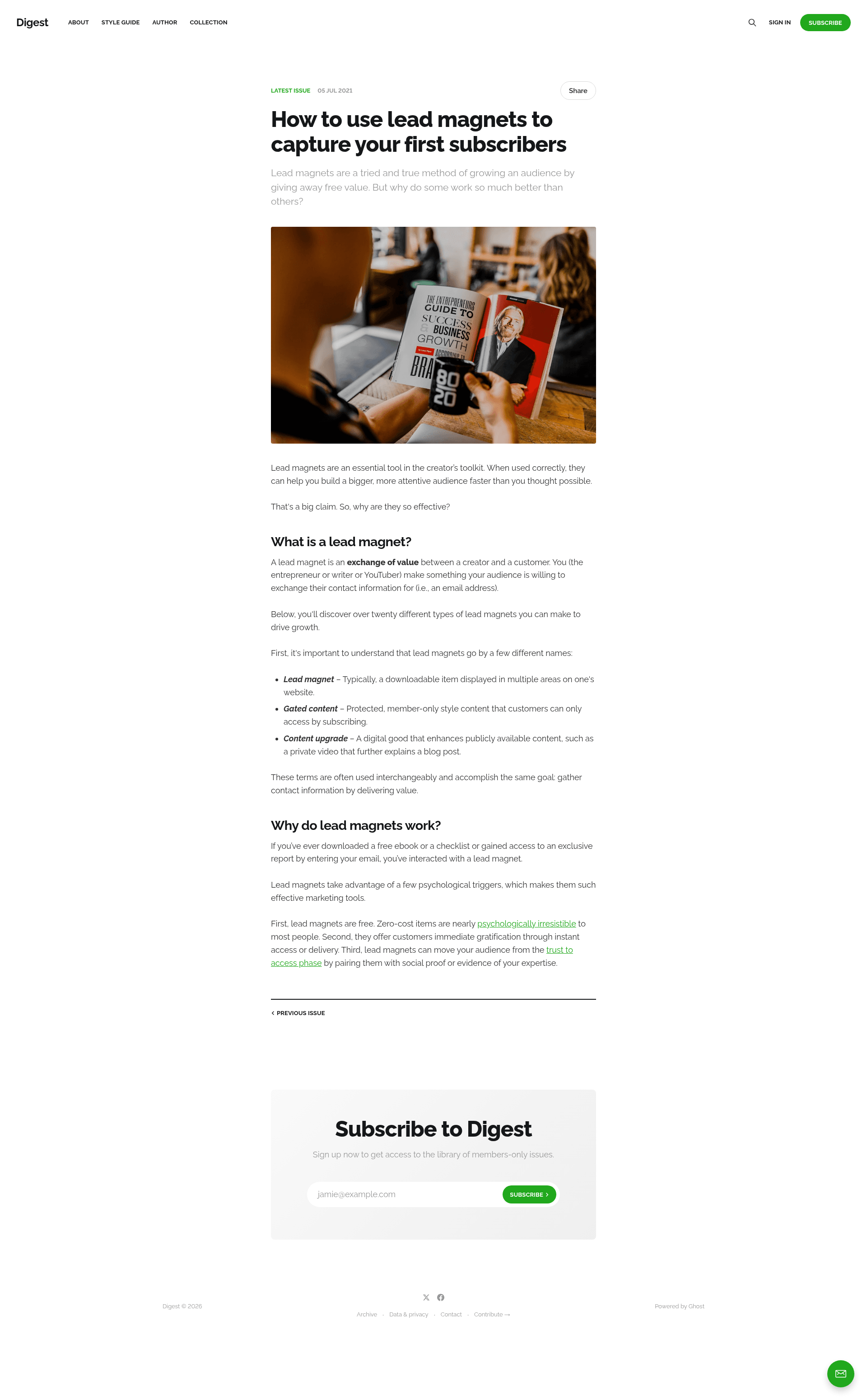
A minimal, open-source newsletter theme for Ghost that automatically displays your latest issue and links to the archive.
About this template
Digest is a minimal, open-source newsletter theme for the Ghost publishing platform that automatically showcases your most recent newsletter issue on the homepage and links readers to your archive.
What is the Digest theme?
Digest is an official Ghost theme developed by the Ghost Foundation and maintained within the TryGhost/Themes monorepo (the repo itself is auto-synced from that monorepo). It is built specifically for newsletter publishers using Ghost, the open-source publishing platform. The theme takes your published newsletter issues and presents the newest one prominently on the homepage, with navigation links to previous issues and a complete archive of everything you've published. A live demo is available at digest.ghost.io, and the source code is released under the MIT license.
Key features
- Automatic latest-issue display — The homepage always features your most recently published issue, so the site stays current without manual curation.
- Archive navigation — Read more by moving to the previous issue or exploring the full archive of all published issues.
- Minimal, content-focused design — The layout is deliberately sparse, keeping the focus on your writing and newsletter content.
- Gulp/PostCSS build system — Styles are compiled with Gulp and PostCSS to polyfill future CSS specifications, making it easy to customize the CSS in
/assets/css/. - Packaging with pnpm — The
pnpm zipcommand bundles the theme intodist/digest.zip, ready to upload to any Ghost site. - Official Ghost theme — Being an official theme, it benefits from compatibility testing with Ghost updates and community support through the TryGhost/Themes repository.
- MIT licensed — Free to use, modify, and distribute for personal or commercial projects.
Who should use the Digest theme?
- Newsletter publishers who want their website's homepage to always reflect their latest issue without needing to update the site by hand.
- Solo writers and bloggers using Ghost to run a newsletter and looking for a clean, typography-first theme that lets the content stand out.
- Developers who need a solid, MIT-licensed Ghost theme to customize for clients; they can extend the CSS with Gulp/PostCSS and repackage the theme using
pnpm zip.
What can you do with the Digest theme?
- Create a self-updating homepage: Publish a new issue in Ghost, and it automatically appears as the featured content on the homepage.
- Help readers navigate your archive: Use the built-in links to previous issues and the full archive listing to let subscribers browse your back catalog.
- Customize the theme's look: Edit the source CSS files and rebuild with Gulp/PostCSS using
pnpm dev, which compiles changes to/assets/built/automatically. - Package and distribute the theme: Run
pnpm zipto produce adist/digest.zipthat can be uploaded via Ghost's Design settings.
How does the Digest theme work?
To install, download the theme zip from the GitHub repository, log into Ghost, and upload the zip in the Design settings area. For local development, you need Node, pnpm, and Gulp installed globally; then run pnpm install to install dependencies and pnpm dev to build the CSS and watch for file changes. The built files are output to /assets/built/.
FAQ
Is the Digest theme free?
Yes, the Digest theme is open-source and released under the MIT license, which means it is free to use, modify, and distribute.
Do I need a Ghost site to use Digest?
Yes, Digest is a theme for the Ghost publishing platform. You must have a Ghost site to upload and activate the theme.
How do I install Digest?
Download the zip from the GitHub repository (or create one with pnpm zip), then go to your Ghost admin's Design settings area and upload the theme zip. Ghost will handle the rest.
How do I customize the theme?
You can edit the CSS files under /assets/css/ and run pnpm dev to recompile them into /assets/built/ using Gulp and PostCSS. Theme translations are handled through Ghost's translation system, documented in the theme-translations README.
What does the theme do with my latest issue?
The homepage of the Digest theme automatically displays your most recently published issue. It also provides navigation to the previous issue and a list of all issues, so readers can easily catch up.