Template details
Ease
A minimal documentation theme for Ghost
About this template
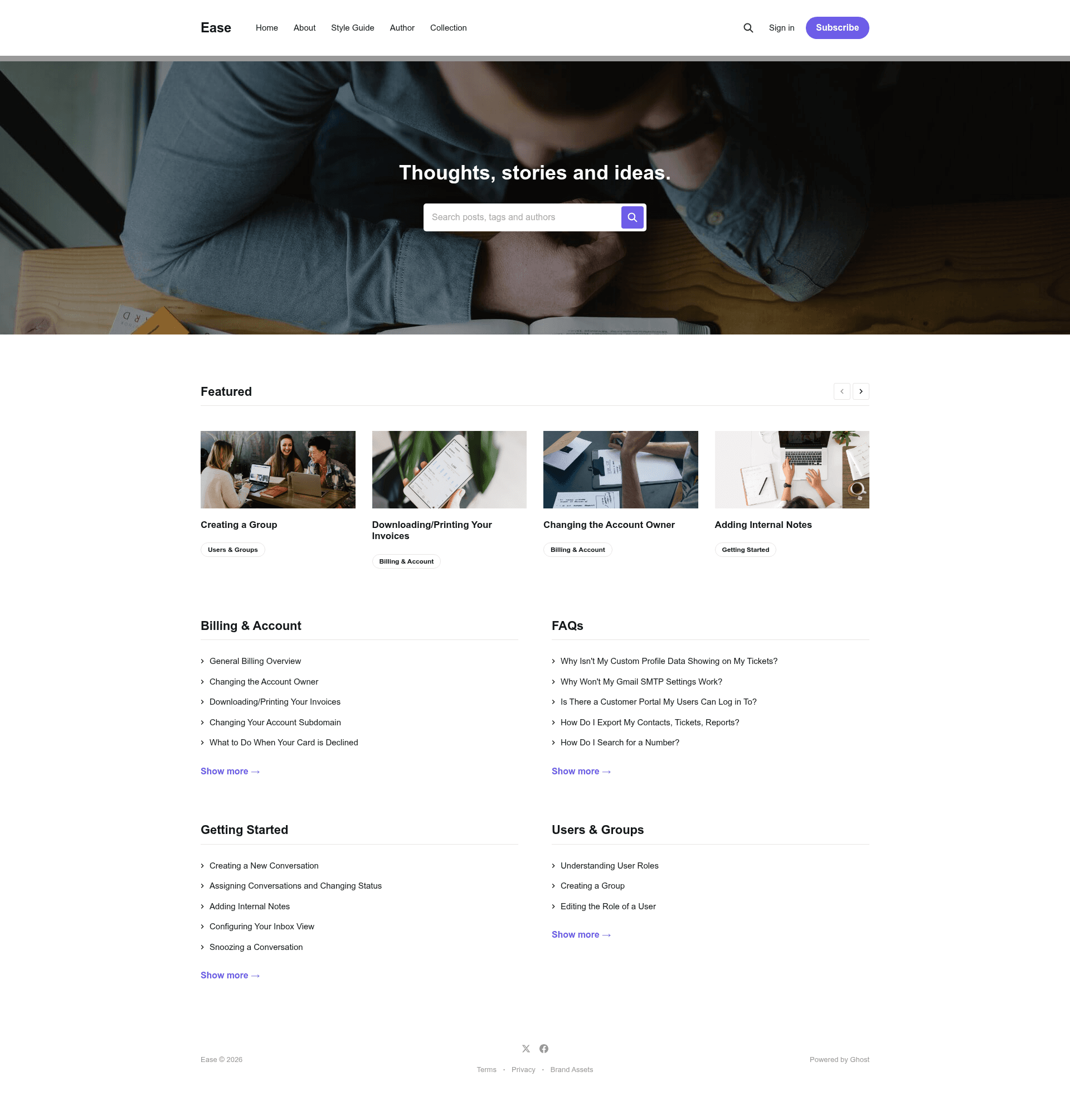
Ease is a minimal documentation theme for the Ghost publishing platform, built by the Ghost Foundation to publish posts and business information with a clean, readable layout.
What is Ease?
Ease is a free, open-source theme for Ghost, the Node.js-based CMS. It takes Ghost's standard content structure — posts, pages, and tags — and renders them in a minimal layout designed for documentation and business sites. The theme is maintained by the Ghost Foundation as part of the TryGhost/Themes monorepo, and a live demo is available at https://ease.ghost.io.
Key Features
- Ghost-native rendering — uses Ghost's standard template system, so it installs by uploading a zip file to the Design settings area.
- Documentation-first design — the theme is explicitly suitable for documentation, while also supporting general blog posts and business information.
- Gulp/PostCSS pipeline — styles are written in future CSS spec and compiled with Gulp and PostCSS; source files live in
/assets/css/and compile to/assets/built/. - Local development workflow — requires Node, pnpm, and Gulp; run
pnpm devto build and watch for changes, andpnpm zipto package the theme intodist/ease.zip. - Translation support — theme translations are managed through the TryGhost/Themes repository, with a shared translation README for contributors.
- MIT licensed — released under the MIT license, copyright (c) 2013-2026 Ghost Foundation.
- Actively maintained — the repository syncs automatically with TryGhost/Themes, where official Ghost themes are developed and issues are handled.
Who is Ease for?
- Documentation writers who need a minimal, readable layout for product docs or knowledge bases built on Ghost.
- Business owners who want to publish company information, announcements, or service pages without a complex design.
- Ghost developers who want a clean starter theme to customize for client projects, with a Gulp/PostCSS build pipeline already in place.
- Bloggers looking for a lightweight, typography-focused theme to replace a busier default.
What can you do with Ease?
- Document your product: publish API guides, user manuals, or feature overviews in the structured layout the theme was designed for.
- Run a business site: put your company's posts, contact information, and service descriptions online with a clean look.
- Build a custom Ghost theme: fork the repo, edit the CSS source files, and run
pnpm zipto generate your own installable theme zip.
How does Ease work?
Download the theme zip from the GitHub repository, log into your Ghost admin, go to the Design settings area, and upload the zip file. For development, clone the repo, install dependencies with pnpm, and run pnpm dev; the Gulp task compiles future CSS to normal CSS and watches for changes.
Pricing
Ease is free and open source under the MIT license. No purchase or subscription is required; you can download the source from GitHub.
FAQ
How do I install Ease on my Ghost site?
Download the theme zip from the GitHub repository's archive link, log into Ghost, and go to the Design settings area to upload the zip. The theme will be applied immediately, and you can then customize it.
Is Ease free?
Yes, Ease is released under the MIT license, which means it is free to use, modify, and distribute. The copyright is held by the Ghost Foundation.
What development tools do I need to customize Ease?
You need Node, pnpm, and Gulp installed globally. After cloning the theme, run "pnpm install" to install dependencies, then "pnpm dev" to build and watch for changes. The compiled CSS is output to /assets/built/.
What is the difference between Ease and other Ghost themes?
Ease is explicitly designed as a minimal documentation theme, while many official Ghost themes target magazines or portfolios. It is maintained in the TryGhost/Themes monorepo and syncs automatically with the main repository.