Template details
Jekyll LibDoc
A Jekyll documentation theme with built-in search and playground
About this template
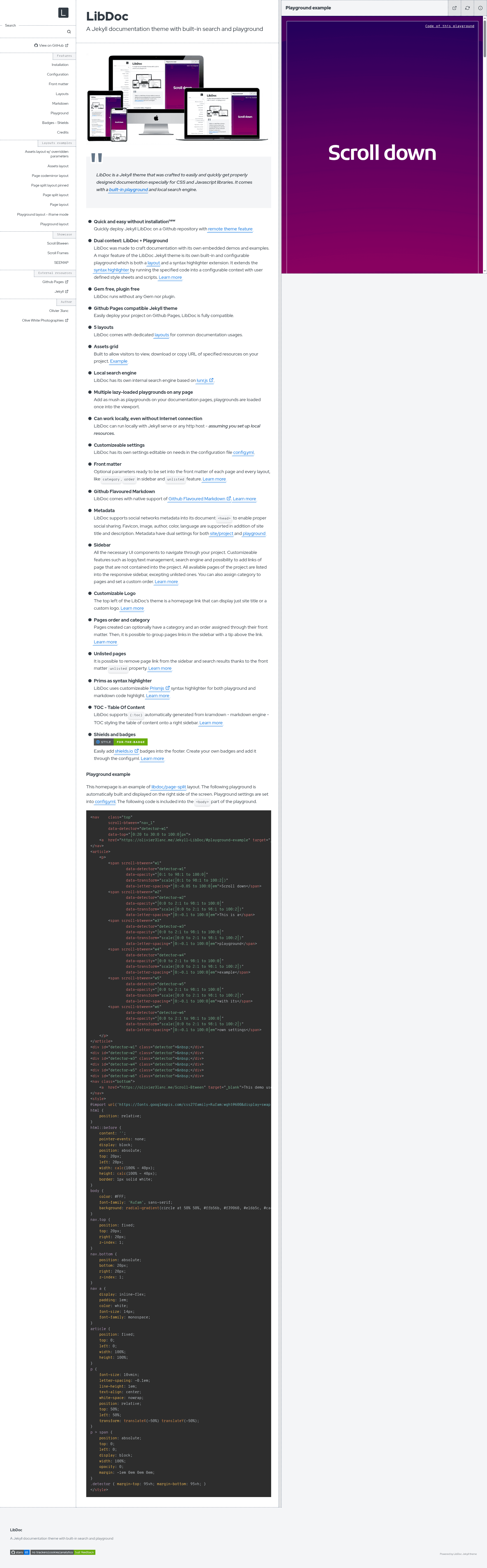
Jekyll LibDoc is a documentation theme for Jekyll, the Ruby-based static site generator, designed specifically for publishing documentation for CSS and JavaScript libraries with a live code playground and local search.
What is Jekyll LibDoc?
Jekyll LibDoc is a Jekyll theme, not a plugin, created by Olivier Blanc for building documentation sites. It takes Markdown content files plus a _config.yml and outputs a static website with a responsive sidebar, table of contents, and an interactive playground for running code examples. The theme is gem-free and plugin-free, works on GitHub Pages, and can be used locally with only Jekyll installed. The repository note states the theme is no longer maintained; the project has moved to Eleventy LibDoc.
Key Features
- Built-in playground — Each playground is a layout and a Prism syntax highlighter extension that runs code inside a configurable context with user-defined stylesheets and scripts; multiple playgrounds on a page load lazily as they enter the viewport.
- Local search engine — Uses lunr.js to index all pages without external search services; pages marked
unlistedin front matter are excluded from both the sidebar and search results. - GitHub Pages compatibility — Works as a remote theme by setting
remote_theme: olivier3lanc/Jekyll-LibDocin_config.yml, enabling deployment to GitHub Pages with no local installation. - Five layouts — Includes dedicated layouts for common documentation pages, plus an assets grid that lets visitors view, download, or copy the URL of project resources.
- Gem-free and plugin-free — Runs with only Jekyll itself, requiring no Ruby gems or plugins; the optional
jekyll-remote-themeplugin is only needed for local builds using the remote theme. - Customizable front matter — Each page can set
category,order, andunlistedto control sidebar grouping, ordering, and visibility in navigation and search. - GitHub Flavored Markdown — Supports GFM and kramdown-generated
{:toc}tables of content styled in a right sidebar. - Metadata and badges — Supports social metadata (favicon, image, author, color, language) in the document head and configurable shields.io badges in the footer.
Who is it for?
- Open-source library authors — Document a CSS or JavaScript library with runnable playground examples so users can test code directly in the docs.
- Front-end teams building internal UI frameworks — Publish component documentation and style guides on GitHub Pages, as demonstrated by the GOA UI Framework and BYmyCAR UI Framework showcase projects.
- Technical writers who prefer Markdown — Write all documentation in Markdown with front matter, then get a navigable site with sidebar, table of contents, and search without touching HTML.
What can you do with Jekyll LibDoc?
- Create a playground for each code sample — Embed code in a playground block; users can run it in a configurable context with scripts and styles from your
_config.yml. - Group and reorder sidebar pages — Assign
categoryandorderin front matter to produce a categorized, ordered sidebar with tooltips above grouped links. - Hide draft pages entirely — Set
unlisted: truein front matter to strip a page from both the sidebar and the lunr.js search index. - Deploy to GitHub Pages in three steps — Create a repository, add a
_config.ymlwith theremote_themeline, and enable GitHub Pages; each push rebuilds the site automatically.
How does Jekyll LibDoc work?
The theme compiles Markdown pages through Jekyll's normal build process. For local use, install Jekyll and run jekyll build or jekyll build -c _personal-config.yml --watch; for online use, add the remote theme line and enable GitHub Pages. Playgrounds are defined inside Markdown and rendered by the Prism-based highlighter into iframes that load only when scrolled into view.
Pros and cons
- Pros: No gems or plugins required, works offline with
jekyll serveor any HTTP host, and offers four deployment options: remote theme, copy/clone, GitHub.dev, or local install. - Cons: No longer maintained; the maintainer recommends migrating to Eleventy LibDoc for continued updates.
FAQ
Is Jekyll LibDoc free?
Yes, Jekyll LibDoc is an open-source theme hosted on GitHub. No pricing or license fee is mentioned on the project page, and it can be used freely for personal or commercial documentation projects.
Is Jekyll LibDoc still maintained?
No. The repository displays a notice that the theme is no longer maintained and that development has moved to Eleventy LibDoc, which is the successor project by the same author.
Does Jekyll LibDoc work with GitHub Pages?
Yes, it is fully compatible with GitHub Pages. You can use it as a remote theme by adding remote_theme: olivier3lanc/Jekyll-LibDoc to your _config.yml, and GitHub Pages will build and host the site automatically on each push.
Does Jekyll LibDoc require plugins?
No. The theme itself is gem-free and plugin-free. The only optional plugin is jekyll-remote-theme, which is needed only when using LibDoc as a remote theme in a local build environment.
Can I add multiple playgrounds to one page?
Yes. LibDoc supports multiple lazy-loaded playgrounds on any page. Each playground loads into the viewport and runs code in a configurable context, using Prism for syntax highlighting and user-defined stylesheets and scripts.