Template details
Emoji CSS
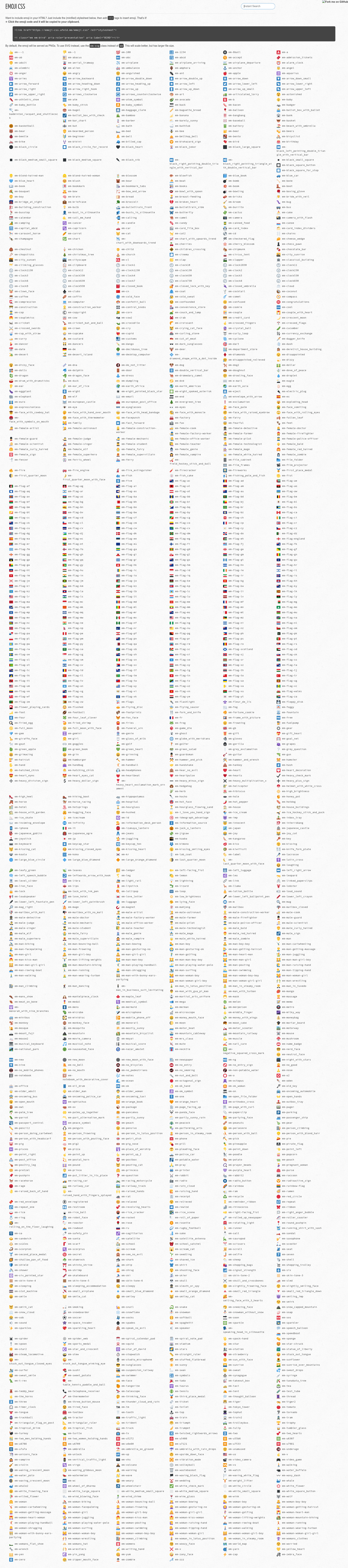
A CSS library that renders emoji in HTML via class names, using Twemoji icons.
About this template
Emoji CSS is a CSS-only utility that renders emoji in HTML through class names, using Twitter's open-source Twemoji icon set.
What is Emoji CSS?
Emoji CSS is a small front-end utility that lets you include emoji in your HTML by adding simple class names to elements, in the spirit of Font Awesome's icon-font approach. Instead of copying and pasting Unicode characters or image files, you write a shortcode-like class such as :smiley: and the stylesheet renders the corresponding emoji graphic. The project is a GitHub repository (893 stars) that builds a demonstration and documentation site with Jekyll, and it pulls its emoji data from the iamcal/emoji-data project. The current implementation relies on Twitter's Twemoji set for the actual emoji artwork, and it is designed to work without JavaScript.
Key Features
Emoji CSS provides a class-based API, Twemoji artwork, and a Jekyll-powered demo site. Here are the notable features:
- Class-based usage — Include a CSS file and add emoji-named classes to elements; no scripting required.
- Twemoji icons — All emoji artwork comes from Twemoji, Twitter's open-source emoji set, ensuring consistent cross-platform rendering.
- Inspired by Font Awesome — The API mirrors the familiar icon-font pattern that developers already know.
- Jekyll-based site — The companion website runs on Jekyll, so you can serve it locally with
bundle exec jekyll serve -w. - Automated data updates — Running
makepulls fresh emoji data from iamcal/emoji-data. - Legacy image folder — The
emoji/directory still contains copyrighted images for backward compatibility, but these are scheduled for removal.
Who is it for?
Web developers, static-site authors, and UI prototypers are the primary users of Emoji CSS.
- Front-end developers who want to drop emoji into a page without hunting for Unicode codepoints.
- Static site users running Jekyll or similar generators who want a documented way to add emoji classes.
- Prototypers building quick mockups who prefer class names over pasting SVG or image tags.
What can you do with Emoji CSS?
Emoji CSS is useful in any HTML context where a visual emoji is needed. Examples include:
- Add emoji to UI text: Mark up buttons, headings, or alerts with emoji classes to give them a visual accent.
- Simplify content authoring: Use shorthand names (like
:smiley:) in HTML or Markdown instead of copying the actual emoji character. - Avoid JavaScript dependencies: Keep pages lightweight by relying on pure CSS rather than a client-side emoji library.
How does Emoji CSS work?
To build or develop the project, you need Ruby 2.x and Bundler. After running bundle and bundle exec jekyll serve -w, the site is available at http://localhost:4000. To refresh the emoji data, run make, which reads from the emoji-data repository and regenerates the stylesheet and assets.
Alternatives
Other projects in the emoji-as-CSS space include:
- emoji-data-css — A similar generator that produces CSS classes from iamcal/emoji-data.
- Twemoji — The underlying icon set, which can also be used directly with its own JavaScript library.
- Emoji Cheat Sheet — A reference site that popularized the
:shortname:syntax and influenced this project.
FAQ
Is Emoji CSS free to use?
The source code is publicly available on GitHub, but the repository does not specify a license. The legacy images in the emoji/ folder are copyrighted and are being removed in the future, so rely on the Twemoji-based output for production use.
Which emoji set does Emoji CSS use?
Twemoji, Twitter's open-source emoji set, provides the emoji graphics. The project's "See Also" links point to the Twemoji repository.
How do I run the demo locally?
You need Ruby 2.x and Bundler. Run bundle to install dependencies, then bundle exec jekyll serve -w and open http://localhost:4000.
How are emoji data updated?
The project's Makefile runs make to pull the latest emoji data from the iamcal/emoji-data repository and regenerate the CSS.