Template details
Ephesus
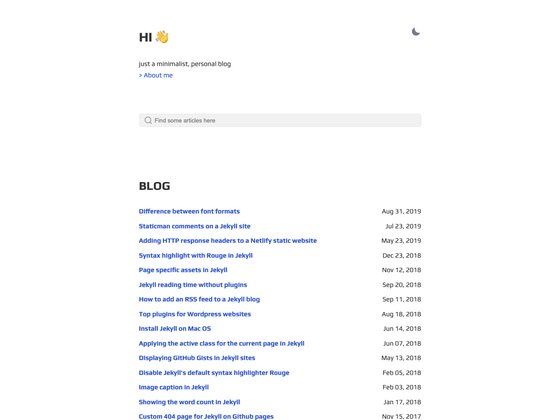
Minimalist Jekyll blog theme with dark/light modes, tags, MathJax, Disqus, and zero CSS dependencies.
About this template
Ephesus is a minimalist Jekyll blog theme by Hakan Torun that builds a dependency-free, responsive personal blog with dark and light modes, auto-generated tags, and MathJax support.
What is Ephesus?
Ephesus is a simple, minimal Jekyll theme designed for personal blog use. It takes standard Jekyll posts and pages written in Markdown as input and outputs a static HTML site with a tiny CSS footprint and no JavaScript dependencies. The theme runs on Jekyll, supports GitHub Pages, and is authored by Hakan Torun. A live demo is available at pardin.us/ephesus.
Key Features
- Tiny CSS & no dependencies — The theme has no external CSS frameworks or JavaScript libraries, keeping page weight low.
- Dark/Light theme — Visitors can switch between dark and light color schemes; the repository shows screenshots of both variants.
- Auto-generated tags page — Tags are created automatically under the /tags page, so authors do not need to build tag archives manually.
- MathJax support — Adding the front matter tag
mathjax:trueto a post enables LaTeX-style math rendering. - Social share and Disqus — Built-in social share buttons and Disqus comment integration work with standard Jekyll post layouts.
- Feeds and SEO files — The theme generates Atom and JSON feeds, robots.txt, and sitemap.xml for search indexing.
- Pagination and post navigation — Next/previous post links and pagination are included to help readers browse the blog.
Who is it for?
- Personal bloggers who want a clean, minimal site without the overhead of a JavaScript-heavy framework.
- Technical writers and developers who publish on GitHub Pages and need automatic tags, feeds, and MathJax for code or math-heavy posts.
- Jekyll users who prefer a no-dependency theme they can customize with plain CSS and standard Liquid templates.
What can you do with Ephesus?
- Publish a personal blog — Write posts in Markdown with YAML front matter, then build the site locally with bundle exec jekyll serve.
- Render math formulas — Add the
mathjax:truefront matter tag to any post to display equations on that page. - Organize posts by tags — Tags appear automatically on the /tags page, so readers can filter content without extra setup.
How does Ephesus work?
Installation follows the standard Jekyll workflow. Clone the repository from GitHub, run bundle install to install dependencies, then build with bundle exec jekyll build and serve locally with bundle exec jekyll serve. The local site runs at 127.0.0.1:4000, and tags appear automatically on the /tags page.
FAQ
Is Ephesus free?
Yes, Ephesus is open source and available under the MIT License, so you can use, modify, and distribute it freely.
Does Ephesus work with GitHub Pages?
Yes, the theme is a Jekyll theme with the github-pages topic, and it builds as a standard Jekyll site, making it compatible with GitHub Pages hosting.
Does Ephesus require JavaScript or CSS frameworks?
No, the theme advertises "Tiny CSS & No Dependency" in its feature list, meaning it does not rely on external CSS frameworks or JavaScript libraries.
How do I enable MathJax on a post?
Add the front matter tag mathjax:true to any post, and the theme will include MathJax support for that post.
What feeds are included?
Ephesus generates Atom and JSON feeds, plus robots.txt and sitemap.xml for search engine crawlers.