Template details
Prezly Bea Theme
News site template built with Next.js, TypeScript, and Prezly SDK for Prezly newsrooms.
About this template
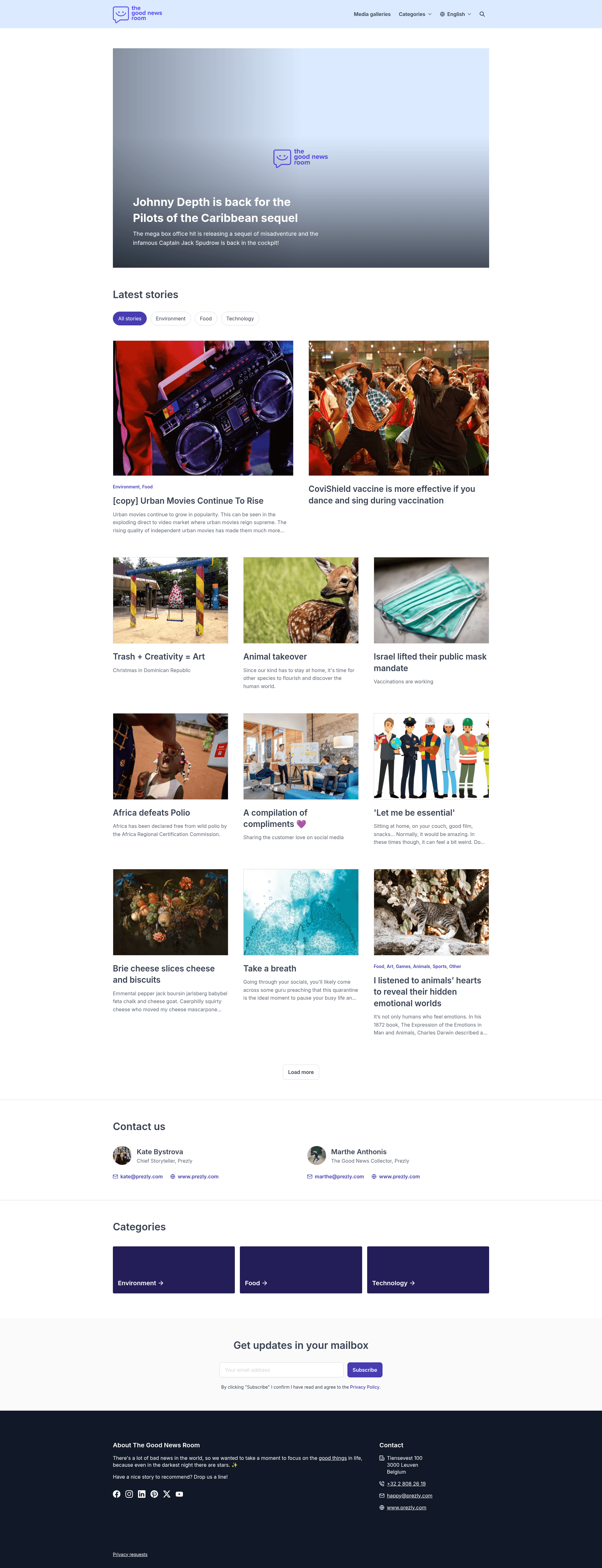
Prezly Bea Theme is a Next.js 12+ starter theme for building multi-language news websites that pull content from a Prezly newsroom. It is developed by Prezly and distributed under the MIT license, with live previews available for three sample newsrooms in different verticals.
What is Prezly Bea Theme?
Prezly Bea Theme is an open-source Next.js starter that turns a Prezly newsroom into a public-facing website. It takes a Prezly API access token and a newsroom UUID as configuration, then outputs a statically rendered or server-rendered site with stories, albums, and categories. The theme uses TypeScript throughout, with data fetching handled by Prezly Theme Kit and the Prezly SDK, and content rendering handled by the Prezly Content React Renderer package.
Key Features
- Next.js 12+ framework — Built on the React-based Next.js framework, providing file-based routing, static generation, and server-side rendering for the news site.
- Multi-language support — React Intl and Prezly Themes Translations power localized interfaces, so a single newsroom can be displayed in multiple languages.
- Prezly Analytics integration — Visitor tracking is wired through Prezly Analytics with no extra setup beyond the access token.
- Meilisearch-powered search — Full-text search is driven by Meilisearch; a Prezly search index API key is required to enable it.
- Sentry error logging — Runtime errors can be reported to Sentry when configured.
- Biome code quality — Linting, formatting, and TypeScript checks are run through Biome, with npm scripts for
lint,lint:fix,format, andformat:fix. - One-click deployment — The repository includes deploy buttons for Vercel and Netlify that connect directly to the GitHub repo.
- Sample newsrooms with test tokens — Three demo newsrooms (Good Newsroom, Cookbook, Anonymous Photographer) provide ready-to-use API tokens and UUIDs for local testing.
Who is it for?
Prezly Bea Theme is for newsrooms, publishers, and content teams that want a production-ready website front end for their Prezly content. Developers building Prezly-powered sites get a complete Next.js codebase with routing, theming, and analytics already wired. Photographers and small studios can use the Anonymous Photographer sample to launch an image-first portfolio site with albums.
What can you do with Prezly Bea Theme?
- Editorial teams: Publish stories from Prezly and have them appear on a custom Next.js site with multi-language support and search.
- Food bloggers: Use the Cookbook sample newsroom as a starting point for a recipe site with structured content and images.
- Photographers: Build a portfolio site from the Anonymous Photographer sample, combining albums and imagery in a single public gallery.
How does Prezly Bea Theme work?
The theme is installed by cloning the repository and running pnpm install. After copying .env.example to .env.local, you fill in a Prezly access token, newsroom UUID, and optionally an HCaptcha sitekey and Meilisearch API key. Running pnpm dev starts a local server on http://localhost:3000, and pnpm run check runs Biome linting plus TypeScript checks.
FAQ
Is Prezly Bea Theme free to use?
Yes, the theme is MIT licensed and free to use, modify, and deploy.
Do I need a Prezly account?
Yes, you need a Prezly newsroom and a valid API access token. The repository includes test tokens for three sample newsrooms so you can try it before configuring your own.
Does it support multiple languages?
Yes, multi-language support is built in through React Intl and Prezly Themes Translations, allowing a single newsroom to serve localized content.
Can I deploy it to any host?
The theme is built on Next.js, so it runs on any Node.js-compatible host. One-click deploy buttons are provided for Vercel and Netlify.
How do I enable search on my site?
Search uses Meilisearch and requires an API key for a Prezly search index, which you can request from Prezly support. Without that key, the search feature will not function.