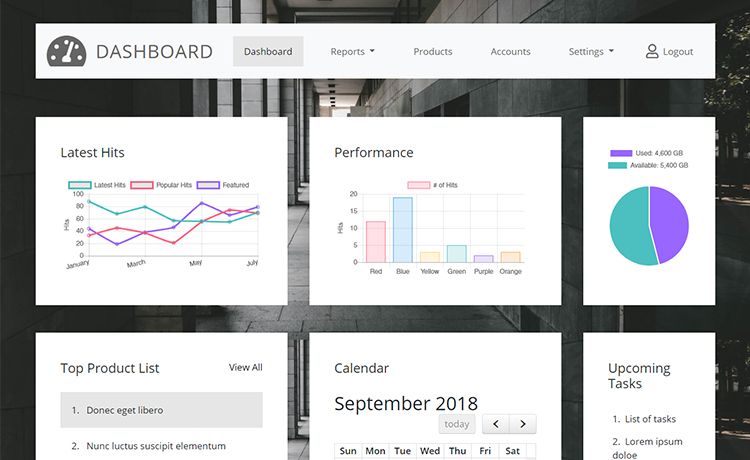
Template details
Estore
Estore is a Next.js 13 admin dashboard template for e-commerce management, built with Tailwind CSS, shadcn/ui, Prisma, and MySQL.
About this template
Estore is a Next.js 13 e-commerce admin dashboard template that pairs Tailwind CSS, shadcn/ui, Prisma, and MySQL to give developers a working foundation for store management interfaces.
What is Estore?
Estore is an admin dashboard template bootstrapped from create-next-app and focused on e-commerce administration. It takes a MySQL database accessed through Prisma as its data layer and produces a browser-based admin interface styled with Tailwind CSS and shadcn/ui components. The repository metadata lists admin-dashboard, e-commerce-admin, mysql, nextjs13, prsima (Prisma), shadcn-ui, and tailwindcss as its core topics, and the default README confirms it is a standard Next.js project with an app/ directory and automatic font optimization via next/font.
Key Features
- Next.js 13 framework — Uses the App Router with an
app/page.tsxentry point, auto-updating as files are edited during development. - Tailwind CSS styling — Utility-first CSS integrated through PostCSS, available to style every admin page and component.
- shadcn/ui components — The repository topic shadcn-ui indicates these Radix-based, copy-paste components are part of the template.
- Prisma ORM — A typed ORM (listed as "prsima" in the metadata) for defining and querying the MySQL schema.
- MySQL database — The target relational database specified in the repository topics for storing e-commerce data.
- Multiple package managers —
npm,yarn,pnpm, andbunscripts are provided for running the dev server. - Automatic Inter font —
next/fontloads and optimizes the Inter Google Font without manual font tags.
Who is it for?
Developers starting an e-commerce admin panel who want a pre-configured stack with Next.js 13, Tailwind, shadcn/ui, Prisma, and MySQL. Full-stack teams that need a dashboard base wired to a Prisma/MySQL backend. Agencies prototyping store back-offices for clients can clone it and begin customizing the Tailwind/shadcn UI immediately.
What can you do with Estore?
- Admin dashboard prototyping: Run
npm run devand openhttp://localhost:3000to see the starter page, then editapp/page.tsxto build out store management views. - Data-layer integration: Use the included Prisma/MySQL combination to model products, orders, or customers, and connect them to the dashboard.
- UI customization: Leverage Tailwind utility classes and shadcn/ui components to create a consistent admin design system.
How does Estore work?
Estore is a standard create-next-app project: after installing dependencies, you run npm run dev (or yarn/pnpm/bun equivalents) to start a local development server. The page at app/page.tsx auto-reloads as you edit it, and the template includes next/font to automatically load and optimize the Inter font. Database-specific behavior comes from the Prisma and MySQL stack listed in the repository metadata.
FAQ
What stack does Estore use?
Estore runs on Next.js 13 with Tailwind CSS, shadcn/ui, Prisma, and MySQL, according to its repository topics. It is bootstrapped with create-next-app and uses PostCSS for Tailwind processing plus next/font for Inter font optimization.
How do I run Estore locally?
Install dependencies, then run npm run dev, yarn dev, pnpm dev, or bun dev from the project root. Open http://localhost:3000 in your browser; the page auto-updates while you edit source files.
Does Estore include a database?
The repository metadata lists MySQL and Prisma as part of the stack, so the template expects a MySQL database accessed through the Prisma ORM. Specific schema and migration commands are not documented in the included README.