Template details
Flotiq Gatsby Recipe 2
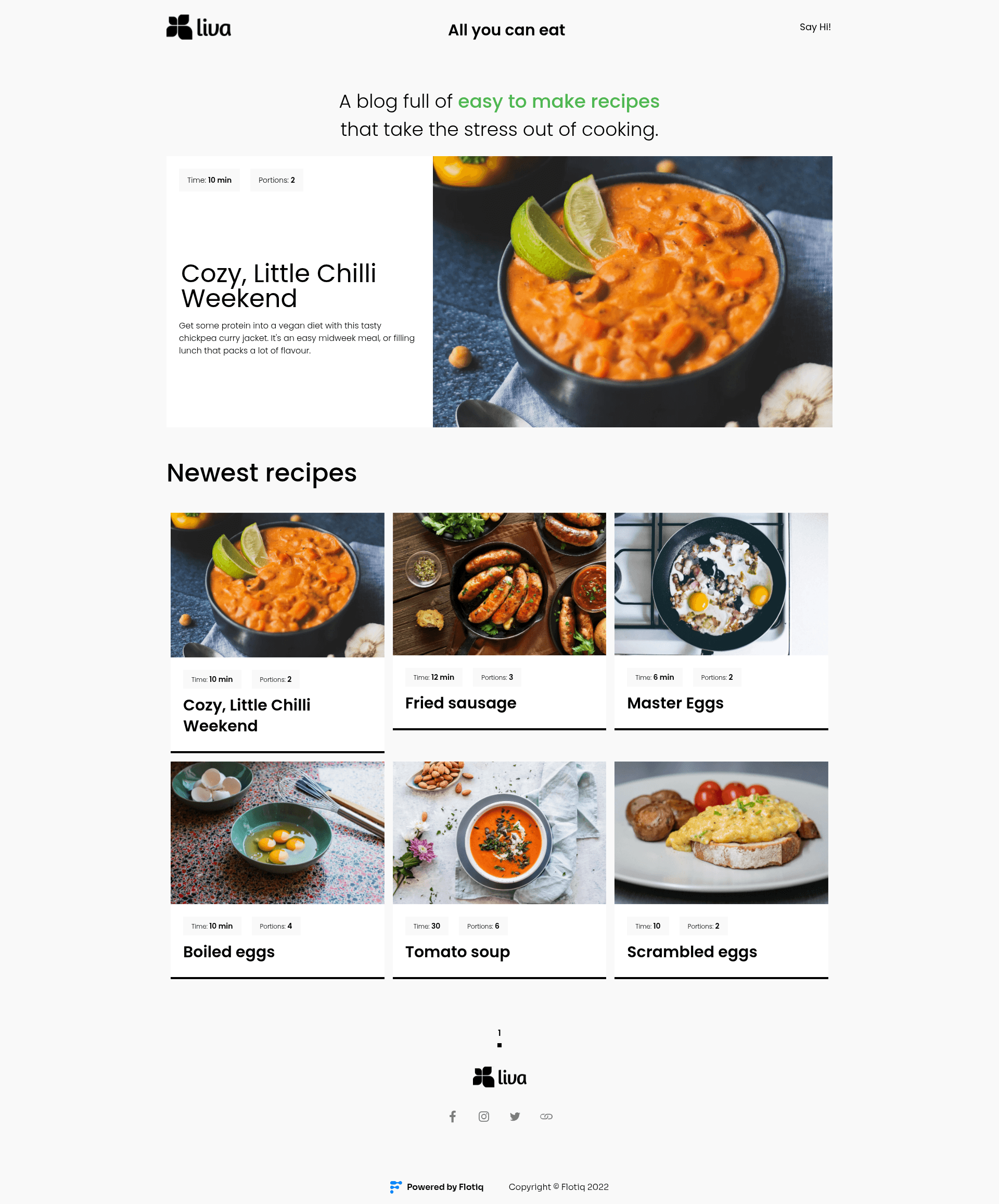
A Gatsby 5 recipe site starter powered by Flotiq headless CMS with Tailwind CSS and one-click deploys.
About this template
Flotiq Gatsby Recipe 2 is a Gatsby 5 starter template for building recipe websites, using Flotiq headless CMS as a content source and Tailwind CSS for styling.
What is Flotiq Gatsby Recipe 2?
This is an open-source starter project created by Flotiq, the headless CMS company, that pairs Gatsby 5 with the Flotiq content platform. It takes a Flotiq read-and-write API key and the project's recipe content types as inputs, and outputs a static recipe website with automatically generated pages. The starter uses the gatsby-source-flotiq plugin to fetch content objects from Flotiq, and the Flotiq components for React library to render those objects. It requires Node.js version 18 or higher, as mandated by Gatsby 5.
Key Features
- Gatsby 5 — Built on Gatsby 5 with a standard configuration file structure including gatsby-config.js, gatsby-node.js, and gatsby-browser.js, and requires Node >= 18.
- Tailwind CSS integration — Styling is handled with the utility-first Tailwind CSS framework, configured through tailwind.config.js.
- Flotiq headless CMS source — The gatsby-source-flotiq plugin loads content objects from a Flotiq account using a GATSBY_FLOTIQ_API_KEY environment variable.
- Recipe content types included — The .flotiq directory contains the content type definitions needed for the starter, so no manual schema setup is required.
- Flotiq components for React — A component library designed to display Flotiq content objects is included, letting you present recipe data without building UI from scratch.
- Example data import — The command
flotiq import .flotiqadds four sample recipe objects to your Flotiq account. - One-click deployment — Deploy buttons are provided for Heroku, Netlify, and Cloudflare Workers, plus configuration files for each platform.
- Flotiq CLI quick start — With flotiq-cli installed, a single command creates the project, installs dependencies, sets environment variables, imports example data, and starts a development server.
Who is it for?
- Recipe bloggers and food writers who want a fast static site with content managed through a visual CMS editor rather than code.
- Gatsby developers looking for a ready-made starter that demonstrates Flotiq integration, including page templates and GraphQL queries.
- Agencies building content-driven websites for clients, who can hand off content management to Flotiq's editor and rebuild the site on publish.
- Small restaurants or culinary brands that want an online recipe collection with a modern Tailwind-based design.
What can you do with Flotiq Gatsby Recipe 2?
- Food bloggers: publish structured recipe content in Flotiq and generate a static recipe site with page templates for each dish.
- Developers: use the starter as a reference for connecting Gatsby to a headless CMS with environment-based API keys.
- Content teams: manage recipes in the Flotiq editor and use the optional refresh endpoint or webhooks to rebuild the site when content changes.
How does Flotiq Gatsby Recipe 2 work?
The quickest start is through the Flotiq CLI: install flotiq-cli globally, then run flotiq start with a project name and your Flotiq read-and-write API key. That command creates the Gatsby project, installs npm dependencies, writes the environment variables into a .env file, imports example data, and launches the development server with gatsby develop. For manual setup, you set GATSBY_FLOTIQ_API_KEY in .env.development, run flotiq import .flotiq to add the four example objects, and then start Gatsby. When content changes in Flotiq, you rerun gatsby develop in development; in production you must rebuild the site, or use the Flotiq plugins for Gatsby Cloud or Netlify to automate rebuilds.
Pros and cons
- Pro: The starter is MIT-licensed, so the code is free to use and modify.
- Pro: Multiple deployment targets are supported out of the box, including Netlify, Heroku, and Cloudflare Workers.
- Con: The site depends on a Flotiq account and API key; without Flotiq the content layer does not work.
- Con: Static pages are generated at build time, so every Flotiq content update requires a rebuild or a plugin to trigger it automatically.
FAQ
Is Flotiq Gatsby Recipe 2 free?
Yes, the starter is released under the MIT license, so the template code itself is free. Using it requires a Flotiq account, and Flotiq is a commercial headless CMS that offers its own pricing plans, but the README does not detail those plans.
Do I need a Flotiq account to use this starter?
Yes. The starter fetches all recipe content from Flotiq through the gatsby-source-flotiq plugin, so you need a Flotiq account and a read-and-write API key for import and development.
What Node.js version is required?
Gatsby 5 requires Node.js version 18 or higher, and the starter's README states it works on Node >= 18.0.0.
How do I update content after deployment?
When you edit content objects in Flotiq, you must rebuild the site with gatsby build for production. The README suggests using the Flotiq Gatsby plugin for Gatsby Cloud or the Flotiq Netlify plugin to automate this, or configuring webhooks.
Does the starter include example data?
Yes. Running flotiq import .flotiq imports four example recipe objects into your Flotiq account, and the .flotiq directory also holds the content type definitions so you can start without creating content types manually.