Template details
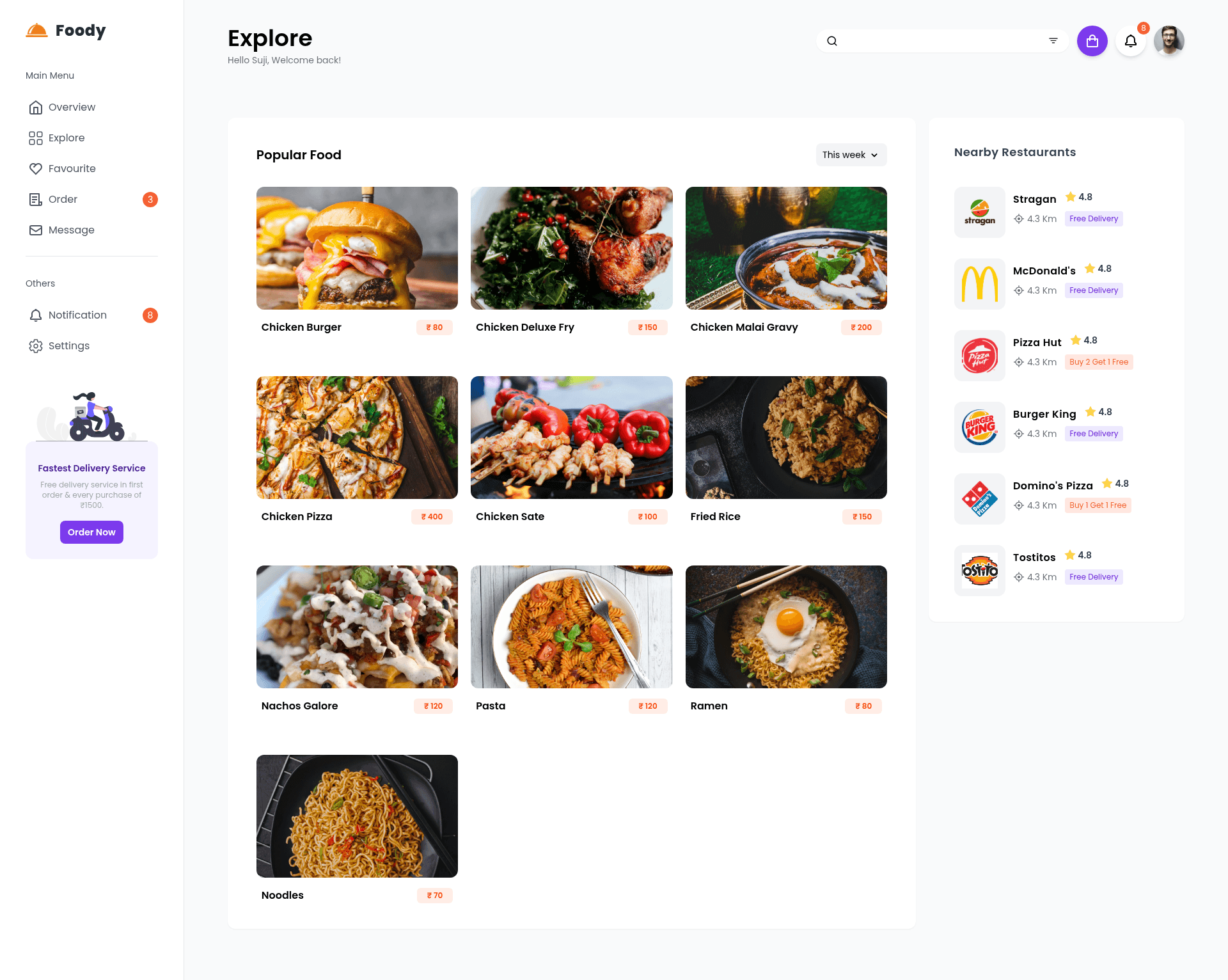
Foody - Landing Page
A static landing page for a food ordering website built with NextJS and TailwindCSS, including a live preview and Just-in-Time Mode.
About this template
Foody is a static landing page template for food ordering websites, built with NextJS and TailwindCSS, that provides a ready-to-deploy single-page marketing site.
What is Foody - Landing Page?
Foody is a static landing page template made for restaurants and food delivery services. It is a NextJS project styled with TailwindCSS that renders a complete homepage for a food ordering website. The template is open-source, created by GitHub user rhythmsaha, and can be cloned, customized, and deployed to platforms like Vercel. A live preview is hosted at https://foody-nextjs.vercel.app/.
Key Features
- NextJS framework — Uses React-based NextJS for static site generation, enabling fast page loads and easy deployment to Node.js hosts.
- TailwindCSS with Just-in-Time Mode — Styles are compiled on demand using Tailwind's JIT engine, keeping the CSS bundle small and build times low.
- Live preview — The template includes a public URL ( https://foody-nextjs.vercel.app/ ) so you can see the exact design before downloading.
- Simple setup — Requires only Node.js and npm or yarn; no backend, database, or API keys are needed.
- Standard scripts — Provides
dev,build, andstartscripts for development, production builds, and serving the output locally. - Food ordering theme — The landing page is designed specifically for food delivery and ordering, with a homepage layout suited to that industry.
Who is it for?
- Freelance web developers — Use Foody as a starting point to deliver a clean landing page for restaurant clients without designing from scratch.
- Food delivery startups — Launch a marketing site quickly by cloning the repo, replacing placeholder text, and deploying to Vercel.
- NextJS and Tailwind learners — Study the project structure and Tailwind JIT configuration to understand modern frontend workflows.
What can you do with Foody - Landing Page?
- Launch a restaurant homepage — Clone the repository and customize the content to present a restaurant's menu and ordering options.
- Deploy to Vercel in minutes — Connect the repo to Vercel for automatic builds, or run
npm run buildlocally and push the out directory. - Learn modern CSS tooling — Explore how Tailwind's Just-in-Time Mode works within a NextJS application.
How does Foody work?
To use the template, clone or download the repository. Open the folder in a terminal and run npm install or yarn install to fetch dependencies. During development, run npm run dev or yarn dev to preview changes; for production, run npm run build to generate an optimized build and npm start to serve it. The output is a static website suitable for any Node.js hosting.