Template details
opensource.microsoft.com
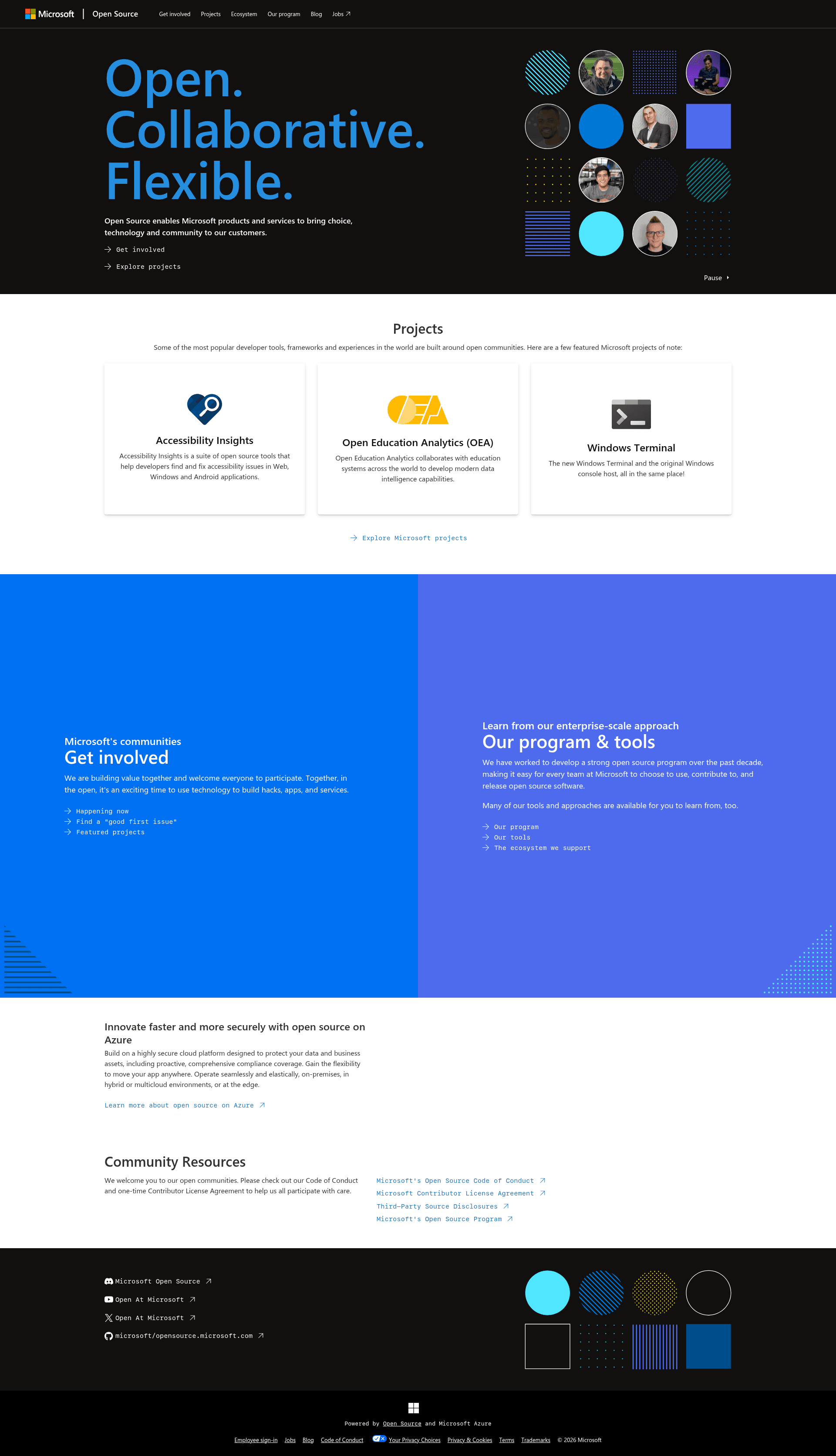
Source code for Microsoft's open source site on Next.js, featuring projects, program details, and 'get involved' pages.
About this template
opensource.microsoft.com is an open-source Next.js static-site project that powers Microsoft's public hub for its open source program, featuring project listings, program details, and contribution pathways.
What is opensource.microsoft.com?
The repository on GitHub contains the source code for opensource.microsoft.com, a mostly-static website published by Microsoft's Open Source Programs Office (OSPO) in partnership with the One Engineering System (1ES) team. Originally built with Jekyll, the site was ported to Next.js and now generates a modern static site that is retrieved at runtime by Microsoft's hosting solution. The site shares information about Microsoft's open source program, the ecosystem it supports, and ways for people to get involved in projects.
Key Features
- Next.js static generation — The site runs on the Next.js framework, having been ported from an older Jekyll implementation, and builds static output (an
out/folder) served by a separate hosting solution. - WCAG 2.1 accessibility checks — Automated axe-based accessibility tests run in Chromium against the primary routes via
npm run a11y:installandnpm run a11y, and the build must meet WCAG 2.1 standards. - Primary navigation sections — The site structure includes five main sections: homepage overview, Get involved, Projects, Ecosystem, and Our program, with additional pages for Jobs (external), Blog (separate site at
/blog), Code of Conduct, and Community Resources. - Production analytics integration — When the build environment is set to Microsoft's production name "opensource.microsoft.com", the site includes Microsoft's standard cookie compliance and Application Insights analytics code; by default, no telemetry is included.
- Dockerfile for local hosting — A
Dockerfileis provided to run the exported static site on a localnginxserver, though dynamic site features are unavailable in that local mode. - CLA bot for contributions — Pull request contributions are automatically checked by a CLA bot, and contributors must sign the Microsoft Contributor License Agreement at cla.opensource.microsoft.com.
- Code of Conduct — The project adopts the Microsoft Open Source Code of Conduct, with questions directed to opencode@microsoft.com.
Who is it for?
This repository is primarily for Microsoft teams and the open source community. Microsoft employees use it to maintain and update the content on opensource.microsoft.com, ensuring the site reflects current program information. External contributors can use it to propose coordinated improvements or content fixes by opening an issue first and then submitting a pull request, though the maintainers note that general contributions may not be accepted. Open source enthusiasts use the published site itself to find Microsoft projects, get involved, and learn about the program.
What can you do with opensource.microsoft.com?
- Microsoft program managers: update the site's primary sections (Get involved, Projects, Ecosystem, Our program) by editing the static content in this Next.js repository and deploying the generated static site.
- Open source contributors: propose changes to site content or functionality through issues and pull requests, with the understanding that the site has strict accessibility and cloud-deployment requirements.
- Developers studying open source sites: inspect the Next.js setup, the Jekyll-to-Next.js migration, and the accessibility-check automation to learn how a large corporate static site is structured and tested.
How does it work?
The development workflow is straightforward: install Node.js, run npm install, then npm run dev to serve the site locally. To run the automated accessibility checks, execute npm run a11y:install followed by npm run a11y, which builds the exported site, serves the generated out/ folder locally, and runs axe-based checks in Chromium against the main routes. For a local production-like preview, the Dockerfile spins up an nginx server, but dynamic features are not available in this mode.
Pros and cons
- Pros: open source under Microsoft's OSPO; uses a modern Next.js static architecture; includes built-in accessibility testing; no telemetry unless explicitly enabled for production builds.
- Cons: general external contributions are often not merged even if valuable, and local Docker execution lacks the dynamic features present in the hosted environment.
FAQ
How do I contribute to opensource.microsoft.com?
Open an issue describing your contribution idea before starting a pull request. The maintainers coordinate contributions through issues, and pull requests may be closed without merging even if they are well-implemented, because the site is public-facing on microsoft.com with strict requirements.
Does the site include telemetry?
No telemetry is included by default. Only when the Jekyll build environment is set to Microsoft's production environment name, "opensource.microsoft.com", does the site add Microsoft's standard cookie compliance and Application Insights analytics code.
What tech stack does this template use?
The site is built with Next.js, having been ported from an older Jekyll implementation. It requires a modern Node.js environment for development, and a Dockerfile is available for running the static output on nginx.
Can I run the site locally?
Yes. Run npm install and npm run dev for a local development server. For a static production preview, use the Dockerfile to host the exported site on nginx, but note that dynamic site features are not available in that local setup.