Template details
Tailwind Laravel Starter
A free and open-source starter project to help you get started with the Flowbite Library components and Laravel
About this template
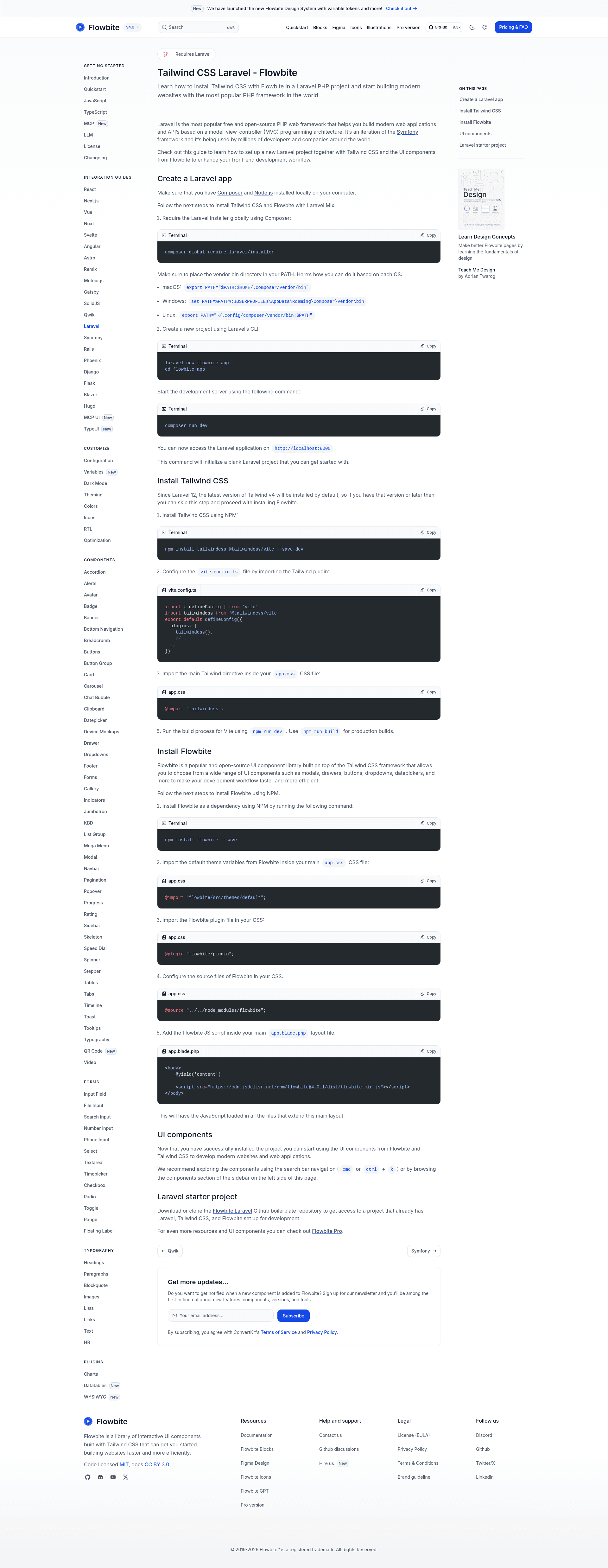
The Tailwind Laravel Starter is a free, open-source boilerplate that combines Laravel 12, Tailwind CSS v4, and the Flowbite UI component library into a single pre-configured starting point for PHP web development.
What is the Tailwind Laravel Starter?
The Tailwind Laravel Starter is a set of instructions and configuration files that produce a blank Laravel 12 project with Tailwind CSS v4 and Flowbite installed. It takes a newly created Laravel application and outputs a development environment where you can immediately use Flowbite's UI components inside Blade templates. The project runs on Laravel's Vite build system and is documented for macOS, Windows, and Linux. It is maintained by the Flowbite team as part of the Flowbite open-source ecosystem.
Key Features
- Laravel 12 default — The boilerplate targets Laravel 12, which auto-installs Tailwind CSS v4, so no separate Tailwind setup is needed on that version.
- Tailwind CSS v4 via Vite — Configuration imports the
@tailwindcss/viteplugin and a single@import "tailwindcss";directive, enabling utility classes and JIT compilation. - Flowbite UI components — Includes access to modals, drawers, buttons, dropdowns, datepickers, and more, with the official
flowbite/pluginand default theme imported in CSS. - CDN script integration — Adds the Flowbite JavaScript (v3.1.2) as a script tag in the main Blade layout, so interactivity loads across all pages that extend it.
- Cross-platform setup — Provides PATH export commands for macOS, Windows, and Linux to install the Laravel installer via Composer.
- Open-source and free — The starter is published as open-source software and is available at no cost.
Who should use the Tailwind Laravel Starter?
PHP developers who want to skip manual Tailwind and Flowbite configuration and go straight to building interfaces with Laravel and Blade. Front-end developers working in Laravel shops who need a consistent UI component set will find it faster than wiring up a component library from scratch. Also useful for teams learning Laravel who want a minimal, blank project with the modern Tailwind v4 tooling already in place.
What can you do with the Tailwind Laravel Starter?
- Laravel developers: quickly bootstrap a new application with the
laravel newcommand and immediately use Flowbite components in Blade views without extra setup. - Agency teams: build client sites on Laravel that need professional UI elements like dropdowns, datepickers, and modals, all styled with Tailwind utilities.
- Tutorial authors: create Laravel tutorials that assume Tailwind and Flowbite are preconfigured, saving readers from repetitive install steps.
How does the starter work?
The process is a sequence of commands. First, install the Laravel installer globally via Composer and add the vendor bin directory to your PATH. Second, create a new Laravel project with laravel new flowbite-app. Third, install Tailwind CSS and the Vite plugin via npm, then import the Tailwind directive in your CSS and run npm run dev. Finally, install Flowbite, import its theme and plugin files, and add the CDN script to your main Blade layout.
Pros and cons
- Pros: Free and open-source; uses the latest Tailwind v4; integrates with Vite for fast development; includes the full Flowbite component library; clear cross-platform instructions.
- Cons: The starter creates a blank Laravel project — no pre-built pages or layouts are included, so you must build your own views. The documented JavaScript setup relies on a CDN link, which means a runtime dependency on that URL unless you change the setup.
Pricing
The Tailwind Laravel Starter is free and open-source. Flowbite itself is open-source, and the components used in this starter are available at no cost.
Alternatives
Laravel Breeze, an official starter kit that also scaffolds Laravel with Tailwind CSS but adds authentication scaffolding and does not bundle the Flowbite component library.
FAQ
Is the Tailwind Laravel Starter really free?
Yes. The starter is published as open-source software and comes at no cost. Flowbite, the UI library it configures, is also open-source and freely usable.
Does it work with Laravel 11 or older versions?
The guide targets Laravel 12 and later, where Tailwind v4 comes preinstalled. For earlier Laravel versions you would need to install Tailwind manually, so the setup steps would differ.
Do I need to install Tailwind CSS separately?
If you're using Laravel 12 or newer, Tailwind v4 is installed automatically, so you can skip the Tailwind installation step and go straight to installing Flowbite. For older versions, the guide includes manual Tailwind installation with the @tailwindcss/vite plugin.
What versions does the guide use?
It uses Laravel 12, Tailwind CSS v4, and Flowbite 3.1.2 (the CDN version specified in the layout example).
Can I customize the components?
Yes, since the source files from Flowbite are imported via the @source directive, you can extend or override the default theme and component styles just like any Tailwind project.