Template details
Free Nonprofit Starter Website
A free Jekyll GitHub Pages template for nonprofits with online donations via DonorBox/Stripe and email capture via TinyLetter.
About this template
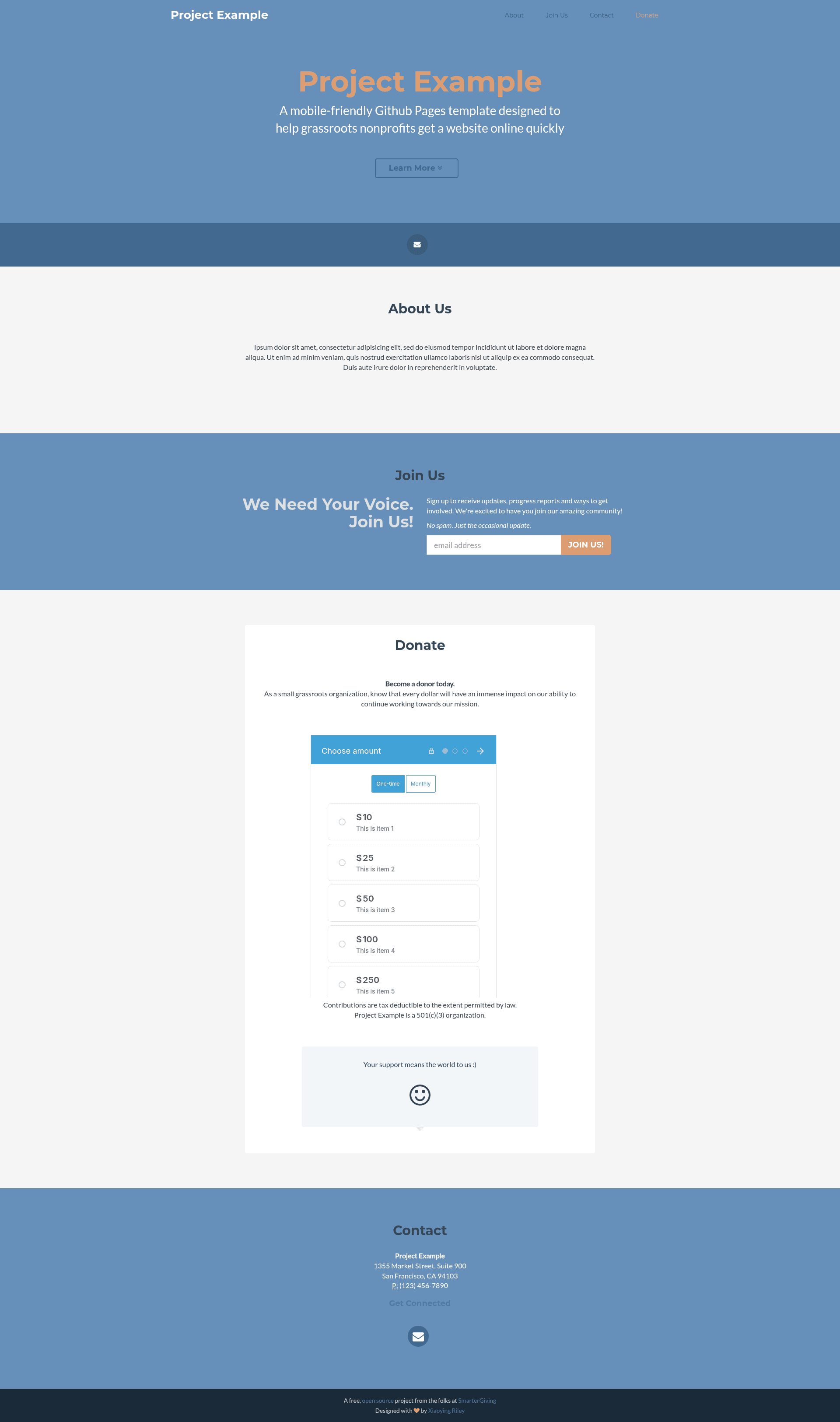
The Free Nonprofit Starter Website is an open-source Jekyll template for GitHub Pages that lets grassroots nonprofits launch a live website with online donations and email capture in about an hour.
What is the Free Nonprofit Starter Website?
The Free Nonprofit Starter Website is a Jekyll-based template distributed under the MIT License by SmarterGiving. It takes a GitHub account and a few edited settings in a _config.yml file and produces a static website hosted at your-org.github.io. The site includes an embedded DonorBox form for Stripe-processed donations and a TinyLetter signup form for email capture.
Key Features
- Open source on GitHub — The site and its code are hosted on GitHub, so volunteers, designers, and developers can fork the repository and submit improvements via pull requests.
- Free hosting on GitHub Pages — The template generates a static site served at
your-org.github.iowith no hosting costs for public repositories. - Online donations via DonorBox and Stripe — A DonorBox campaign form is embedded in the site; Stripe handles credit card processing, and the setup can later switch to a more full-featured fundraising tool.
- Email capture with TinyLetter — A TinyLetter signup form collects supporter addresses to start building a newsletter list.
- No coding skills required — The step-by-step tutorial is written for people who can set up email on a smartphone; editing the configuration file is the only technical step.
- Configuration in one file — Organization name, DonorBox campaign URL, TinyLetter username, and color scheme are all set in
_config.yml. - Built on Bootstrap — The template exposes the full suite of Bootstrap components, so volunteers who know HTML/CSS can extend it with new sections.
- Multiple color schemes — Changing the
color_scheme:option in_config.ymlswaps the site's palette without any HTML edits.
Who is it for?
- Grassroots nonprofits without a web developer — They can follow the tutorial and launch a professional one-page site in under an hour.
- Small organizations that need online donations — They can connect a DonorBox campaign with Stripe to accept credit card payments immediately.
- Charities that want community involvement — Hosting on GitHub lets supporters contribute code, copy, and design improvements through the standard fork-and-pull-request workflow.
- Organizations planning to hire help later — The codebase provides a clean starting point that a contractor can customize without starting from scratch.
What can you do with the Free Nonprofit Starter Website?
- New nonprofits: Launch a live site at
your-org.github.iodemonstrating your mission and contact details immediately after setup. - Fundraising campaigns: Embed a DonorBox donation form and begin collecting supporter email addresses through TinyLetter in the same session.
- Open-source projects: Invite volunteers to improve the site by adding pages, changing the Bootstrap layout, or integrating additional services like analytics.
How does the Free Nonprofit Starter Website work?
The template is a standard GitHub Pages Jekyll site. After forking the repository into your GitHub organization, you edit _config.yml to add your organization's name, DonorBox campaign name, and TinyLetter username; GitHub Pages rebuilds the site automatically. The 7-step tutorial walks through creating GitHub accounts, forking the repo, setting up DonorBox/Stripe and TinyLetter accounts, and entering credentials.
Pricing
The template itself is completely free, with no upfront or ongoing costs. It runs on GitHub Pages, which offers free hosting for public repositories. You will need to create accounts on DonorBox, Stripe, and TinyLetter; those services have their own pricing, which is not specified on this page.
Alternatives
- Squarespace — A paid, drag-and-drop website builder that the template's authors recommend if you prefer a more user-friendly service.
- Wix — Another paid, user-friendly website builder mentioned on the page as an easier alternative.
FAQ
Do I need coding skills to use this template?
No. The tutorial is designed for people who can set up email on a smartphone. You fork the repository, edit a configuration file, and create accounts on DonorBox and TinyLetter — no HTML or CSS is required for the initial launch.
Is the template really free?
Yes, the template is MIT-licensed and there are no upfront or ongoing costs. It runs on GitHub Pages, which provides free hosting for public repositories. Third-party services have their own pricing.
How do I set up online donations?
Create a DonorBox account (which will also set up Stripe for payment processing), add a campaign, and paste the campaign's form URL into _config.yml under the DonorBox username field. The site will then display the donation form.
Can volunteers customize this template?
Because the code lives on GitHub, anyone can fork the repository, modify the Bootstrap-based HTML, and submit a pull request. The README includes suggestions for next steps like setting up a local development environment with GitHub Desktop and Atom.
How do I change the color scheme?
Edit _config.yml and change the color_scheme: option to one of the alternative palettes shown in the template's screenshots. The change takes effect after you commit the file.