Template details
FSW Store
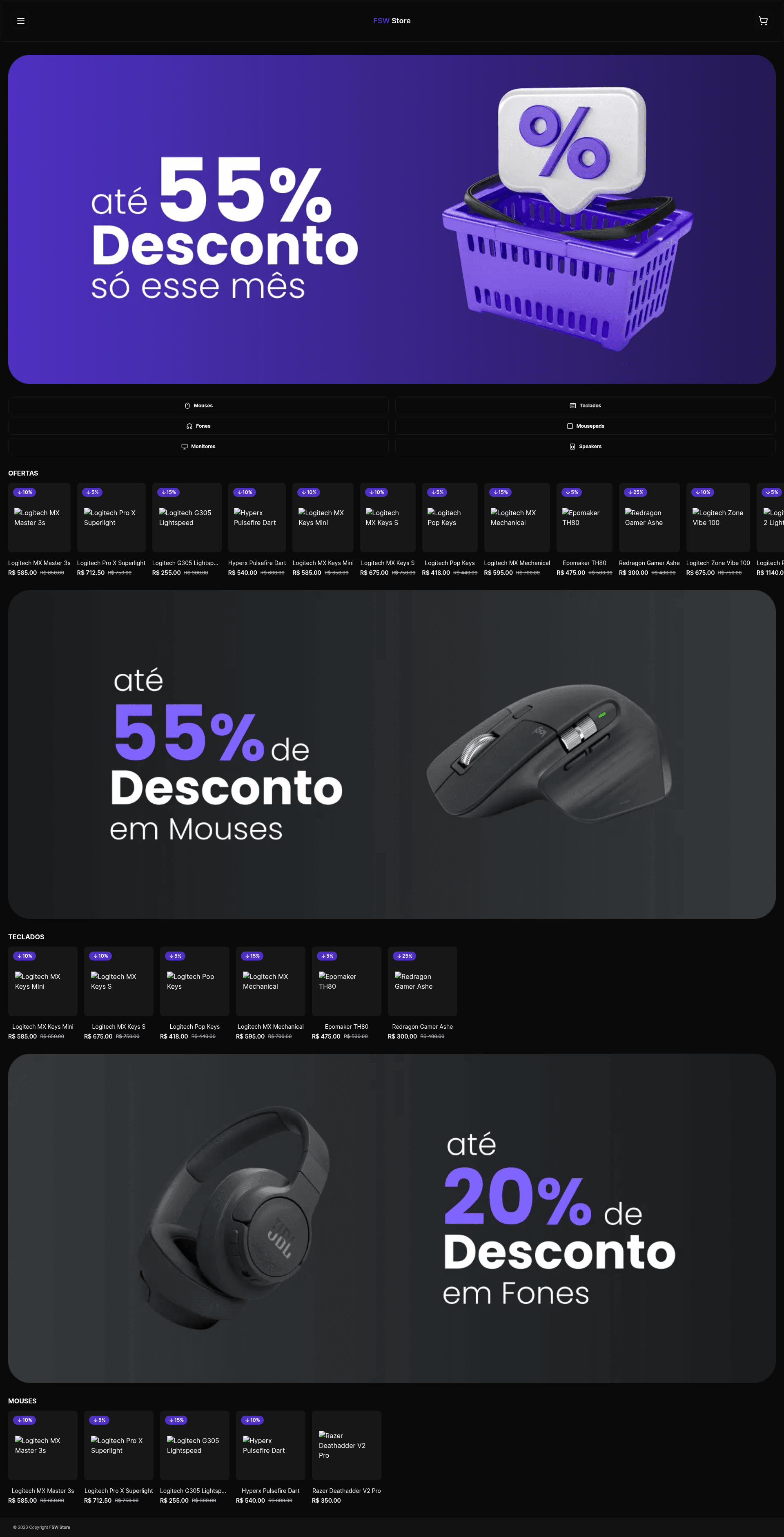
Full-stack technology e-commerce built with Next.js, TypeScript, Tailwind, Prisma, and MongoDB.
About this template
FSW Store is a full-stack technology e-commerce project built with Next.js, TypeScript, Tailwind CSS, and MongoDB that comes with Google authentication, Stripe payments, and Prisma ORM out of the box. Created by GitHub user tuliooov, it serves as a production-ready starting point for developers who want to launch an online storefront without building authentication, payments, and a product catalog from scratch.
What is FSW Store?
FSW Store is a full-stack e-commerce application codebase written primarily in TypeScript, using the Next.js framework for both frontend and backend. It takes environment variables for Google OAuth, Stripe, and a MongoDB connection string as input, and produces a seeded online storefront that can run locally at localhost:3000 or be deployed to Vercel. The project is published on GitHub and also has a live demo hosted at https://fsw-store-omega.vercel.app/.
Key Features
- Next.js framework — The project uses Next.js to serve pages and API routes, with TypeScript as the language.
- Google Authentication — Sign-in flow is handled with Google OAuth, configured via GOOGLE_CLIENT_ID and GOOGLE_CLIENT_SECRET environment variables.
- Stripe Payments — Payment processing is integrated with Stripe using secret, public, and webhook keys.
- MongoDB with Prisma — Data is stored in MongoDB and managed through the Prisma ORM, with schema generation and seeding via
npx prisma generateandnpx prisma db seed. - Tailwind CSS — Styling is done with Tailwind CSS utility classes.
- Radix UI — Accessible headless UI primitives from Radix are used for interactions.
- Vercel Deployment — The storefront is optimized for Vercel hosting, with a live example at fsw-store-omega.vercel.app.
- Environment-based Configuration — All secrets and API keys are externalized to a .env file, allowing separate local and production setups.
Who is it for?
- Full-stack developers who want a ready-made e-commerce architecture with auth and payments already wired up, so they can focus on customizing products and design.
- Next.js learners who want to study a real-world integration of NextAuth, Stripe, Prisma, and Tailwind in a single project.
- Freelancers or small agencies that need a quick starting point for client storefronts, using the seeded data and configuration as a foundation.
What can you do with FSW Store?
- Launch a tech storefront — After cloning the repo and adding your environment variables, you can seed a product catalog and run the store locally or deploy it to Vercel.
- Customize the design — Modify Tailwind classes and Radix UI components to change the look and feel of the store without rewriting logic.
- Integrate real payments — Replace the Stripe test keys with production keys to accept actual payments.
- Use it as a teaching reference — Examine how Google OAuth, Stripe webhooks, and Prisma seeding are implemented together in a Next.js app.
How does FSW Store work?
The setup workflow is documented in the README: create a .env file, add the required environment variables (DATABASE_URL, Google OAuth keys, Stripe keys, NEXTAUTH_SECRET, HOST_URL), generate the Prisma client, seed the database, then run npm run dev to start the development server on localhost:3000.
FAQ
What do I need to run FSW Store?
You need a MongoDB database (the README shows a mongodb+srv connection string), Google OAuth credentials for authentication, Stripe keys for payments, and a NEXTAUTH_SECRET value. These are placed in a .env file before running Prisma commands.
Does FSW Store use Stripe for payments?
Yes, payments are handled with Stripe. The environment configuration includes STRIPE_SECRET_KEY, STRIPE_WEBHOOK_SECRET_KEY, and NEXT_PUBLIC_STRIPE_PUBLIC_KEY, indicating both the server-side and client-side payment integration.
What authentication does FSW Store use?
Authentication uses Google OAuth via NextAuth. You must provide GOOGLE_CLIENT_ID and GOOGLE_CLIENT_SECRET in the environment variables, and the NEXTAUTH_SECRET is used to secure sessions.
Can I deploy FSW Store to Vercel?
Yes, the project is deployed on Vercel, and the live demo at fsw-store-omega.vercel.app is on Vercel. The README lists Vercel Host as part of the stack.
How do I populate the store with products?
The database is seeded using Prisma. After creating your .env and running npx prisma generate, you run npx prisma db seed to insert initial product data into MongoDB.