Template details
Gatsby Github Personal Website
A GatsbyJS starter that builds a developer portfolio site auto-populated from GitHub data and hosted on GitHub Pages.
About this template
The Gatsby Github Personal Website is an open-source starter template that builds a developer portfolio site with GatsbyJS, auto-populates it from GitHub data, and hosts it for free on GitHub Pages. It is a JavaScript port of GitHub's original personal-website repository and is released under the MIT License.
What is the Gatsby Github Personal Website?
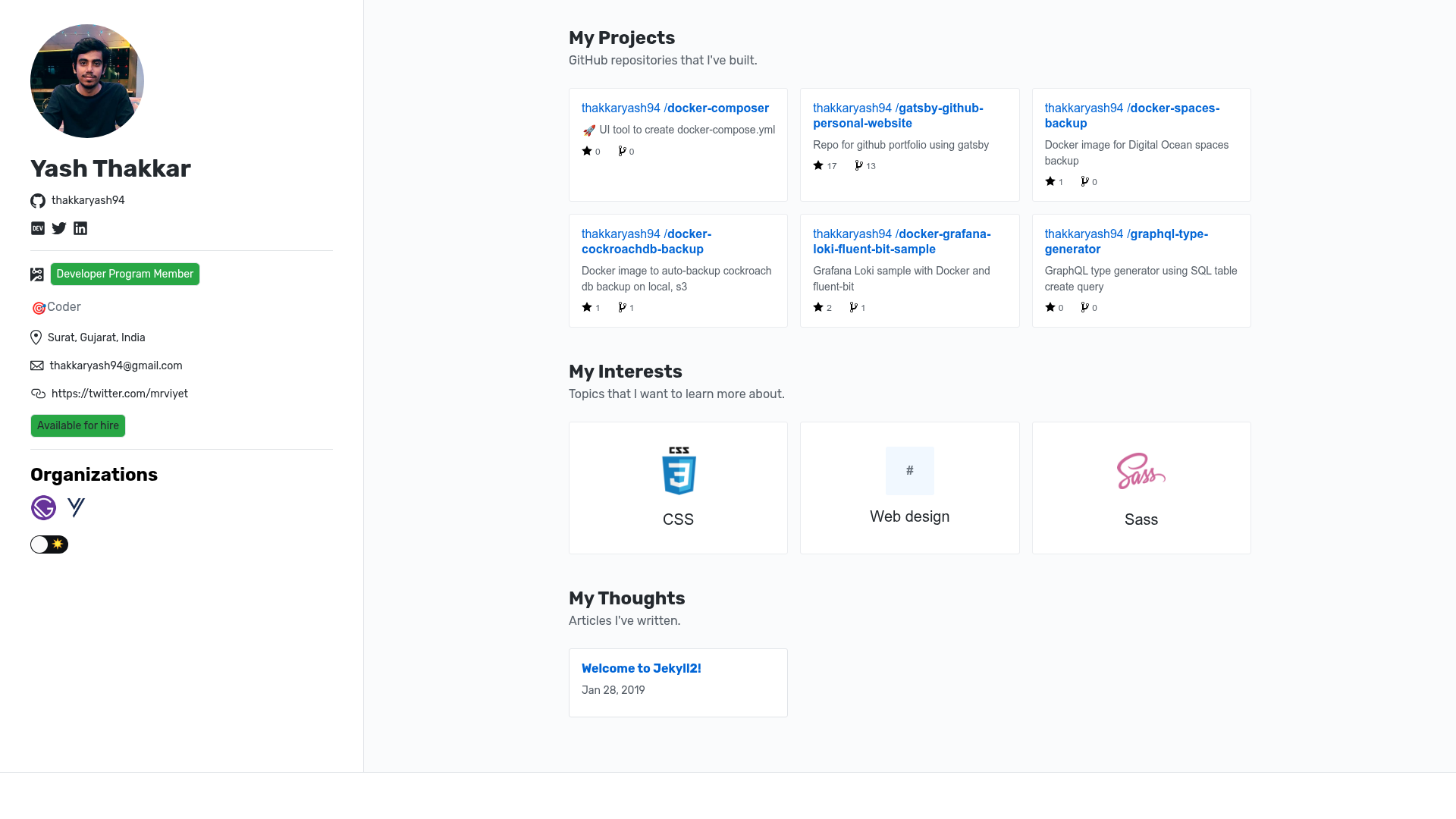
This is a GatsbyJS-based starter repository that generates a personal website for software developers. It takes a GitHub username and a personal access token as input, fetches profile information, repositories, and topics through GitHub's GraphQL API, and produces a static site with a photo, bio, project listings, and blog. The final output is a folder of static HTML, CSS, and JavaScript files that can be served from the root of any GitHub Pages repository.
Key Features
- GitHub API autopopulation — Uses a personal access token to fetch your profile, repos, and interests via the GraphQL API, so the site fills in without manual content entry.
- Dual layout options — Switch between a two-column sidebar layout and a single-column stacked layout by changing the
layoutvalue ingatsby-config.js. - Light and dark themes — Toggle the
stylevalue fromlighttodarkingatsby-config.jsto swap between white/dark text backgrounds. - Markdown blog — Write posts as
.mdfiles in/data/posts/with aYEAR-MONTH-DAY-title.mdfilename andtitlefront matter; a sample post ships withpublished: false. - Reusable components — The
/components/directory includesinterests.js,masthead.js,postCard.js,projects.js,repoCard.js,thoughts.js, andtopicCard.jsto display interests, profile info, posts, and repos. - Three page layouts —
default,home, andpostlayouts are prebuilt;homeis used on the index page andpostis used for blog entries. - Primer CSS styling — Loads GitHub Primer CSS via an
@importfrom unpkg and allows custom overrides through/assets/styles.scss. - Custom domain support — Once hosted, you can add a custom domain in the repository's Custom domain settings and configure your DNS provider.
Who is it for?
Developers who want a personal portfolio without designing a site from scratch can fork this starter and have a live site in minutes. Job seekers and freelancers can use it to display their GitHub repositories and blog posts as a professional online presence. Gatsby learners can study a working example of a Gatsby site wired to GitHub's API and deployed on GitHub Pages.
What can you do with it?
- Personal branding: Show your bio, avatar, interests, and newest GitHub repositories on a home page generated from your profile data.
- Technical blogging: Publish Markdown posts from
/data/posts/; each becomes a page under your site's URL and appears in the "My Thoughts" listing. - Custom domain setup: Point your own domain to the GitHub Pages site using the repository's Custom domain field and a DNS provider.
- Learning Gatsby: Use the starter's source code to see how Gatsby queries GitHub's GraphQL API and builds static pages.
How does it work?
After forking the repository, create a GitHub personal access token with the scopes public_repo, read:org, read:user, and user:email. Then run npm install followed by GITHUB_TOKEN=YOUR_GITHUB_TOKEN npm run develop to preview at http://localhost:8000. For deployment, GITHUB_TOKEN=YOUR_GITHUB_TOKEN npm run gh-build generates the static site into a public folder and copies those files to the repository root, ready for GitHub Pages.
FAQ
Do I need a GitHub personal access token?
Yes. The starter uses the token to authenticate with GitHub's GraphQL API and fetch your profile data. The README specifies the exact scopes to grant and warns not to commit the token to the repository.
Can I use a custom domain?
Yes. Set your domain in the repository's "Custom domain" settings on GitHub and configure a DNS provider. The GitHub Pages docs linked from the README cover the process.
How do I add a blog post?
Create a Markdown file in the /data/posts/ directory with a filename like 2025-01-01-my-post.md and include title in the front matter. The included placeholder post uses published: false, which hides it from the site.
What CSS framework is used?
The template is pre-configured with GitHub's Primer CSS framework, loaded through an @import in layout.scss. You can extend it by adding custom styles to /assets/styles.scss.
Is this template free?
Yes, the theme is open source under the MIT License, so you can use, modify, and redistribute it freely.