Template details
Gatsby Starter Hyperspace
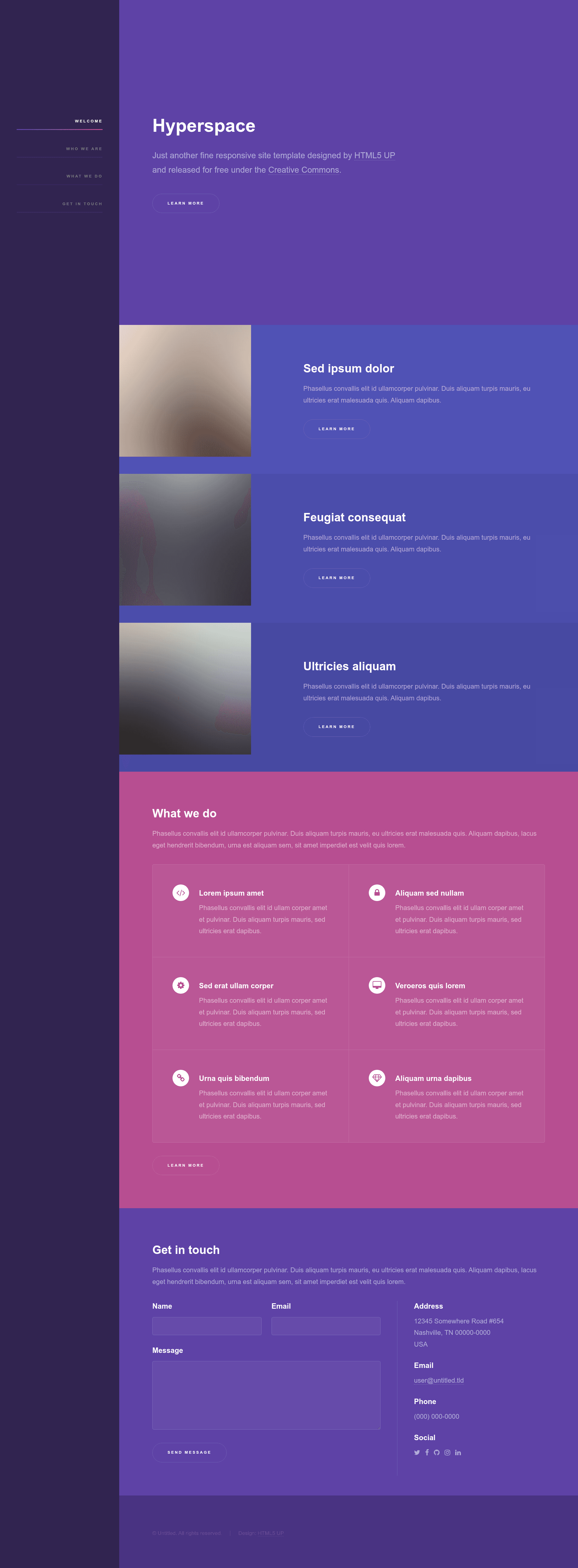
Gatsby.js V4 starter template based on the Hyperspace design by HTML5 UP for building single-page portfolio sites.
About this template
Gatsby Starter Hyperspace is a free, open-source Gatsby.js V4 starter template that scaffolds a single-page website based on the Hyperspace design by HTML5 UP. It is published on GitHub by Anubhav Srivastava and is part of a series of Gatsby starters based on HTML5 UP templates.
What is Gatsby Starter Hyperspace?
Gatsby Starter Hyperspace is a Gatsby.js V4 starting point that wraps the Hyperspace template from HTML5 UP in a modern React-based static site generator. It takes the Hyperspace layout — a single-page portfolio design with sidebar navigation and feature sections — and provides it as reusable React components, a sample homepage, and a standard Gatsby project structure. The output is a fully static website that can be deployed to any static host, including GitHub Pages. The repository includes configuration files such as config.js for site metadata and path-prefix settings.
Key Features
- Gatsby.js V4 and React — Built on Gatsby V4 and React, giving you a component-based architecture and static site generation out of the box.
- Hyperspace design from HTML5 UP — Implements the Hyperspace single-page layout, a portfolio-style design with an intro section, feature blocks, and a sidebar.
- GitHub Pages deployment — Includes an
npm run deployscript that uses thegh-pagesmodule to publish your built site to GitHub Pages. - Path-prefix support — A
pathPrefixvalue inconfig.jslets you host the site on a subpath likehttps://example.com/somePath/, or remove it for root-level hosting. - Gatsby CLI setup — Install with a single command:
gatsby new <site-name> https://github.com/anubhavsrivastava/gatsby-starter-hyperspace. - MIT licensed — The project is released under the MIT open-source license, so you can use it freely in personal and commercial projects.
- Related starter series — Part of a curated collection of over a dozen Gatsby starters, including Casual, Grayscale, and Spectral, all based on HTML5 UP designs.
Who is it for?
Gatsby Starter Hyperspace is for developers who want a pre-built Gatsby site with the Hyperspace design rather than starting from scratch. It suits freelance designers and developers looking for a portfolio homepage template, startup founders wanting a single-page landing site, and anyone already familiar with Gatsby who wants to experiment with a new layout. Because the code is component-based, it also works as a learning reference for how to port an HTML5 UP theme into a Gatsby project.
What can you do with it?
- Portfolio sites: Replace the sample content in the intro and feature sections to present your own projects, skills, or services.
- Landing pages: Adapt the single-page structure into a product or personal landing page with a call-to-action in the intro section.
- Learning Gatsby: Study how the starter organizes components, pages, and configuration to learn Gatsby's folder conventions and static data handling.
How do I install and run it?
Run npm install --global gatsby-cli to install the Gatsby CLI, then create a new site with gatsby new <site-name> https://github.com/anubhavsrivastava/gatsby-starter-hyperspace. Inside the new directory, execute npm install and then gatsby develop to start a local development server. The site is ready for production builds with gatsby build.
How do I deploy it to GitHub Pages?
The package.json includes a script that publishes the site to GitHub Pages. Simply run npm run deploy after building the site, and the gh-pages module will push the output to the gh-pages branch. If your site is hosted on a subpath, update pathPrefix in config.js; if it is at the root, remove the path-prefix configuration.
Pricing and license
The template is free to use and distributed under the MIT License. The LICENSE file is included in the repository, and the README links to the open-source license badge.
Alternatives
The same author maintains other Gatsby starters built on HTML5 UP designs, including gatsby-starter-casual, gatsby-starter-grayscale, and gatsby-starter-spectral. Each follows the same Gatsby setup but uses a different visual theme.
FAQ
Is Gatsby Starter Hyperspace free?
Yes, the starter is free and released under the MIT License, so you can use it without cost in personal or commercial projects.
How do I create a new site with this starter?
First install the Gatsby CLI globally with npm install --global gatsby-cli, then run gatsby new <site-name> https://github.com/anubhavsrivastava/gatsby-starter-hyperspace. The command clones the repository and installs dependencies.
Can I deploy the generated site to GitHub Pages?
Yes, the project includes a deploy script. Run npm run deploy and the gh-pages module will publish your site to GitHub Pages. You may need to adjust the pathPrefix in config.js if hosting on a subpath.
Does this starter work with a custom domain?
Yes, since the build output is a static site, you can point any custom domain to the hosting service. For GitHub Pages, set the custom domain in the repository settings.
What version of Gatsby does this starter use?
The README states that it is a Gatsby.js V4 starter template, so it expects a project built with Gatsby V4 or later.