Template details
Nuxt Hacker News
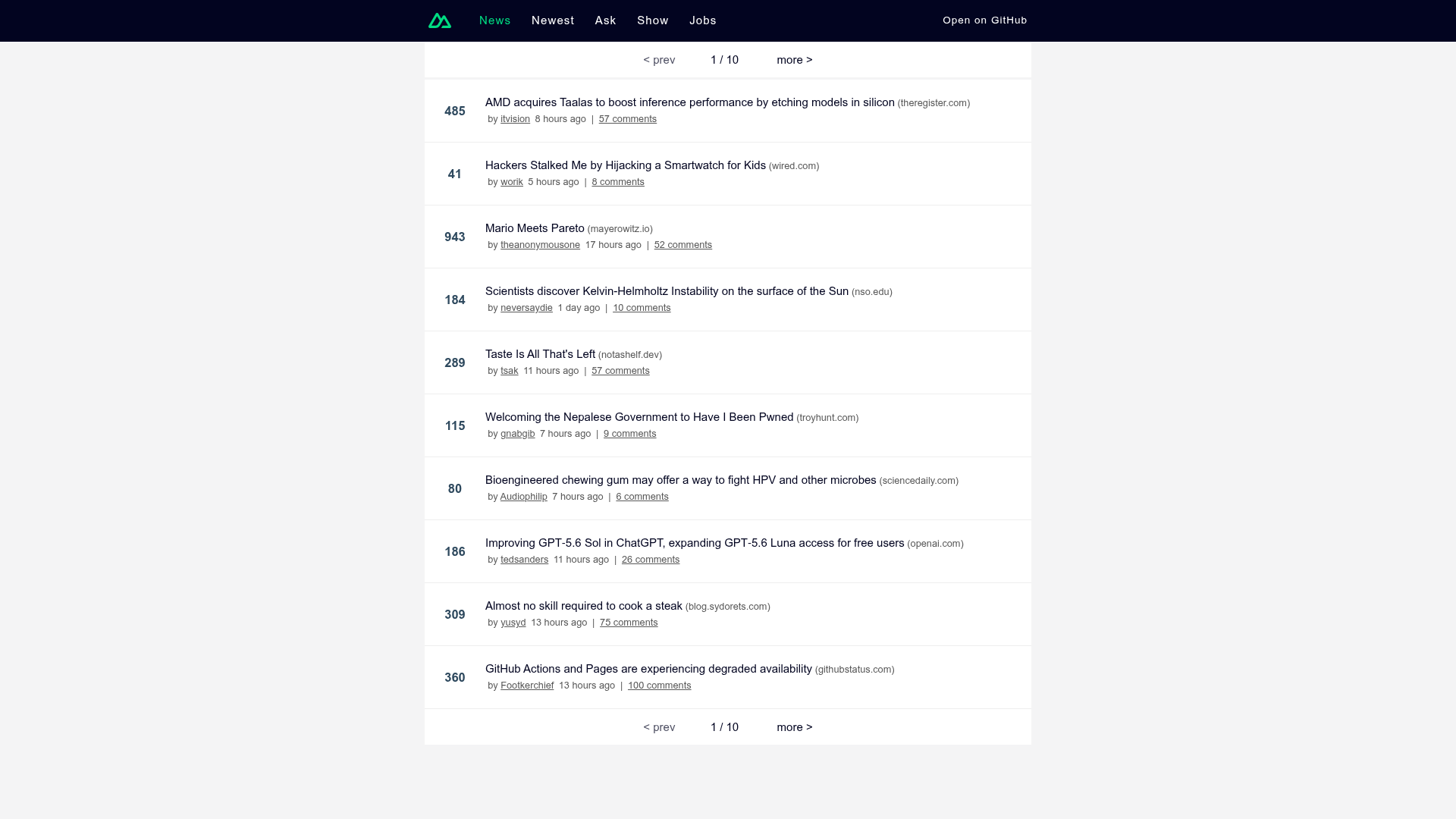
Hacker News clone built with Nuxt, featuring server-side rendering, code splitting, and zero-config deployment.
About this template
Nuxt Hacker News is an open-source Hacker News clone built on the Nuxt framework, designed to showcase server-side rendering and universal Vue applications in a real-world project. It is maintained in the Nuxt GitHub organization and is a modern port of the classic vue-hackernews-2.0 project.
What is Nuxt Hacker News?
Nuxt Hacker News is a fully functional Hacker News client that consumes the live Hacker News API and renders it as a server-side-rendered Vue application. It outputs a Nuxt app with SSR, code splitting, and prefetching, and it can run locally or be deployed to any Node.js or serverless host. The template ships under the MIT license and has gathered over 1,400 stars on GitHub, with a live demo available at hn.nuxt.dev.
Key Features
- Server-side rendering — The app renders on the server and hydrates on the client, achieving a Lighthouse score of 100/100 on Slow 4G with a Mobile Moto G4 (see the PageSpeed report linked from the demo).
- Vite HMR development — Development mode uses Vite for instant hot module replacement; run
npm run devto see changes live at localhost:3000. - Zero-config deployment — Nitro powers the server engine, so the same codebase deploys to Vercel, Netlify, Cloudflare, and other platforms without configuration. The demo is hosted on Cloudflare Pages via NuxtHub.
- Code splitting and prefetching — Route-level code splitting loads only the necessary JavaScript per page, and the template prefetches/preloads JS, DNS, and data to speed up navigation.
- Rich Vue ecosystem — Built with Vue and uses vue-router for routing and Vuex for state management, mirroring the architecture of the original vue-hackernews-2.0.
Who should use Nuxt Hacker News?
Nuxt developers can use it as a reference implementation for building an isomorphic app that pairs SSR with Vite and Nitro. Vue developers who want to see a real-world port from Vue 2 to modern Nuxt can compare the main branch to the nuxt2 branch. Teams evaluating Nuxt can deploy this template to test performance and CDN hosting options before starting a new project, and open-source contributors can study an official MIT-licensed example from the Nuxt organization.
What can you do with Nuxt Hacker News?
- Learn SSR patterns — Inspect the code to see how data fetching, prefetching, and hydration are handled in a Nuxt app with Vuex.
- Deploy a live demo — Follow the demo's approach: build with
npm run buildand host the output on a serverless platform like Cloudflare Pages. - Extend it into a custom news reader — Modify the API calls, styling, and routes to create a personalized feed or aggregator.
How does Nuxt Hacker News work?
The project follows a standard Nuxt workflow. After cloning the repository, install dependencies with npm install, run npm run dev for a hot-reloading dev server, and use npm run build to produce a server-rendered production build that can be served with npm start. The demo itself is deployed to Cloudflare Pages using NuxtHub and is built with the same npm run build command.
Pricing
Nuxt Hacker News is free. The repository is published under the MIT license, so you can use it for commercial and personal projects without charge.
FAQ
Is Nuxt Hacker News free to use?
Yes, the project is open source under the MIT license, allowing free use, modification, and distribution even in commercial projects. There are no paid tiers or premium features.
What Node.js version is required?
Node.js 14 or newer is required for the build tooling and dev server. The setup instructions list this as the minimum version for installing dependencies and running the app.
Which platforms can I deploy to?
Because the app uses Nitro, it deploys to any platform that supports Node.js or serverless functions—including Vercel, Netlify, and Cloudflare. The demo is hosted on Cloudflare Pages with NuxtHub.
Where is the Nuxt 2 version?
The repository keeps a dedicated nuxt2 branch with the older Nuxt 2 implementation. The main branch focuses on the modern Nuxt setup with Vite and Nitro.
How do I run the app during development?
Run npm install once to install dependencies, then npm run dev to start the development server with hot module replacement at http://localhost:3000. npm run lintfix runs ESLint and Prettier to validate and format the code.