Template details
Gatsby Starter - WordPress Twenty Twenty
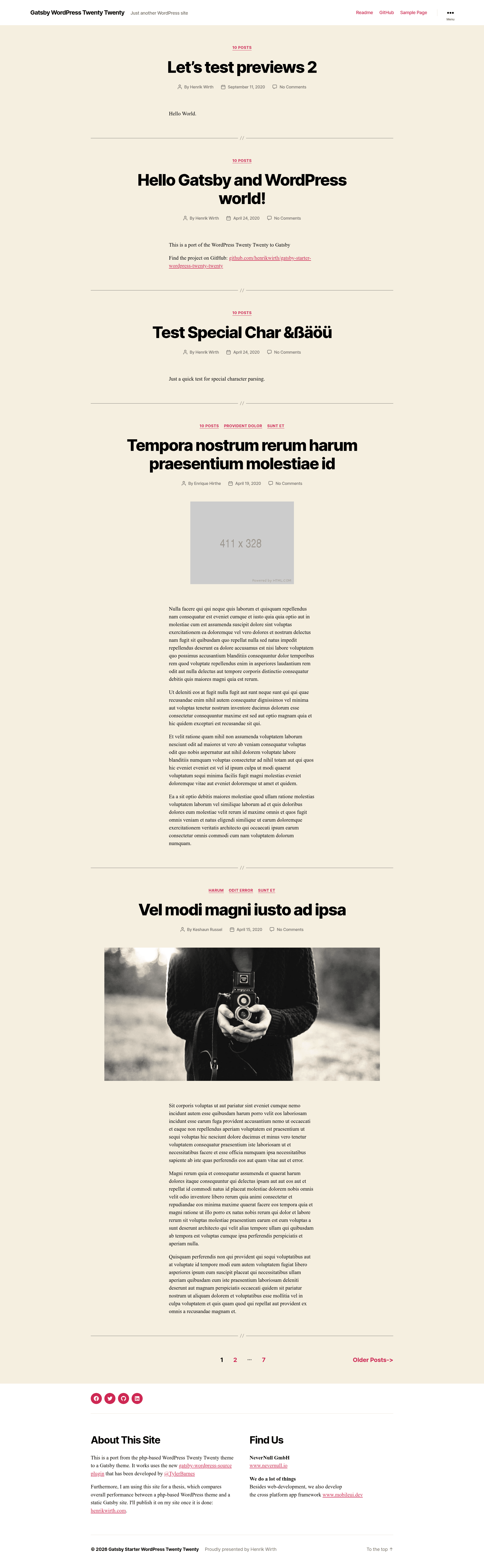
A port of the WordPress Twenty Twenty theme to Gatsby.
About this template
Gatsby Starter - WordPress Twenty Twenty is a boilerplate that ports the default WordPress Twenty Twenty theme to a Gatsby site, using Gatsby V3 and the gatsby-source-wordpress v5 plugin. It takes a WordPress site that runs the Twenty Twenty theme and WPGraphQL/WPGatsby plugins as input, and produces a static Gatsby front end with the same visual design and menu structure. The starter is maintained as an open-source repository and links to the official documentation for the source plugin.
What is this Gatsby starter?
This starter reproduces the WordPress Twenty Twenty theme as a Gatsby site. It connects to a WordPress backend through the gatsby-source-wordpress v5 package, which pulls content via the WPGraphQL API. The output is a static-site build that can be deployed on any Gatsby-supported host. The repository is authored by the team at NeverNull GmbH and acknowledges core contributors to gatsby-source-wordpress and WPGraphQL.
Key Features
- Gatsby V3 and gatsby-source-wordpress v5 — The starter is built on Gatsby V3 and the modern v5 source plugin, tested with gatsby-source-wordpress 5.5.0 and gatsby-plugin-image 1.5.0.
- WordPress plugin requirements — Requires the WPGraphQL and WPGatsby WordPress plugins to expose content and build hooks; tested with WPGraphQL 1.3.5 and WPGatsby 1.0.8.
- Three menu locations — Supports the 'primary' top menu, 'extended' drawer menu, and 'social-links-menu' footer/drawer menu, all pulled from WordPress.
- Social menu icons — A SocialMenu.js component parses SVGs based on the link label, allowing custom social icons without an icon library.
- Environment-based configuration — A .env.example file is provided; renaming it to .env and setting WPGRAPHQL_URL and SITE_URL configures the GraphQL endpoint and the frontend domain for SEO image URLs.
- Documented limitations — The starter clearly lists unimplemented features: comments, monthly archive pages, and tags (only categories are supported).
Who is it for?
- Gatsby developers who want a jump-start on a WordPress-backed site without designing a new theme from scratch.
- WordPress agencies building headless or static-site versions of client sites that already use the Twenty Twenty theme.
- Bloggers and content sites that want to migrate from a classic WordPress theme to a faster static Gatsby front end while keeping the same look and content structure.
What can you do with it?
- Migrate an existing WordPress Twenty Twenty site — Point the starter at a WordPress install with WPGraphQL and WPGatsby, and it will generate a static Gatsby site with posts, pages, and menus.
- Set up a three-tier navigation — Use the primary, extended, and social menu slots to replicate the original theme's header, drawer, and footer navigation.
- Customize the social icon set — Edit SocialMenu.js to add or change SVG icons for social links based on the link label from WordPress.
How does the setup work?
The README provides a four-step setup process. First, install and activate the WPGatsby and WPGraphQL plugins on the WordPress site. Second, install and activate the default WordPress Twenty Twenty theme. Third, create the three required menus with the slugs 'primary', 'extended', and 'social-links-menu'. Fourth, rename .env.example to .env and fill in WPGRAPHQL_URL and SITE_URL. After that, the Gatsby build pulls the content from WordPress.
Known limitations
The starter does not implement comments, monthly archive pages, or tags; only categories are available for taxonomy. The README invites users to suggest additional fixes as issues.