Template details
Gatsby Status Dashboard
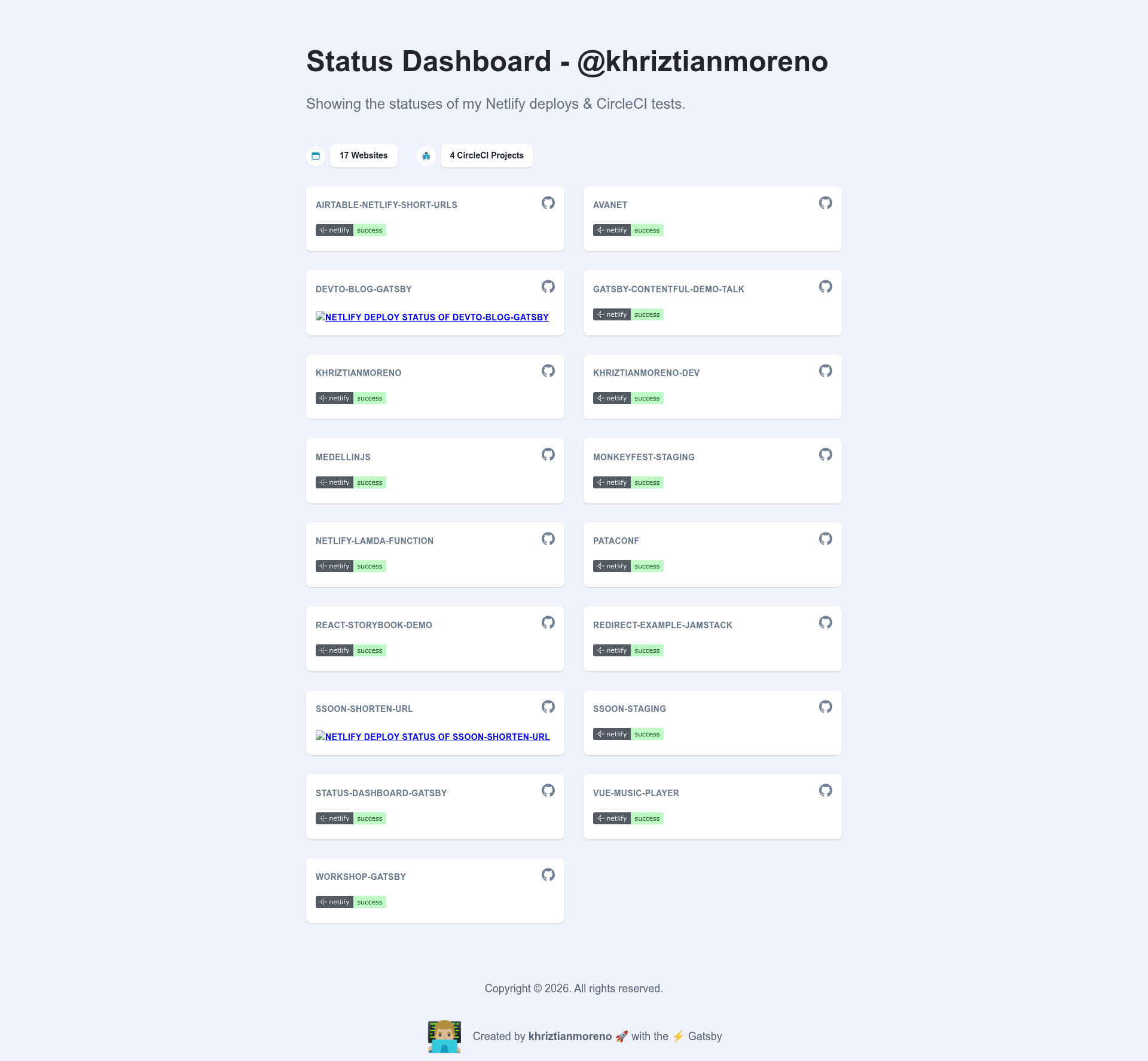
Dashboard showing the statuses of Netlify builds and CircleCI tests, built with Gatsby.
About this template
Gatsby Status Dashboard is a Gatsby starter and theme that renders a public status dashboard for Netlify deployment status and CircleCI test results. Built by khriztianmoreno, it pulls live data through the gatsby-source-netlify and gatsby-source-circleci plugins and exposes two React components rather than a prebuilt page.
What is Gatsby Status Dashboard?
Gatsby Status Dashboard is a Gatsby starter that shows the status of Netlify deploys and CircleCI projects in one place. It takes API keys as environment variables and outputs a static site with a card grid of each site's build status. The project is MIT-licensed, has a live demo at status-dashboard-gatsby.netlify.com, and is designed to be deployed to Netlify with one click.
Key Features
- Info component — Displays the total number of Netlify websites and CircleCI projects, such as "18 Websites" and "7 CircleCI Projects", using a simple text layout.
- Grid component — Renders each site as a card in a CSS Grid layout; each card shows the site name, links to GitHub and CircleCI, Netlify deploy status, and optionally the matching CircleCI status.
- Source plugin integration — Fetches data via
gatsby-source-netlifyandgatsby-source-circleci, which query the Netlify and CircleCI APIs at build time. - Environment variable setup — Requires two environment variables,
NETLIFY_ACCESS_KEYandCIRCLECI_KEY, to authenticate with both services. - One-click deploy — A Deploy to Netlify button in the repository clones the example and provisions a new Netlify site without manual configuration.
- Formatters shadowing — Supports a
formattersfile that can be shadowed to replace words in GitHub URLs, normalizing project links between Netlify and CircleCI. - Theme architecture — The starter is built on a Gatsby theme, so developers can override components and utilities using standard theme shadowing.
Who is it for?
- Developers using Netlify and CircleCI who want a clean, static status page showing the health of their builds and tests without maintaining a server.
- Gatsby theme learners who want a real-world example of shadowing components and formatters in a Gatsby theme structure.
- Open-source contributors — the repository is marked with hacktoberfest and welcomes pull requests, making it a good first project for contributing to Gatsby starters.
What can you do with it?
- Publish a live status dashboard for your own Netlify sites and CircleCI projects by adding your two API keys and deploying once.
- Customize the look and feel by shadowing the
InfoandGridcomponents to change layout, styling, and rendered data. - Normalize CI project matching by editing the formatters file so that GitHub URLs from Netlify match the ones used in CircleCI, which is required for side-by-side status display.
How does the starter work?
The README's getting-started flow is: clone the repository with git clone, navigate into the folder, run gatsby develop, and configure NETLIFY_ACCESS_KEY and CIRCLECI_KEY. The starter does not generate its own page; you import the Info and Grid components into your Gatsby layout. The theme then queries both APIs at build time, formats the data, and renders the status cards statically, so the output is a fast, serverless-ready site.