Template details
Gatsby Typescript Jest Starter
Gatsby starter with TypeScript, Jest, ESLint, Prettier, and GitLab-CI deployment to AWS S3 buckets.
About this template
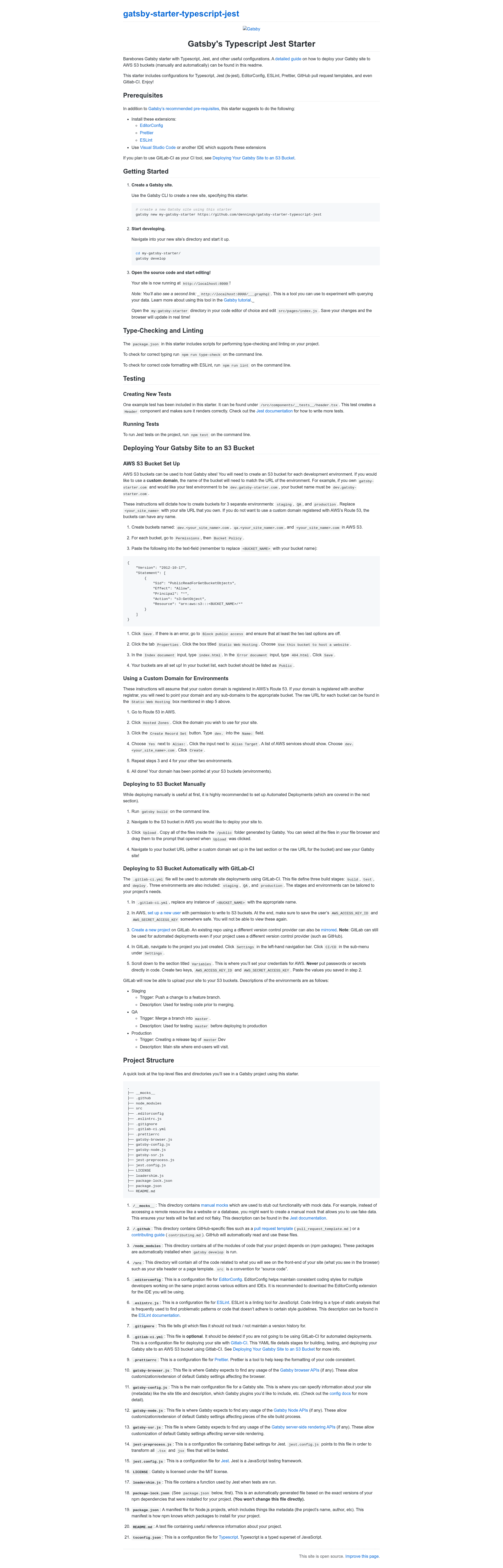
Gatsby Typescript Jest Starter is a Boilerplate starter for Gatsby sites that wires up TypeScript, Jest, ESLint, Prettier, and optional GitLab-CI deployment to AWS S3 buckets. It was created by GitHub user denningk and is described in its README as a barebones Gatsby starter that also ships with a detailed guide for deploying your site to AWS S3, both manually and automatically.
What is the Gatsby Typescript Jest Starter?
This starter takes a new Gatsby project name as input and scaffolds a working site through the gatsby new my-gatsby-starter https://github.com/denningk/gatsby-starter-typescript-jest command. It runs on the Gatsby framework using Node.js and npm, and it outputs a static site in the /public folder after running gatsby build. The repository includes Gatsby's standard configuration files — gatsby-config.js, gatsby-node.js, gatsby-browser.js, and gatsby-ssr.js — so browser APIs, Node APIs, and server-side rendering APIs can be customized directly.
Key Features
- TypeScript configuration — A
tsconfig.jsonis included, and thenpm run type-checkscript lets you statically check your.tsxsource files from the command line. - Jest testing setup — Jest is wired through
jest.config.js,jest-preprocess.jsfor Babel transforms, andloadershim.js; an example snapshot test lives at/src/components/__tests__/header.tsxand verifies that theHeadercomponent renders correctly. - ESLint and Prettier —
.eslintrc.jsand.prettierrcare provided, withnpm run lintfor checking code style, plus an.editorconfigto keep consistent formatting across editors and IDEs. - GitHub pull request template — The
/.githubdirectory contains GitHub-specific files such as a pull request template, so contributors follow the same PR structure. - GitLab-CI pipeline — A
.gitlab-ci.ymldefinesbuild,test, anddeploystages with staging, QA, and production environments that deploy the generated/publicfolder to versioned AWS S3 buckets automatically. - Manual AWS S3 deployment path — The README documents creating S3 buckets named after environment domains, enabling static web hosting with
index.htmland404.html, and uploading thepublicfolder by hand. - Jest manual mocks — The
__mocks__directory provides a pattern for stubbing remote resources so tests stay fast and deterministic.
Who is it for?
- Gatsby developers who want TypeScript and Jest configured from the start instead of manually adding them to the official default starter.
- Small product teams that want automated staging, QA, and production deploys to AWS S3 through GitLab-CI without maintaining a separate hosting service.
- Gatsby beginners following the Gatsby tutorial can use the bundled GraphiQL tool at
http://localhost:8000/___graphqlto experiment with data queries while editingsrc/pages/index.js. - Open-source maintainers who want a consistent contribution workflow through the included GitHub pull request template.
What can you do with the Gatsby Typescript Jest Starter?
- Set up a new Gatsby site quickly: run one
gatsby newcommand with the starter's repository URL to get a working site with TypeScript, Jest, ESLint, and Prettier preconfigured. - Run quality checks before committing: use
npm run type-check,npm run lint, andnpm testto catch type errors, style issues, and test failures locally. - Deploy manually to AWS S3: run
gatsby build, then upload everything inside the generated/publicfolder to an S3 bucket configured for static website hosting. - Automate multi-environment deploys: push to a feature branch to deploy to staging, merge into
masterto deploy to QA, and create a release tag to deploy to production, all through the included GitLab-CI pipeline.
How does this starter work?
First, create a new site with gatsby new my-gatsby-starter https://github.com/denningk/gatsby-starter-typescript-jest. Then gatsby develop starts the development server at http://localhost:8000, while npm test, npm run lint, and npm run type-check run the testing, linting, and type-checking tools. For deployment, gatsby build generates the static /public folder, which you either upload manually to S3 or let GitLab-CI upload based on the stages and triggers defined in .gitlab-ci.yml.
Pros and cons
Pros:
- TypeScript, Jest, ESLint, and Prettier are all configured, so there is no initial setup time for those tools.
- The GitLab-CI file and the README's S3 instructions cover staging, QA, and production environments with clear triggers.
- The example test and the
__mocks__directory give a concrete pattern for adding more component and snapshot tests.
Cons:
- AWS S3 bucket creation, bucket policy configuration, and static website hosting setup are manual steps that must be completed before the first deployment.
- The
.gitlab-ci.ymlfile is optional; the README says it should be deleted if you do not plan to use GitLab-CI.
Alternatives
- Gatsby's official default starter — a more minimal starting point without TypeScript and Jest, which you would need to add yourself.
FAQ
Is the Gatsby Typescript Jest Starter free?
Yes. The starter ships with an MIT LICENSE file, and the README notes that Gatsby is licensed under the MIT license. You can use the starter for personal or commercial projects without paying a fee.
What commands does this starter include?
npm run type-check runs TypeScript type checking, npm run lint runs ESLint, and npm test runs Jest tests. For development, gatsby develop starts the server at http://localhost:8000, and gatsby build creates the static output in /public for deployment.
Does this template deploy to AWS S3 automatically?
Yes, if you use GitLab-CI. The .gitlab-ci.yml triggers staging, QA, and production deploys on feature branch pushes, merges into master, and release tags of master respectively. You must first set AWS_ACCESS_KEY_ID and AWS_SECRET_ACCESS_KEY as variables in GitLab's CI/CD settings.
Where can I find the example test?
The starter includes one example Jest snapshot test at /src/components/__tests__/header.tsx. It creates the Header component and verifies it renders correctly. The jest-preprocess.js file contains Babel settings that let Jest transform .tsx and .jsx files during testing.