Template details
Gatsby WordPress Theme Phoenix
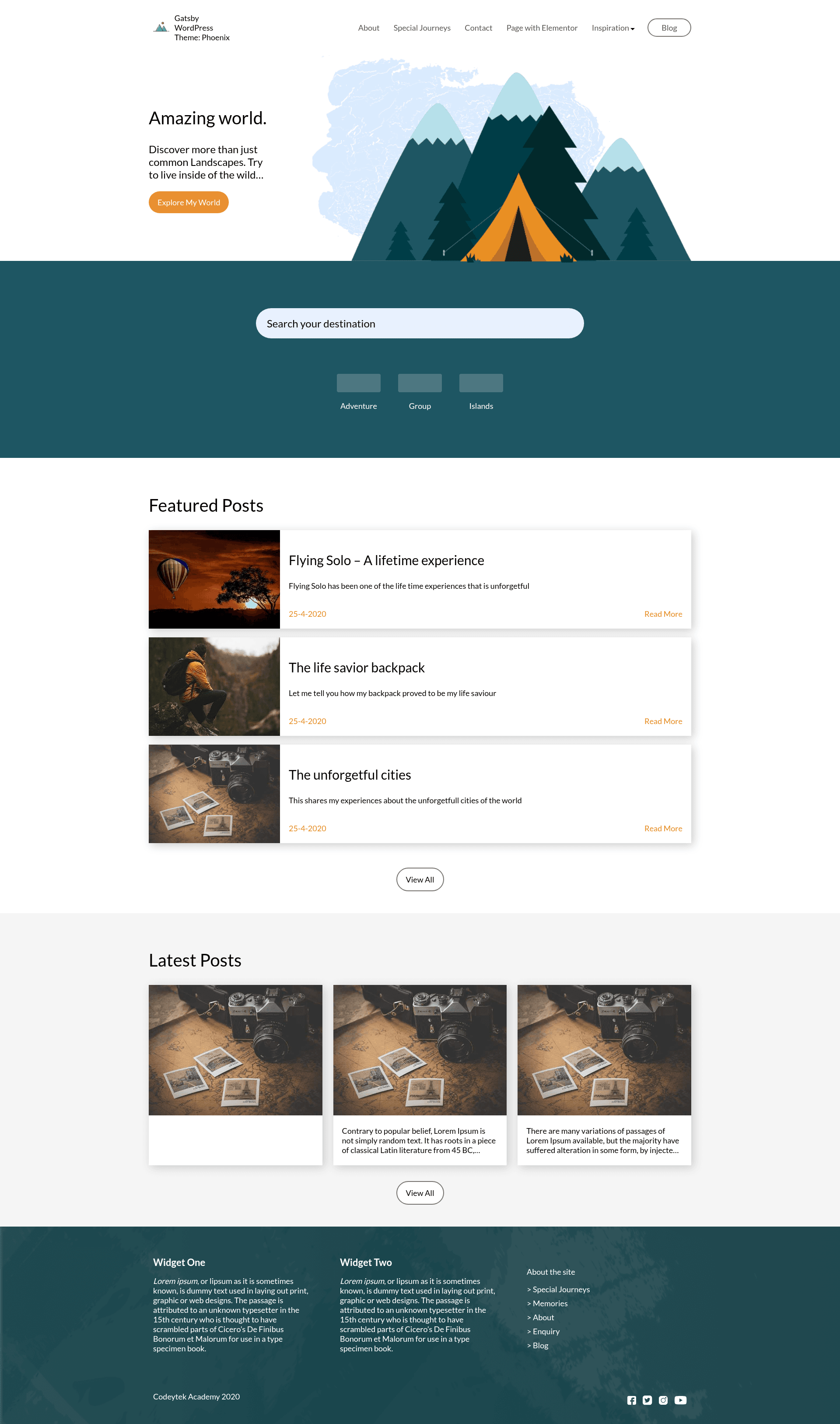
A Gatsby theme for WordPress with decoupled architecture, React front end, GraphQL, ACF, Yoast SEO, and offline PWA support.
About this template
gatsby-wordpress-theme-phoenix is a Gatsby theme that gives you a decoupled WordPress site: WordPress handles content, Gatsby and React render the front end, and WP GraphQL carries data between them. Built and maintained by Imran Sayed, it ships as an npm package with a demo site, a Storybook component library, and a set of WordPress plugins to install on the backend.
What is gatsby-wordpress-theme-phoenix?
gatsby-wordpress-theme-phoenix is an open-source Gatsby theme that connects a Gatsby/React front end to a WordPress backend using the wp-graphql plugin. It takes a WordPress site with custom fields, menus, widgets, and Yoast SEO data as its input and outputs a static, offline-capable PWA website with paginated blog pages and offline search. The theme is distributed on npm under the name gatsby-wordpress-theme-phoenix and its repository lives on GitHub, where it has 347 stars. It is maintained by Imran Sayed (@imranhsayed on GitHub).
Key Features
- React with Gatsby — The front end is built with React and Gatsby, generating a static site that Gatsby describes as blazing fast.
- PWA support — The generated site works offline, satisfying Progressive Web App requirements.
- Image optimization with blur effect — Images are optimized and given a blur-up placeholder effect as they load.
- ACF and GraphQL — Advanced Custom Fields are exposed through wp-graphql-acf, letting you define structured custom fields in WordPress and query them with GraphQL.
- Blog page with pagination — The theme includes a blog index with numbered pagination for WordPress posts.
- Offline search — A search feature is bundled that works without an internet connection.
- Categories, archives, and custom home page — WordPress categories and archive pages are generated, and the home page can be customized through ACF field groups.
- Custom widgets and menus — The theme registers header and footer menu locations (HCMS Header Menu and HCMS Footer Menu) and two footer widget areas (HCMS Footer #1 and #HCMS Footer #2).
- Yoast SEO support — Integration with the Yoast SEO plugin via wp-graphql-yoast-seo passes SEO metadata to the front end.
- Elementor support — With the GATSBY_ELEMENTOR_SUPPORT environment variable set to true, posts and pages built with Elementor are rendered on the front end.
Who is it for?
- WordPress developers moving to headless architecture can use this theme as a working reference for connecting WP GraphQL, ACF, and Yoast to a React front end.
- Gatsby developers who need a WordPress-backed starter can install the npm package and point it at their own WordPress URL through the GATSBY_WORDPRESS_SITE_URL environment variable.
- Agencies and freelancers building client sites can reuse the demo site, Storybook components, and build configuration to deliver decoupled WordPress projects.
What can you do with gatsby-wordpress-theme-phoenix?
- Launch a headless WordPress blog: Set up the backend plugins, import the ACF JSON, and generate a static blog with pagination and offline search.
- Build a custom-marketing home page: Use the ACF field groups and Elementor support to assemble a home page from the WordPress admin.
- Style components in isolation: Run
npm run storybookinside the theme package to develop UI components separately from the full Gatsby site.
How does it work?
- Clone the repository, then copy the
.env-examplefile in thesitedirectory to.envand setGATSBY_WORDPRESS_SITE_URL,FRONTEND_URL, and optionallyGATSBY_ELEMENTOR_SUPPORTandGATSBY_SIDEBAR. - On the WordPress side, install and activate the plugins listed in the repository: Headless CMS, wp-graphql, wp-graphiql, ACF, wp-graphql-acf, Yoast SEO, and wp-graphql-yoast-seo.
- Assign the HCMS Header Menu and HCMS Footer Menu to the corresponding theme locations, add text widgets to the footer areas, import the ACF JSON, and fill in ACF fields on the home page.
- Run
npm run devin the site directory to start Gatsby athttp://localhost:8000, ornpm run buildto create a production bundle.
FAQ
Is gatsby-wordpress-theme-phoenix free?
The theme is published as a public npm package and the full source code is available on GitHub, with the README asking for stars rather than payment. No pricing, license fee, or paid tier is mentioned anywhere in the project documentation.
What do I need on the WordPress backend?
You need WordPress with the following plugins: Headless CMS, wp-graphql, wp-graphiql, Advanced Custom Fields, wp-graphql-acf, Yoast SEO, and wp-graphql-yoast-seo. The repository provides zips for some of these plugins in its wordpress/plugins folder.
Does the theme support Elementor?
Yes, if you set GATSBY_ELEMENTOR_SUPPORT=true in the .env file, the Gatsby front end can render posts and pages that were built with Elementor in WordPress.
Where can I see a live demo?
The repository lists two live demos: one deployed on Netlify at gatsby-wordpress-theme-phoenix.netlify.app and one on Vercel. There is also a video demo linked from the README.
How do I develop components with Storybook?
Change into the package/gatsby-wordpress-theme-phoenix directory and run npm run storybook. The repository includes a Storybook configuration and demo screenshots of the component library.