Template details
GenAI Startup Astro Theme
Free, MIT-licensed Astro theme for GenAI startups with dark/light mode, animations, and pre-built sections.
About this template
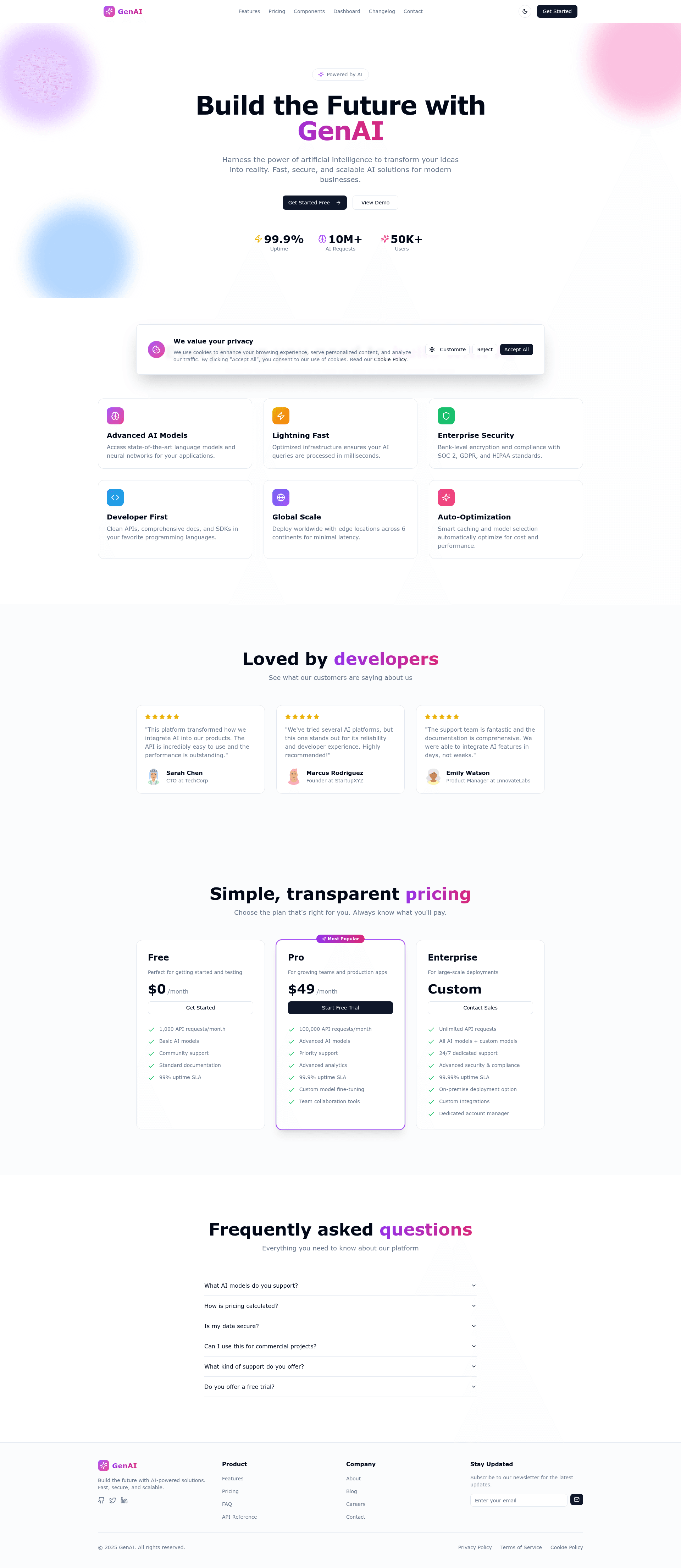
GenAI Startup Astro Theme is a free, MIT-licensed Astro 5 landing page template aimed squarely at artificial-intelligence and generative-AI startups, delivering a ready-to-deploy marketing site with dark/light mode, scroll animations, and a full set of pre-built sections.
What is GenAI Startup Astro Theme?
GenAI Startup Astro Theme is a static site starter that combines Astro 5.16, React 19, TypeScript, Tailwind CSS v4, and shadcn/ui into a single landing page template. It takes the text, links, and configuration that you edit in dedicated component files and outputs a production-ready, static HTML site. The template is available on GitHub under an MIT license and is maintained by the community (no specific company or author is named on the page).
Key Features
- Astro 5.16 with React 19 — The template pairs Astro's static-first output with React component islands; TypeScript is enabled across the project for type safety.
- Dark/light mode toggle — A built-in ThemeToggle component swaps between dark and light themes and persists the selection in localStorage, so returning visitors see their preference.
- Tailwind CSS v4 and shadcn/ui — Styling uses the latest Tailwind utility classes, while shadcn/ui components (including accordion and button) are built on Radix UI primitives for accessibility.
- Framer Motion animations — Hero gradients and section transitions animate with Framer Motion; the effect is scroll-triggered rather than purely visual.
- Pre-built marketing sections — The landing page includes an animated gradient hero with stats, a feature-card grid, pricing cards with a highlighted popular plan, testimonials with ratings, an FAQ accordion, a newsletter signup, and social links.
- GitHub Pages workflow included — A GitHub Actions YAML file at .github/workflows/deploy.yml automatically builds and deploys the site on every push; you only need to enable Pages and set the source to Actions.
- Responsive and accessible — Layouts adapt across mobile, tablet, and desktop breakpoints, and the component set follows WCAG accessibility guidelines via Radix UI.
Who is it for?
- Founders of AI and GenAI startups who need a polished landing page with pricing and testimonials before a product launch.
- SaaS product teams that want a quick way to showcase features and convert visitors with a newsletter signup.
- Developers building developer tools who need a clean site for API docs and integration announcements without setting up a CMS.
- Freelance web designers who want a free Astro-based starting point that they can rebrand and customize for AI clients.
What can you do with GenAI Startup Astro Theme?
- Launch a marketing site in an afternoon: clone the repo, edit the text and links inside src/components/Hero.tsx, Features.tsx, Pricing.tsx, Testimonials.tsx, and FAQ.tsx, then run npm run dev to preview at http://localhost:4321.
- Customize branding without touching layout: replace the logo and brand name in Header.tsx, Footer.tsx, and layouts/main.astro, and change the color palette by editing the CSS variables in src/styles/global.css.
- Deploy to GitHub Pages automatically: update astro.config.js with your site URL and base path, push to GitHub, then enable GitHub Pages with the Actions source; the included workflow rebuilds the site on every commit.
- Extend the design system: because the template uses shadcn/ui, you can add more components from ui.shadcn.com and use the included lucide-react icon set to expand features or pages.
How does GenAI Startup Astro Theme work?
The template's workflow is centered on npm scripts. After cloning and running npm install, developers use npm run dev for local development, npm run build for a production static build, and npm run preview to test the output. Content is organized into a src/components folder with one file per section, and the pages directory currently contains index.astro plus an example markdown-page.md. The Astro config file holds the site URL and base path used by the GitHub Actions deployment.
Pricing
The template is free and open source under the MIT license. There are no paid tiers, premium components, or subscription fees; you can use it for commercial projects without paying.
Pros and cons
- Pros: free and MIT-licensed; includes dark/light mode, Framer Motion animations, responsive layout, and a GitHub Actions deployment workflow; built on a modern stack with type safety and accessible components.
- Cons: out of the box the site has only two pages (a landing page and an example markdown page), so blog or docs sections require additional work; the template does not include a CMS, analytics, or contact form, and the repo metadata describes it as a "quick multipage site," signaling it is a starter rather than a feature-complete product.
FAQ
Is GenAI Startup Astro Theme free?
Yes, the template is released under the MIT license, which means you can use, modify, and even sell projects built with it. There is no paid version or premium tier, and all components and configurations are included in the repository.
What tech stack does GenAI Startup Astro Theme use?
The theme is built with Astro 5.16, React 19, TypeScript, Tailwind CSS v4, shadcn/ui, Framer Motion, Lucide Icons, and Radix UI. That combination yields a static site with interactive component islands and a utility-first styling system.
Does the template support dark mode?
Yes, there is a functional theme toggle that switches between dark and light appearances. The selected theme is stored in localStorage, so it persists across page reloads and sessions.
Can I deploy it to GitHub Pages?
Yes. The repository includes a GitHub Actions workflow that builds the site and publishes it to GitHub Pages on every push. You need to set your site URL and base path in astro.config.js, then enable GitHub Pages with the source set to Actions.
Do I need to learn React to use this template?
Basic familiarity helps because the page sections are React components, but you can update most content—headings, body text, pricing values, and testimonials—by editing props and strings in each component file. Styling changes can be done in the global CSS file without writing React code.