Template details
Get Shit Done Kit
Free Bootstrap 3 UI kit by Creative Tim with styled components, example pages, and SASS source files.
About this template
Get Shit Done Kit is a free Bootstrap 3 UI kit from Creative Tim that packages styled components, JavaScript plugins, and example pages for starting responsive web projects.
What is Get Shit Done Kit?
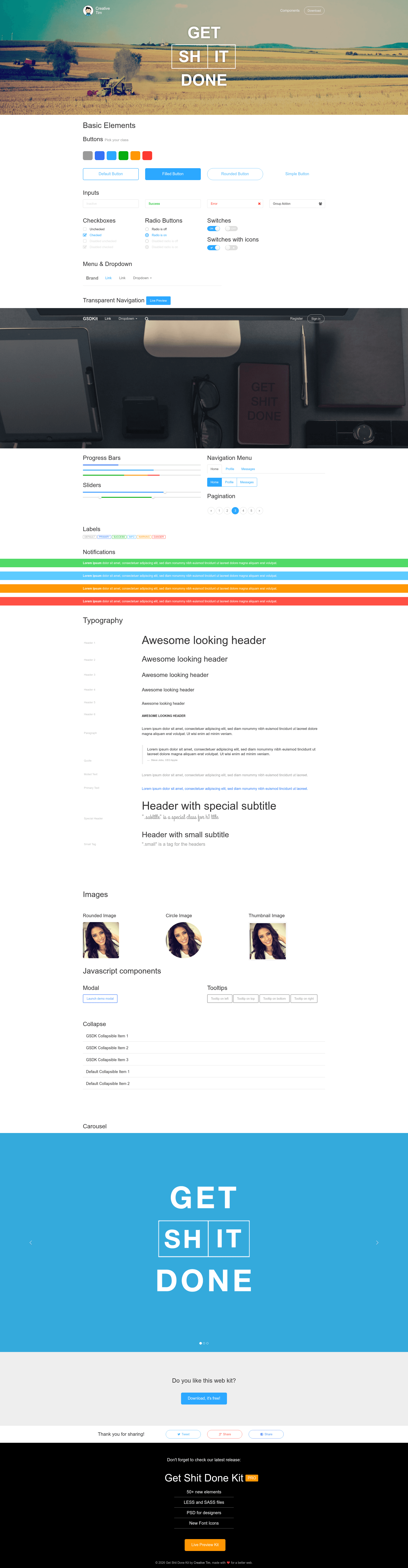
Get Shit Done Kit is a free UI kit built on Twitter Bootstrap 3, created by the design team at Creative Tim. It provides a set of custom-styled Bootstrap components — buttons, forms, navigation, switches, checkboxes, and radio buttons — along with example HTML pages such as components.html, index.html, navbar-transparent.html, notification.html, template.html, and tutorial.html. The kit is distributed as a download that you can import into an existing Bootstrap project or use as the foundation of a new one. It is licensed under MIT, so it can be used in commercial and personal projects without restriction.
Key Features
- Bootstrap 3 foundation — Built on Twitter Bootstrap 3, so it inherits the grid system and core components while replacing the default styling with a custom look.
- SASS source files — Includes a gsdk.scss file and a gsdk/ folder so you can adjust variables and compile your own CSS.
- Ready-made example pages — Comes with components, index (a presentation page), navbar-transparent, notification, template, and tutorial pages you can copy and adapt.
- Custom JavaScript plugins — Ships with gsdk-bootstrapswitch.js, gsdk-checkbox.js, gsdk-radio.js, and get-shit-done.js, plus a jQuery UI version for interactions.
- Responsive design — Layouts and components are built to scale across desktop, tablet, and mobile viewports.
- Free under MIT license — You can use it for personal or commercial projects without paying license fees.
- Active version history — Updated through V1.4.1 with bug fixes and SASS support added in later releases.
Who is it for?
- Web developers who want to avoid the default Bootstrap appearance and need a styled starting point for projects.
- Startup founders who need a quick landing page or product demo from the included index.html and template.html pages.
- Front-end designers who want to prototype with pre-built components and access SASS variables for theming.
What can you do with it?
- Create a product landing page: Start from index.html and replace the placeholder text and images to showcase your own product.
- Build a transparent navigation experience: Use navbar-transparent.html to create a site with a navbar that overlays hero content.
- Add notification and alert flows: Use notification.html as a reference for implementing in-page alerts and messages.
- Prototype a full UI: Use components.html to explore every styled element (switches, checkboxes, radio buttons) before customizing.
How does it work?
To get started, download the kit from GitHub or the Creative Tim product page, or clone the repository with git clone https://github.com/creativetimofficial/get-shit-done. The documentation suggests simply importing the kit into your project or building on top of the included HTML files. After that, you can open components.html or index.html to view the styled components in the browser.
Pricing
Get Shit Done Kit is free to download and use under the MIT license. Creative Tim also offers Get Shit Done PRO, a paid extension with additional components and features, with pricing starting at $39.
FAQ
Is Get Shit Done Kit free?
Yes, the kit is free to download from GitHub and the Creative Tim site, and it is licensed under MIT, so you can use it in commercial projects without cost.
What does the download include?
The download contains a Bootstrap 3 folder, SASS source files under assets/sass, compiled CSS and JavaScript files under assets/css and assets/js, and six HTML pages: components.html, index.html, navbar-transparent.html, notification.html, template.html, and tutorial.html.
Does it work with the latest Bootstrap?
The kit is explicitly built on Twitter Bootstrap 3. It is not updated for Bootstrap 4 or 5, so if you need a current Bootstrap version you would need to adapt the files manually.
Is there a paid version?
Creative Tim sells Get Shit Done PRO, a separate product with more components and options, from $39. The free kit remains available and MIT-licensed.
What license does it use?
The free kit uses the MIT license, as stated in the repository. You can modify and redistribute it as long as you preserve the copyright notice.