Template details
Github Style Plus
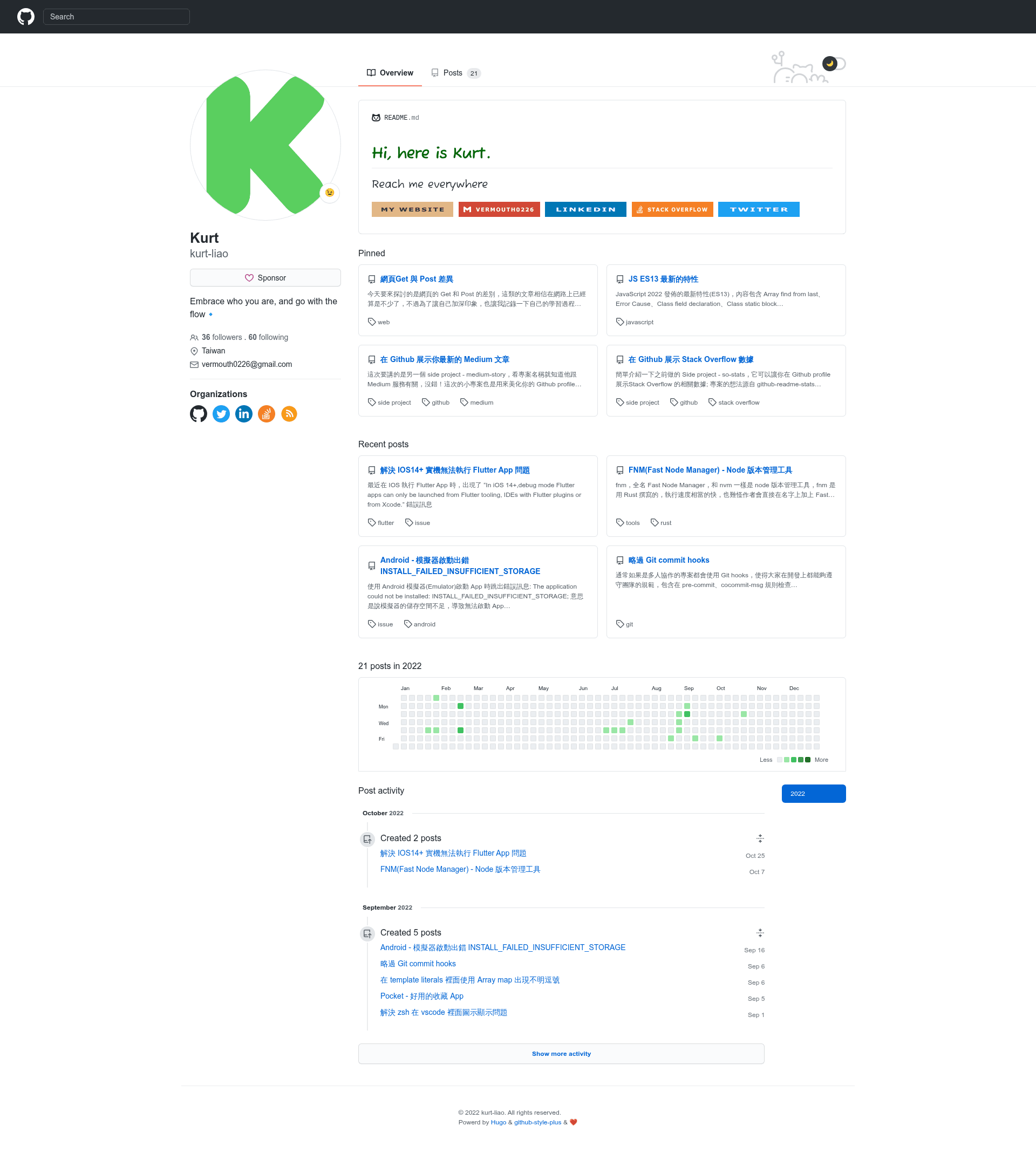
A Hugo theme with GitHub appearance, forked from github-style and extended with 12 extra blogging features.
About this template
Github Style Plus is a Hugo blog theme that recreates the visual appearance of a GitHub profile page, forked from the github-style theme by MeiK2333 and extended with 12 additional features for personal publishing.
What is Github Style Plus?
Github Style Plus is a Hugo theme for building personal blogs and portfolio sites that look like a GitHub profile. It takes Hugo site content from the content/post folder and renders it as a GitHub-style page with pinned posts, contribution graphs, and profile links. The theme is maintained by kurt-liao, and a full live demo is available at https://blog.kurtstories.com/. The repository documentation only covers the additional features; basic usage follows the original github-style repository.
Key Features
- Pinned posts and recent posts together — both blocks display on the homepage, while the original theme shows only one of them.
- Reading time estimation — every post shows estimated reading time and word count, using a formula referenced from kodify.net.
- Real GitHub followers stats — set enableGithubFollowers = true and a github username in config.toml to display live follower counts.
- Sponsor link button — add a sponsorLink URL in config.toml, such as a Buy Me a Coffee link, and a sponsorship button appears on the page.
- Local keyword search — client-side search is enabled by setting params.rss = true and params.enableLocalSearch = true, using the Hugo RSS index.xml feed.
- Clickable day contributions — clicking a day in the yearly contribution graph shows the posts published on that day.
- Custom CSS file — place a style file in the static folder and set its path in config.toml to override the theme styles.
- Previous and next post navigation — each post has links to the previous and next article.
- Show more button — most posts are hidden on first paint and revealed through a show more button to speed up initial page load.
- GA4 and GTM support — the Google Analytics code is updated to GA4, and a gtmId field in config.toml injects Google Tag Manager.
- Custom organizations block — custom organization links can be added beyond the default GitHub, Twitter, and Facebook icons.
Who is it for?
- Personal bloggers using Hugo — set up a GitHub-looking blog by installing the theme as a git submodule and renaming the content/posts folder to content/post.
- Developers building a portfolio — present posts, pinned items, and GitHub statistics on a profile-style homepage.
- Existing github-style users — upgrade to this fork to gain local search, sponsor buttons, GA4 analytics, and other added features.
What can you do with Github Style Plus?
- Independent developers: publish a blog with a GitHub-profile aesthetic, including live follower counts and pinned posts, without writing front-end code.
- Technical writers: show reading time and word count on every post, and enable local keyword search so readers can locate articles quickly.
- Open-source maintainers: add a sponsor link button and custom organization links to make it easy for visitors to support related projects.
How does Github Style Plus work?
The theme is installed with git submodule add from its repository URL and then enabled as the Hugo theme. After installation, the content/posts folder must be renamed to content/post. Configuration is done in config.toml, where feature toggles such as enableGithubFollowers, params.enableLocalSearch, sponsorLink, and gtmId are set. The theme combines post metadata and GitHub profile data to build the GitHub-style interface.
FAQ
Does Github Style Plus work without the original documentation?
The repository documentation introduces only the additional features, so basic usage follows the original github-style theme by MeiK2333.
How do I enable local keyword search?
Set params.rss = true and params.enableLocalSearch = true in config.toml. The search uses the Hugo-generated index.xml feed.
How do I display real GitHub follower stats?
Set enableGithubFollowers = true and add your GitHub username in config.toml.
Can I use Google Tag Manager with this theme?
Yes, add a gtmId value in config.toml to inject the GTM script. The theme also updates old Google Analytics to GA4.
Do pinned and recent posts show at the same time?
Yes, in this fork both the pinned and recent post blocks display together on the homepage.