Template details
GPT API Integration in HTML/CSS with JS/PHP
A basic GPT conversation script designed to help you learn to interact with OpenAI's GPT technology. Includes best practices and a free security whitepaper.
About this template
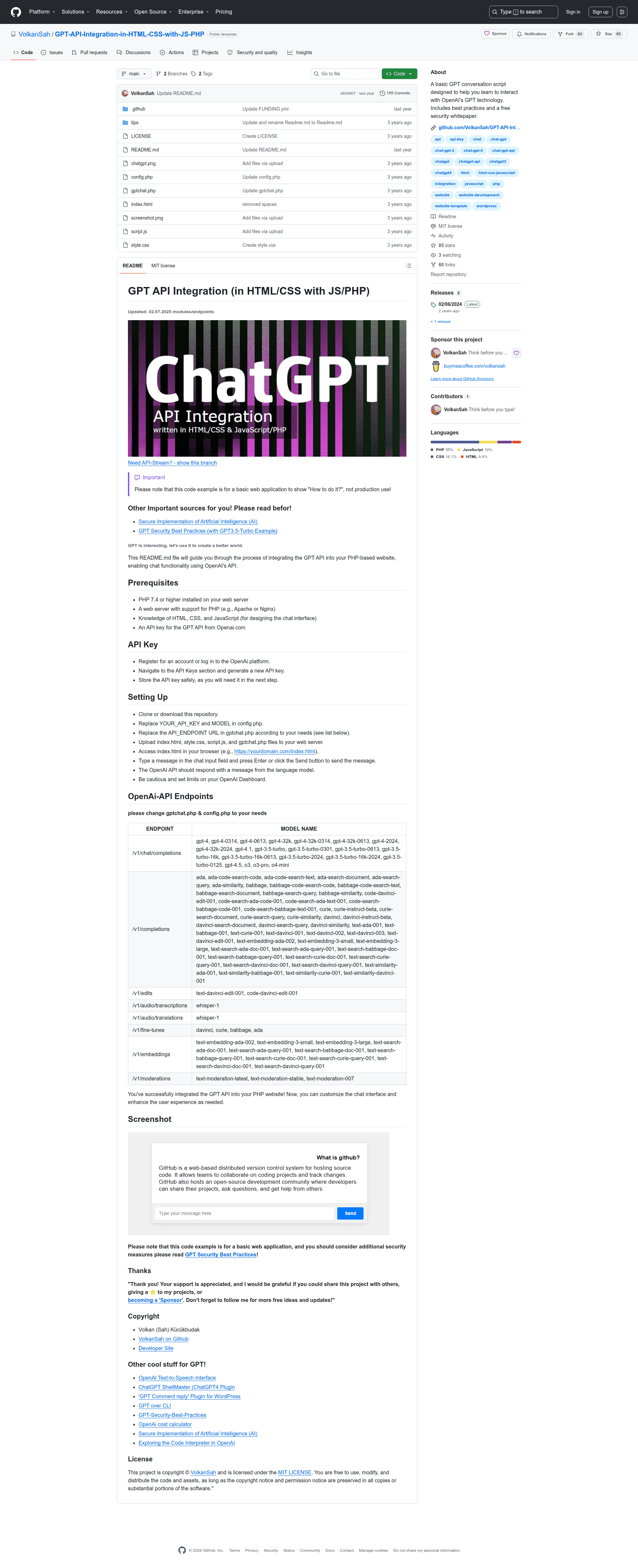
GPT API Integration in HTML/CSS with JS/PHP is a boilerplate web application that connects a plain chat interface to OpenAI's GPT API using a PHP backend, designed for developers learning how to integrate OpenAI models into a website. The repository, created by Volkan (Sah) Kücükbudak, contains the minimal files needed to run a chat conversation with models like gpt-4 and gpt-3.5-turbo from a PHP-powered server.
What is GPT API Integration in HTML/CSS with JS/PHP?
GPT API Integration is a learning-oriented template that pairs an HTML/CSS/JavaScript frontend with a PHP backend to call OpenAI's API. It takes a user's typed message as input, sends it through gptchat.php to an endpoint such as /v1/chat/completions, and displays the language model's reply in the chat window. The project is published on GitHub under an MIT License and explicitly states it is a basic example for showing how to do the integration rather than a production-ready application.
Key Features
- Tiny file set — Only five files are needed: index.html, style.css, script.js, gptchat.php, and config.php, making deployment as simple as uploading a folder to any PHP host.
- Endpoint flexibility — The code lets you switch between /v1/chat/completions, /v1/completions, /v1/edits, /v1/audio/transcriptions, /v1/audio/translations, /v1/fine-tunes, /v1/embeddings, and /v1/moderations by editing a variable in gptchat.php.
- Broad model support — The README lists models ranging from gpt-4, gpt-4.1, gpt-4.5, o3, and o4-mini to gpt-3.5-turbo variants, plus embedding, moderation, and audio transcription models such as whisper-1.
- Interactive chat UI — The frontend provides a chat input field and a Send button, with messages submitted by pressing Enter, and the response appears in the page.
- Configuration via placeholders — Open config.php and replace YOUR_API_KEY and MODEL with your OpenAI credentials and chosen model to get started.
- Security guidance bundled — The README links to GPT Security Best Practices and a free security whitepaper to help developers harden their integration.
- MIT licensed — You are free to use, modify, and distribute the code while preserving the copyright notice.
Who is it for?
- PHP developers — To learn the mechanics of making authenticated POST requests to OpenAI's API from a server-side script.
- Frontend developers — To see how a vanilla JavaScript chat interface can talk to a backend API without any framework.
- Hobbyist builders — To quickly stand up a working GPT chat demo on a shared PHP host and then customize the UI and logic.
- Students of AI integration — To study a minimal, readable codebase that shows the complete request-response cycle with OpenAI.
What can you do with it?
- Prototype a chat widget — Upload the files to a PHP server, configure your API key, and you have a working GPT conversation box in minutes.
- Test multiple OpenAI endpoints — Swap the endpoint and model to experiment with completions, embeddings, audio transcription, translation, and moderation from the same UI.
- Learn API key security — Use the linked security whitepaper and best-practices guide to understand how to protect credentials and validate user input before building a larger project.
How does it work?
The setup flow is: clone or download the repository, open config.php to replace YOUR_API_KEY and MODEL, adjust the API_ENDPOINT in gptchat.php if you want to use a different endpoint, and upload the PHP, HTML, CSS, and JS files to your web server. After that, visit index.html in a browser, type a message, and press Enter or click Send. The JavaScript sends the text to gptchat.php, which relays it to the OpenAI endpoint and returns the model's response for display.
FAQ
Is this template free to use?
Yes, the entire project is released under the MIT License, so you can use, modify, and redistribute the code as long as you keep the copyright and permission notice.
What are the server requirements?
You need PHP 7.4 or higher and a web server with PHP support, such as Apache or Nginx. No database or Composer dependencies are mentioned.
Can I use this in production?
The author explicitly says the example is a basic web application to show how to do it, not for production use. They recommend reading the GPT Security Best Practices guide before deploying a real service.
How do I get an OpenAI API key?
You register or log in at the OpenAI platform, go to the API Keys section, generate a new key, and store it safely. Then put that key into config.php.
Which models work with this template?
The README lists supported models per endpoint; for chat completions you can use gpt-4, gpt-3.5-turbo, gpt-4.1, o3, and more, while the completions endpoint covers older models like davinci and curie. You can change the model value in config.php.