Template details
OpenBcon
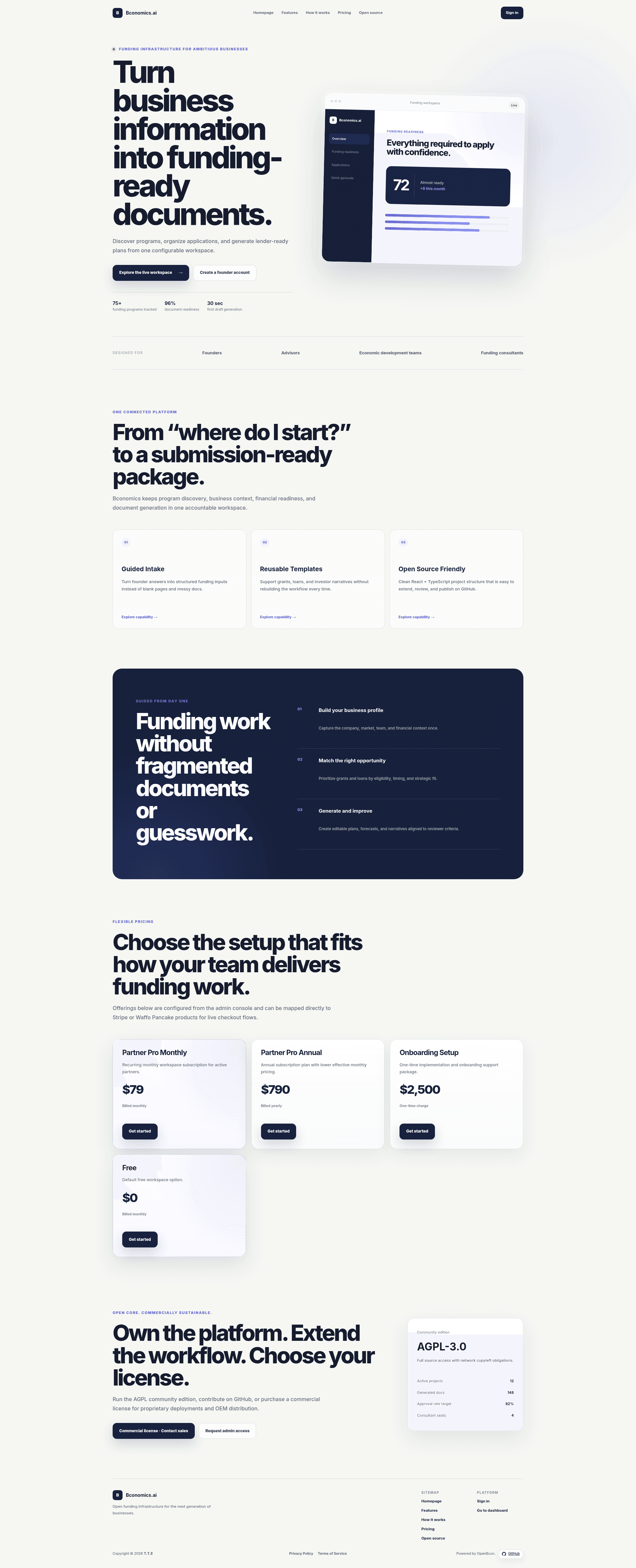
Open-source AI funding workspace for consultants, advisors, and incubators. Manage opportunities, companies, applications, and AI-generated funding packages.
About this template
OpenBcon is an open-source AI-powered workspace for funding consultants, advisors, and incubators that combines funding-program discovery, client management, and AI-generated business-plan production in a single self-hostable web application.
What is OpenBcon?
OpenBcon is a full-stack web application built with React 19, TypeScript, Vite, React Router, and an Express API, using PostgreSQL 17 for relational domain data and MongoDB 8 for dynamic configuration. It takes company profiles, funding-program records, and application data as input, and produces funding-ready business plans, strategic reports, financial forecasts, and scouting reports through a separate FastAPI/LangGraph Python generation service. The project uses a dual-license model: the community edition is AGPL-3.0-or-later, while a commercial license covers private deployments, white-label/OEM distribution, implementation services, and ongoing support. The repository includes three product surfaces: a public landing page, a user dashboard, and an admin configuration console.
Key Features
- AI business plan generation — turns company and funding-program context into a structured funding-ready package via a LangGraph workflow that generates sections in admin-defined order using per-agent names, roles, and prompts.
- Strategic Reports — dedicated route at
/strategic-reportsreopens the latest generated package; each application maps to one report row in PostgreSQL, including the LangGraph trace and final result. - Discovery scouting reports — compares each funding program against a selected company with fit scoring, positive signals, reviewer concerns, and a recommended next move, rendered as a dynamic progress ring.
- Three-step Quick Build workflow — validates input, imports a configured default company, restores applications by public
app_id, and generates previews; generation itself is delegated to Strategic Reports. - Financial forecasting — produces three-year, 36-month monthly forecasts with revenue and expense rows, annual summaries, trend charts, and net-cash-flow bars, with per-year line-item tables.
- Admin Console — manages branding, landing-page content, pricing catalog, modules, AI models, payment settings, data sources, and Strategic Report sections, document types, agents, prompts, and reusable CSS layouts with live preview.
- Data-source integrations — Google Sheets (CSV import from a sharing URL) and Airtable (through a server-side proxy so tokens never reach the browser) populate Grants & Loans, Templates, Social Resources, and Tools directories.
- Multilingual UI — supports English (Canada), French (Canada), and Simplified Chinese for labels, dates, numbers, currency formatting, and generated forecast language.
Who is it for?
OpenBcon is designed for teams that help businesses secure funding. Funding consultants and grant writers can manage client companies and generate funding-ready packages; incubators and accelerators can run readiness assessments and track applications across a portfolio; economic development organizations can maintain a grant/loan directory and produce scouting reports; and internal advisory teams or partner networks can run a multi-client workspace with configurable modules and a partner portal.
What can you do with OpenBcon?
- Funding consultants: produce a funding-ready business plan for a client in a three-step workflow, with a structured cover page, business analysis, and 36-month financial forecast.
- Grant writers: maintain a searchable funding-program database, sync rows from Google Sheets or Airtable, and shortlist opportunities that match a company's legal structure, sector, stage, and funding usage.
- Incubator managers: configure Strategic Report sections, agents, prompts, and layouts in the Admin Console, then run the same generation workflow for each portfolio company.
- Platform administrators: set up Stripe Checkout and the customer portal, manage free/monthly/annual/one-time pricing offers, control landing-page content, and switch between isolated Test and Live database environments.
How does OpenBcon work?
After setup, users register an account and an administrator promotes them to the admin role in the database. From the dashboard, a user adds a company, selects a funding program, and starts Quick Build; the app creates an application record and navigates to Strategic Reports, which runs the LangGraph workflow and persists the report. The Python generation service listens on port 8010 and is proxied through the same-origin /ai-api path. In Test Mode, generation falls back to a mock gateway when no model is configured; Live Mode requires live database variables and a configured real model gateway.
Pricing
OpenBcon uses a dual-license model. The community edition is AGPL-3.0-or-later and free to self-host. Paid commercial licenses are available for proprietary or closed-source deployment rights, private modifications without AGPL disclosure, white-label/OEM distribution, implementation services, and ongoing support. The Admin Console also includes a pricing catalog with free, monthly, annual, and one-time offers, and Stripe Checkout is the only live billing flow wired to the server today.
FAQ
Is OpenBcon free?
Yes, the community edition is AGPL-3.0-or-later and can be self-hosted at no cost. A separate paid commercial license is required if you want closed-source deployment, proprietary modifications, or white-label/OEM distribution.
What tech stack does OpenBcon use?
The frontend uses React 19, TypeScript, Vite, React Router, and i18next; the backend uses Express, PostgreSQL 17, MongoDB 8, and Zod. A Python FastAPI/LangGraph service handles AI generation, and Docker Compose includes Caddy, Ollama, PostgreSQL, MongoDB, the Node API, and the Python service.
What languages does OpenBcon support?
The workspace UI is localized in English (Canada), French (Canada), and Simplified Chinese. The selected language controls labels, dates, numbers, currency formatting, and is passed to LangGraph prompts so generated reports match the user's locale.
How does Test vs Live Mode work?
The Admin Console Mode Switch is a database boundary. Test Mode writes to DATABASE_URL_TEST and MONGODB_DATABASE_TEST and falls back to the mock gateway when no model is saved; Live Mode uses DATABASE_URL_LIVE and MONGODB_DATABASE_LIVE and requires live connection variables and a real model gateway. The browser cache is never copied across modes.
Does OpenBcon support local AI models?
Yes, both Compose files include Ollama with a one-time model pull service, defaulting to smollm2:135m. The Ollama endpoint stays on the private Docker network, does not require an API key, and can be selected as a model preset in the Admin Console.