Template details
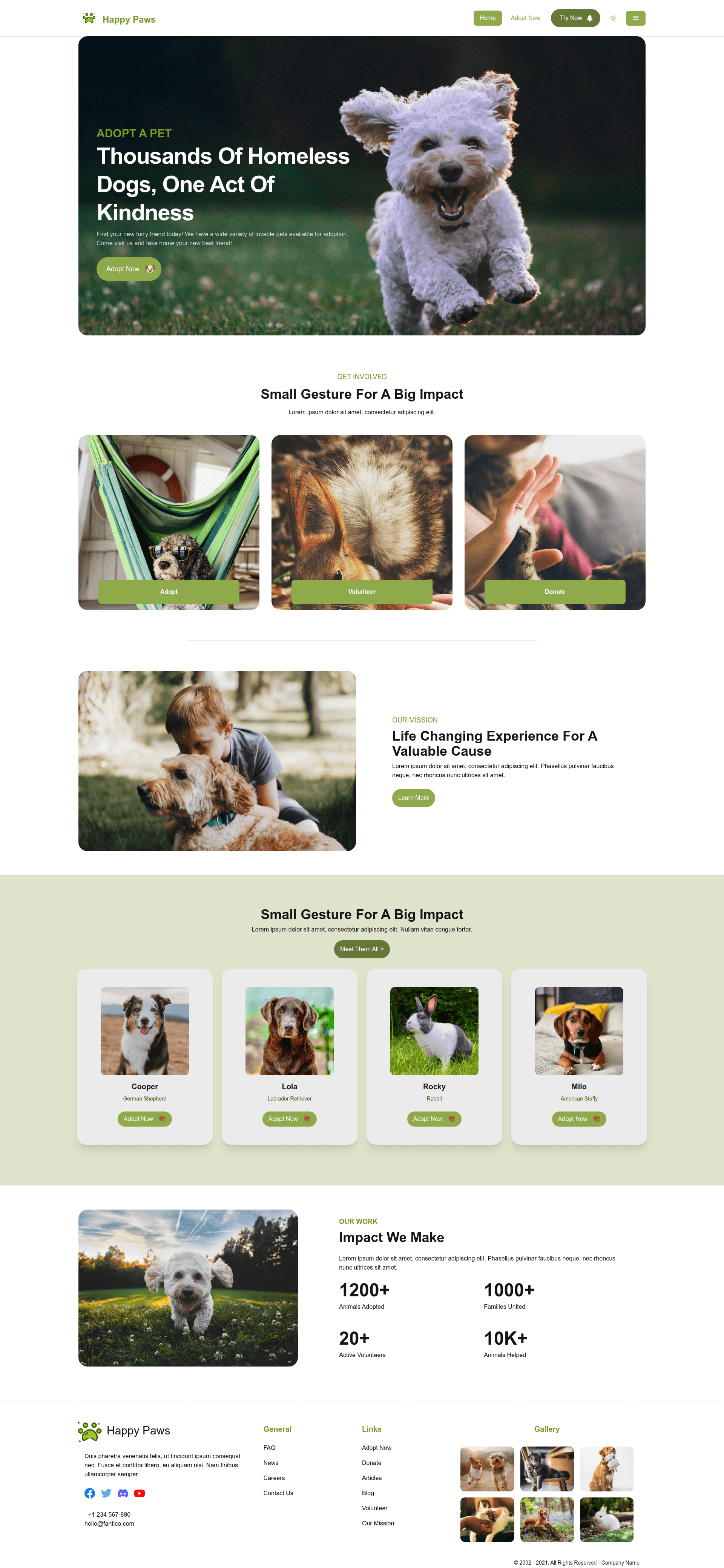
Happy Paws
Full-stack pet adoption app template with Nuxt 3, Tailwind CSS, and Vue Designer integration.
About this template
Happy Paws is a full-stack Nuxt 3 starter template for pet adoption organizations that pairs server-side rendering (SSR), static site generation (SSG), and a Tailwind CSS interface with built-in SEO modules from Pinegrow.
What is Happy Paws?
Happy Paws is a sample project created with the Vue Designer Nuxt Tailwind CSS quick start template by Pinegrow. It's a Nuxt 3 fullstack application (SPA-SSR) where pet data is fetched via APIs served by Nitro-powered server routes, statically generated articles are pulled from an external REST API source, and blog posts are authored with markdown files. Everything is styled with Tailwind CSS. The live demo is available at https://happy-paws-with-nuxt-tailwindcss.netlify.app/.
Key Features
- Nuxt 3 framework — Provides file-based routing, SSR/SSG modes, and Nitro server routes for pet data APIs.
- Tailwind CSS — Utility-first CSS framework for fast, responsive styling.
- Nuxt Content — File-based CMS powered by Markdown and Vue components for blog pages.
- UnoCSS Preset Icons — Access to over 100,000 open-source Iconify icons using the unocss format, e.g.,
i-mdi-home. - Pinegrow Nuxt Module — Enables live-design of Vue single-file components visually in Vue Designer.
- Pinia — Light-weight, type-safe global state management via the
@pinia/nuxtmodule. - VeeValidate — Handles value tracking, validation, errors, and submissions in forms.
- Nuxt Image — Plug-and-play image optimization for Nuxt apps.
- Nuxt SEO — Includes nuxt-site-config, nuxt-simple-robots, nuxt-simple-sitemap, nuxt-og-image, nuxt-link-checker, nuxt-seo-utils, and nuxt-schema-org modules.
- Development tools — Nuxt Devtools, Vue Devtools (standalone, currently deactivated), and VS Code extensions for Volar, ESLint, and Prettier.
Who should use Happy Paws?
Happy Paws is a reference starter for Nuxt developers who want a full-stack setup with SSR, SSG, markdown blogging, and a visual design workflow. Pet adoption organizations can use it to list animals from API data, publish articles from REST sources, and maintain a markdown blog. Vue developers interested in visual editing with Vue Designer will find it a practical starting point.
Use cases
- Pet adoption agencies: Manage pet listings pulled from Nitro server routes and publish blog posts written in markdown, with static generation for optimal SEO.
- Nuxt developers: Use it as a learning reference for a full-stack Nuxt 3 app combining Tailwind, Pinia, VeeValidate, Nuxt Image, and the Nuxt SEO module collection.
- Vue Designer users: Visually design Vue single-file components while keeping a clean Vite-based build and no vendor lock-in.
How does Happy Paws work?
Start by cloning the template from the GitHub template repository or using npx giget@latest gh:pinegrow/happy-paws-with-nuxt-tailwindcss. Install dependencies with npm install or pnpm. Open the project in Vue Designer to follow the Config Panel instructions, then run npm run dev for development. For production, npm run build creates an SSR build, npm run generate produces a full-static SSG site, npm run analyze shows bundle sizes, and npm run unlighthouse runs Lighthouse on every page. Deploy to Netlify by connecting the repo.
FAQ
How do I start the development server?
Run npm run dev in the project root after installing dependencies. The dev server starts Vite with hot module replacement, so changes to components, pages, and markdown content appear instantly.
What is the difference between build and generate?
npm run build compiles the app for SPA SSR, meaning pages are rendered on the server. npm run generate compiles a full-static SSG site with all pages pre-rendered as HTML, which can be hosted on any static host. The project's package.json defines these scripts explicitly.
What is Vue Designer?
Vue Designer is a desktop visual editor for Vue apps by Pinegrow, available for Mac, Windows, and Linux. It integrates with Vite-based CLI workflows and lets you visually design Vue single-file components through a free trial at vuedesigner.com.
How do I deploy this to Netlify?
You can deploy directly from the GitHub template using the Netlify deploy button, or connect the repository to Netlify manually. The project includes deployment documentation links from Nuxt for more details.
Is there a community for questions?
The Vue Designer Community Discord server at https://discord.gg/BYp45Nnu5T is available for discussion and support around this template.