Template details
hexo-theme-aria
A Hexo theme inspired by Kalafina's song ARIA.
About this template
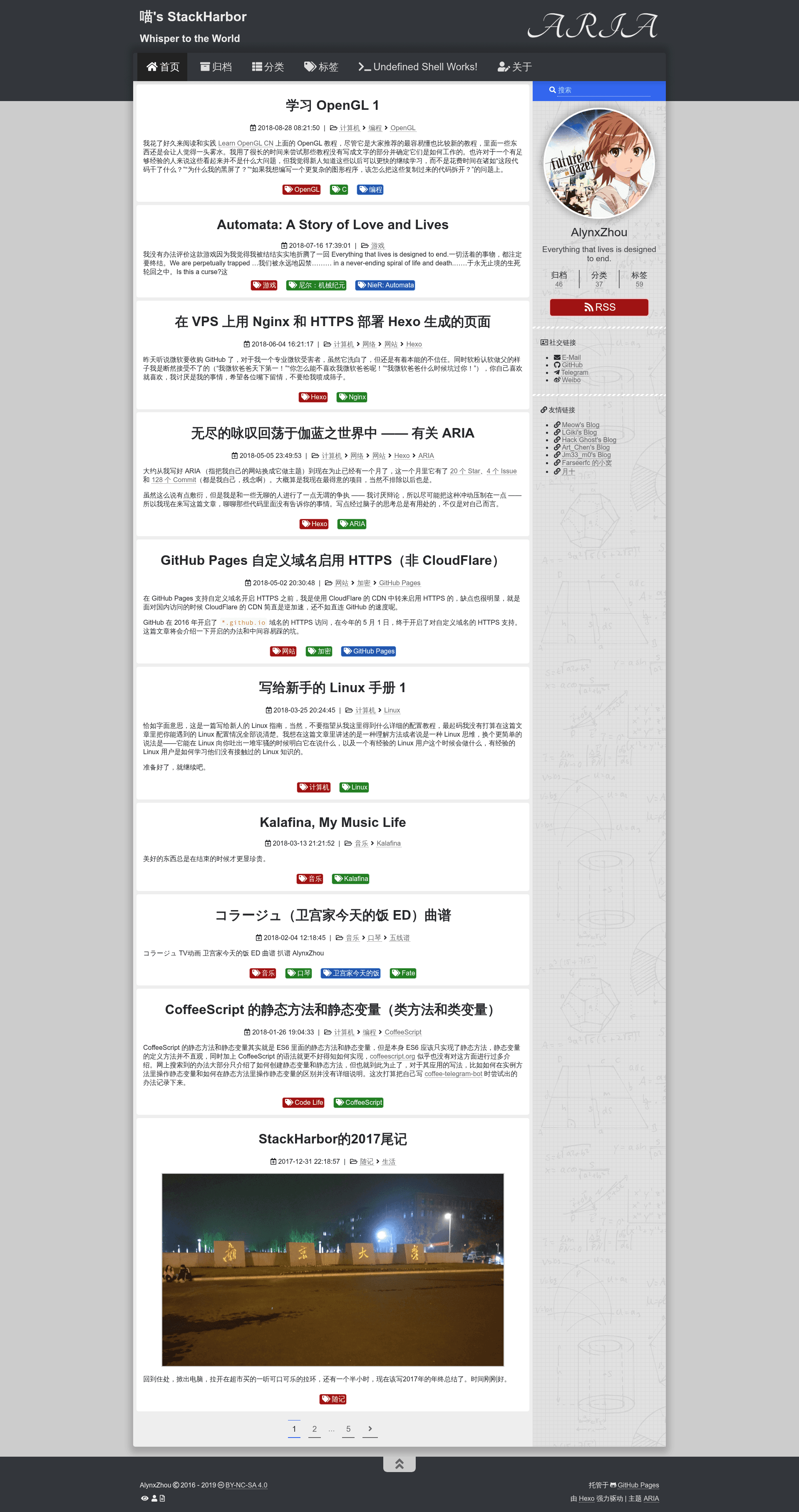
hexo-theme-aria is a Hexo blog theme inspired by Kalafina's song ARIA, delivering a responsive two-column layout with built-in search, comments, and customization options.
What is hexo-theme-aria?
hexo-theme-aria is an open-source theme for the Hexo static site generator, created by AlynxZhou. It turns Markdown-based blog content into a responsive website with a two-column layout and CSS animations, and it ships with integrations for local search, comments, RSS, and image lightboxes.
Key Features
- Responsive two-column layout — A flexible layout built with FlexBox and CSS animations, with sidebar placement configurable to left, right, or hidden.
- Comment system options — Support for Disqus, commentjs (GitHub or Oschina hosting), and Valine, with only the first enabled service shown.
- Busuanzi counting — Displays website and page visit counts; can be disabled with a single config flag.
- Hexo local search — Works with hexo-generator-search to generate a search.xml data file queried by JavaScript, with no external database service required.
- Multi-language support — Includes zh_CN, zh_HK, zh_TW, and en locales, with "default" aliased to English.
- Image lightbox — Uses Lightgallery to display images in posts as a gallery.
- RSS feed support — Integrates with hexo-generator-feed for Atom feeds.
- Markdown asset path handling — Automatically converts Markdown asset folder links and images to absolute paths, removing the need for the hexo-asset-image plugin.
Who is it for?
- Hexo bloggers — Anyone running a Hexo site who wants a clean, feature-rich theme without heavy configuration.
- Self-hosted site owners — Users who prefer local search and static-site tools over paid search services like Algolia.
- Multilingual writers — Bloggers publishing in Chinese (Simplified/Traditional) or English can switch languages via the language config.
What can you do with it?
- Set up a personal blog — Configure menu links, categories, tags, and an about page, then enable search and RSS for a complete blogging setup.
- Customize the look — Change highlight theme, custom fonts, theme color, avatar, logo, and add custom CSS/JS via custom.styl and custom.js.
- Monetize or accept support — Enable the reward feature to display WeChat Pay, AliPay, or BitCoin QR codes in the footer.
- Write math-heavy posts — Enable MathJax per-page by adding a front-matter flag and setting a CDN.
How does hexo-theme-aria work?
The theme runs on Hexo's standard workflow: write posts in Markdown, configure the site and theme 's _config.yml files, and generate static HTML. Installation requires cloning the repo to themes/aria, installing plugins like hexo-renderer-njucks and hexo-renderer-stylus, and copying the theme's _config.yml.example to _config.yml.
FAQ
Is hexo-theme-aria free?
Yes, the theme is open-source and released under the Apache-2.0 license. The author also accepts donations via WeChatPay, AliPay, and PayPal.
What comment systems are supported?
The theme supports Disqus, commentjs (with GitHub or Oschina as host), and Valine. If more than one is enabled, only the first in the queue—Disqus, then commentjs, then Valine—will be shown.
How do I enable local search?
Install the hexo-generator-search plugin and add a search block to the site config with path, field, and format settings, then set search to true in the theme config. The search box appears at the top of the sidebar.
Does the theme support MathJax?
MathJax is not bundled by default. To use it, enable mathjax.enable in the theme config, set a CDN, and add mathjax: true to the front-matter of any page containing formulas.
What are the language options?
Available languages are zh_CN, zh_HK, zh_TW, and en. The value default is an alias for English, and other values like zh-Hans used by some older NexT versions are not recognized.